
Intel N100 Is Rewriting the Home-Server Game

For almost a decade, the Raspberry Pi dominated the home-server ecosystem. It was cheap, silent, extremely energy-efficient, and versatile enough to power everything from Pi-hole and Home Assistant to basic media servers and Docker containers. But in the last 18 months, a new contender has quietly taken over the space: the Intel N100 mini-PC.
Packed inside tiny fanless or low-noise compact cases, these N100 machines have shaken the home-lab world because they strike the perfect balance between performance, efficiency, compatibility, and cost. In fact, many developers, students, and home-lab enthusiasts now admit that the Intel N100 hasn’t just replaced the Raspberry Pi — it has surpassed it as the new default home-server option.
Let’s dive in.
1. The Performance Gap: Intel N100 vs Raspberry Pi
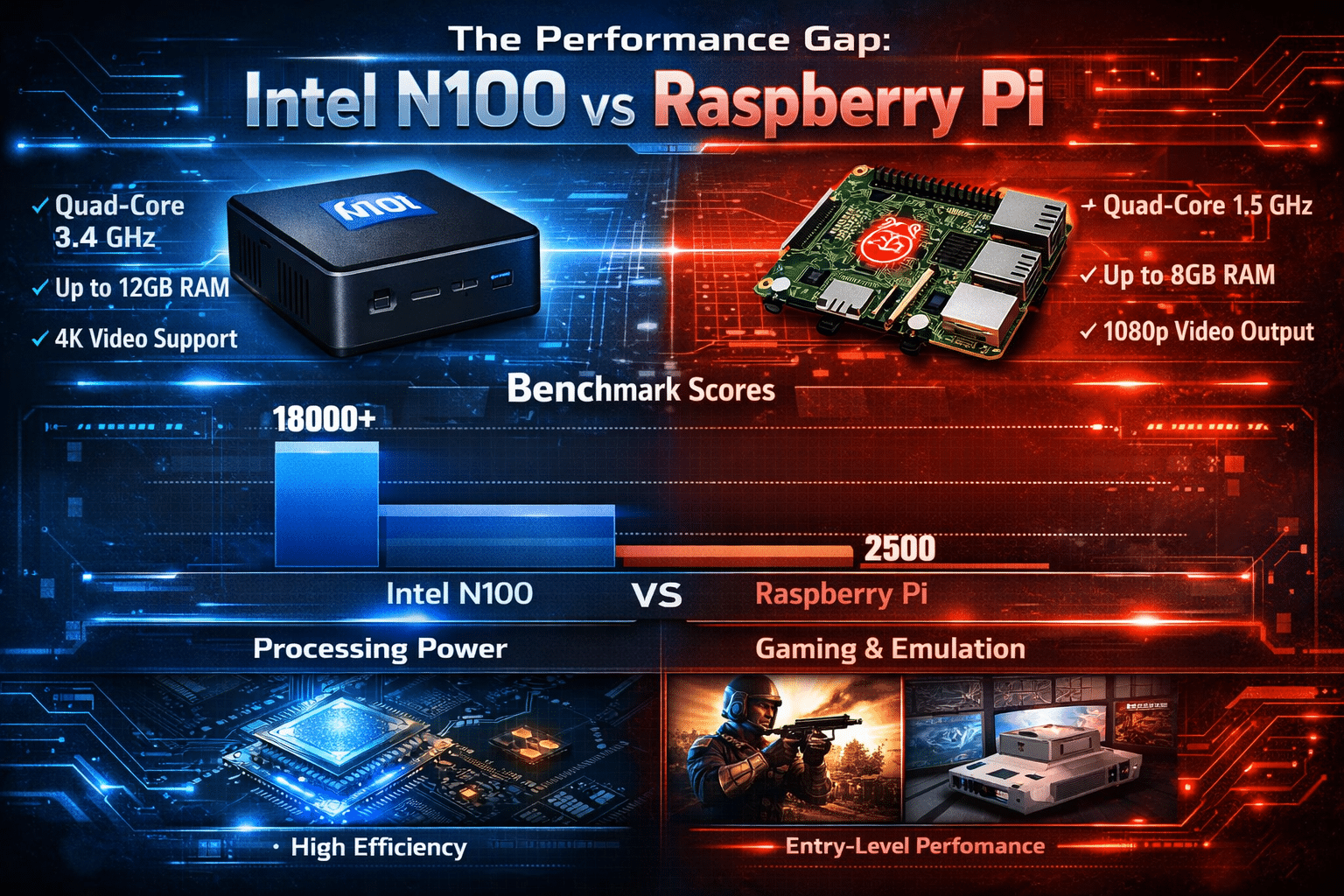
The core reason the N100 is taking over is simple: its performance jump is massive.
CPU Power: A Leap Too Big to Ignore
The Intel N100 is a quad-core Alder Lake-N processor with efficient Gracemont cores capable of boosting up to 3.4GHz. In benchmarks:
- Single-core performance is 3–4× higher than Raspberry Pi 4/5
- Multi-core performance is 5–6× higher depending on workload
- Real-world responsiveness feels closer to a laptop than a microcontroller
This makes workloads like:
- Docker containers
- Databases
- Vanilla Linux servers
- Media servers (Plex, Jellyfin)
- Local LLM inference
- File hosting
significantly smoother and more reliable.
GPU Advantage: Hardware Transcoding Becomes Easy
One of the most important benefits is Intel UHD Graphics with Quick Sync Video, enabling:
- Hardware HEVC/H.264 decoding
- Smooth transcoding in Jellyfin/Plex
- Low-power media playback
- Accelerated containers that rely on GPU
Raspberry Pi often struggles with transcoding or depends heavily on software decoding. The N100 handles these effortlessly while still consuming very little power.
Storage & I/O: NVMe Changes Everything
This is another major game-changer.
Raspberry Pi relies on:
- MicroSD cards (slow & often fail)
- USB-to-SATA adapters
- Limited PCIe access (Pi 5 only)
But N100 mini PCs ship with:
- Full NVMe SSD slots
- SATA ports (varies by model)
- USB 3.2 high-speed IO
- 1GbE or 2.5GbE Ethernet
This opens up real server-grade possibilities like:
- Hosting databases
- Using the server as a NAS
- Deploying 30–50 Docker containers
- Running VMs through Proxmox
- Maintaining long-term reliability
Simply put, NVMe + N100 CPU = unbeatable value.
2. Power Efficiency & Cost
Many assume that N100 must consume more power than a Raspberry Pi. Surprisingly, it doesn’t — at least not significantly.
Typical Power Consumption
- Idle: 5–9W
- Light workloads: 10–12W
- Heavy multithread processing: 15–22W
This is shockingly efficient for a CPU that delivers laptop-class performance.
Price-to-Performance Ratio
Depending on region:
- N100 mini PCs typically cost ₹10,000–₹15,000
- Raspberry Pi 5 with power supply, case, cooling, and storage often costs ₹9,000–₹12,000
For just 10–15% higher cost, the N100 delivers 300–500% more performance.
This ratio alone explains why the Pi is losing the home-server crowd.
3. Software Compatibility
Another huge advantage: x86 architecture compatibility.
With N100, you can run:
- Ubuntu
- Debian
- Windows
- Proxmox
- TrueNAS
- Docker Swarm / Kubernetes
- Virtual machines
- Developer tools
- Python automation stacks
No ARM workarounds. No missing libraries. No dependency hell.
Everything just works.
This makes the N100 perfect for:
- Students learning DevOps
- Developers testing software stacks
- Home-lab beginners
- IT professionals running local test environments
- Anyone migrating Docker setups from PC to server
4. Real Home-Server Use Cases Where N100 Shines
Here are the workloads that run exceptionally well on an Intel N100 mini PC:
✔ Home Media Server (Jellyfin / Plex)
Hardware transcoding makes N100 ideal for multi-user households.
✔ Docker Stack with 20–50 Containers
From databases to automation tools like:
- Portainer
- Nextcloud
- Pi-hole
- Uptime Kuma
- Prometheus + Grafana
- Immich
- Open WebUI
Everything runs smoothly.
✔ Proxmox Virtualization
You can run multiple lightweight VMs:
- Ubuntu servers
- Windows Server
- Firewall VMs
- Development environments
✔ NAS / File Server
2.5GbE + NVMe = excellent small-office NAS performance.
✔ Self-Hosted AI / LLM
N100 can handle:
- Local embeddings
- RAG pipelines
- Medium-sized models with quantization
- Chat model inference at decent speeds
✔ Home Automation (Home Assistant)
Better reliability + faster response times.
The N100 excels everywhere the Pi struggles.
Why a Hybrid Setup With 99RDP
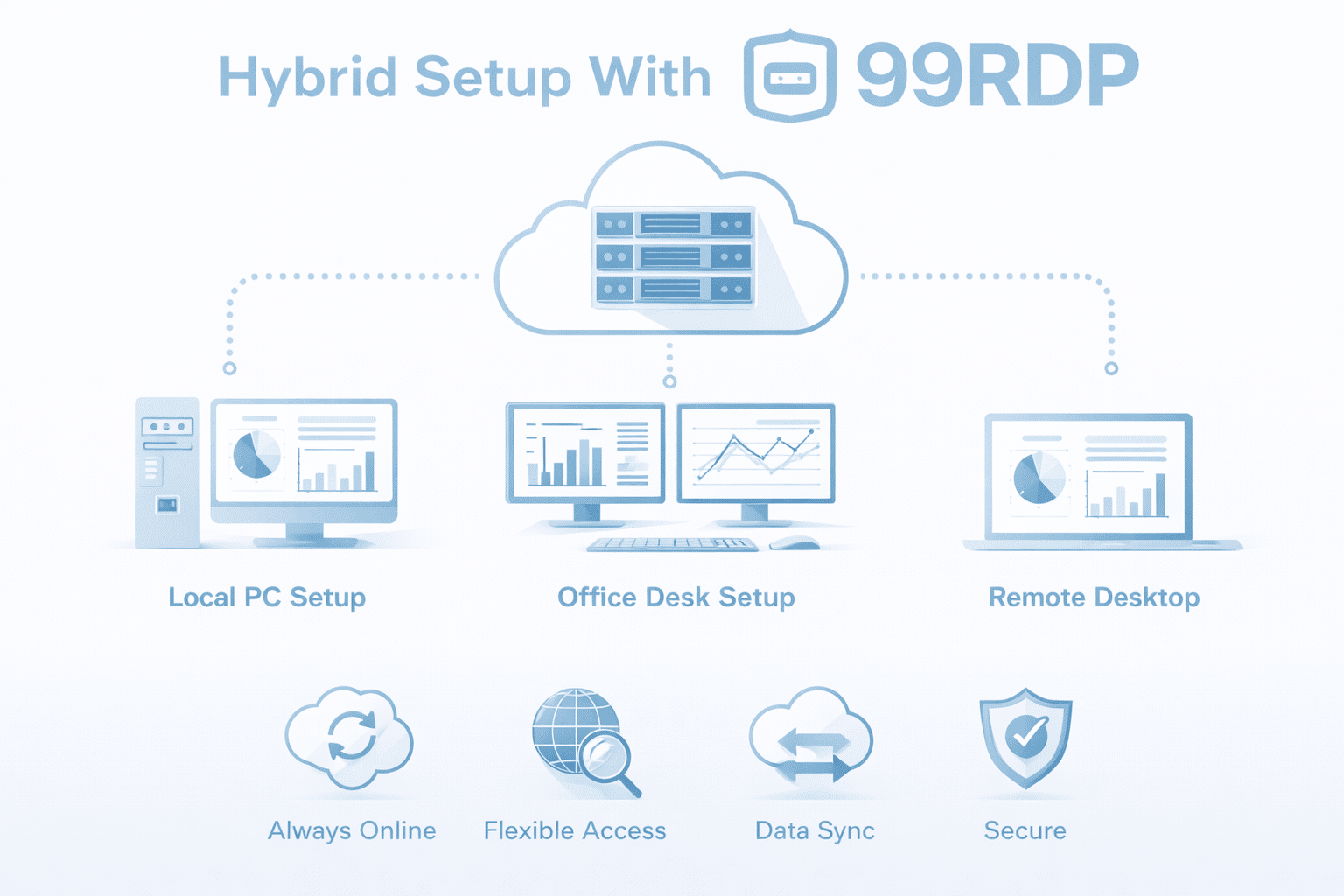
While the Intel N100 is fantastic for a local home-server setup, pairing it with 99RDP unlocks a far more powerful architecture.
Here’s why a Local N100 + 99RDP Cloud Server hybrid is the perfect modern solution:
A. Offload Heavy, Spiky, or Remote Workloads
Certain tasks are better handled on the cloud:
- High-CPU automation
- Large datasets
- Running Windows-only software
- CPU- or RAM-intense Python scripts
- Remote work requirements
99RDP’s High-CPU, NVMe-powered RDP plans give you cloud-level power while keeping sensitive data on your local N100.
B. Access Your Home Server from Anywhere
Your N100 stays at home — but 99RDP gives you a permanent, reliable remote access point, especially when:
- Your ISP uses CG-NAT
- Your router has poor port-forwarding options
- You want secure access without exposing public ports
You simply log into 99RDP from anywhere and tunnel into your N100 easily.
C. Hybrid Redundancy & Backup
If your local setup ever goes down due to:
- Power cuts
- Router issues
- Hardware failure
99RDP acts as a hot standby server. This ensures:
- Your hosted applications stay online
- Your development work continues
- Your backups remain accessible
D. Scalable Growth
As your needs increase, simply scale your workload to 99RDP’s:
- High CPU
- High RAM
- GPU RDP
- Storage-heavy RDP plans
Your home server stays fast for local use while heavy lifting gets offloaded.
Intel N100 Didn’t Just Replace Raspberry Pi — It Redefined the Home-Server Landscape
The Raspberry Pi remains an incredible device for enthusiasts and IoT automation, but the era of using it as a serious home server is fading.
The Intel N100 offers:
- More performance
- Better efficiency
- x86 compatibility
- NVMe storage
- Faster networking
- Greater reliability
- Wider flexibility
This leap has reshaped build choices for home-lab beginners, developers, and professionals.
However, the smartest and most future-proof setup is not choosing between local hardware and cloud — but combining both.
A local Intel N100 home server + 99RDP remote infrastructure creates the ideal hybrid system:
- fast,
- accessible,
- secure,
- and infinitely scalable.
If you’re building or upgrading your home server in 2025, the Intel N100 and 99RDP together deliver the strongest performance-to-cost value in the ecosystem.
EXPLORE MORE; How to Update Your Self-Hosted n8n Instance on 99RDP
READ OUR BLOGS


