
From AI Workloads to Kubernetes: 15 Powerful Dedicated Server Use Cases

Modern computing workloads have changed dramatically. A few years ago, a virtual private server was enough for many developers, startups, and small businesses. Today, however, organizations run containerized applications, process massive datasets, train AI models, host real-time services, manage distributed databases, and deploy increasingly complex DevOps pipelines.
These workloads demand more than basic compute capacity. They require predictable performance, direct control, fast storage, substantial memory, high network throughput, and the freedom to customize infrastructure.
That is where dedicated servers continue to play an important role.
Unlike shared infrastructure, a dedicated server gives a single customer access to the physical machine’s computing resources. This model can be particularly useful when applications have sustained workloads, specialized configuration requirements, or performance-sensitive infrastructure.
From artificial intelligence and Kubernetes to private clouds and video processing, dedicated infrastructure can support a surprisingly broad range of technical projects.
This article explores 15 powerful dedicated server use cases, explains why each workload benefits from dedicated resources, and shows how developers and businesses can choose infrastructure that fits modern computing demands.
Why Dedicated Servers Still Matter in a Cloud-First World
Cloud computing has made infrastructure easier to provision, but not every workload benefits equally from heavily shared or abstracted environments.
Some applications require:
- Consistent CPU performance
- Large amounts of RAM
- High-speed NVMe storage
- Full root or administrator access
- Custom operating system configurations
- Virtualization capabilities
- High-bandwidth networking
- Predictable infrastructure costs
- Long-running workloads
A dedicated server provides an environment where teams have significantly more control over the underlying machine.
This matters because modern workloads are becoming increasingly resource-intensive.
Artificial intelligence applications process larger datasets. Kubernetes clusters run dozens or hundreds of containers. Databases consume enormous amounts of memory for caching. Video platforms process high-resolution media. Development teams continuously build, test, deploy, and monitor software.
The infrastructure decision is no longer simply about choosing “cloud versus server.” Instead, organizations must evaluate the characteristics of their workloads.
For predictable and sustained workloads, dedicated infrastructure can provide an attractive foundation.
1. Running AI and Machine Learning Workloads
Artificial intelligence has rapidly moved from research laboratories into mainstream software development.
Today, developers deploy AI systems for:
- Natural language processing
- Image recognition
- Recommendation engines
- Predictive analytics
- AI chatbots
- Document processing
- Fraud detection
- Model inference
AI workloads can be demanding because they often require significant compute resources and memory.
A dedicated server allows developers to configure an environment specifically around their workload rather than competing with unrelated applications for underlying resources.
For example, a development team might use a dedicated server to:
- Run AI inference APIs
- Process large datasets
- Host internal machine learning platforms
- Build automated data pipelines
- Run model experimentation environments
GPU-equipped dedicated servers can be particularly useful for workloads that benefit from parallel computation.
The infrastructure requirement should always match the workload. Small AI applications may run efficiently on standard CPUs, while large-scale training and inference workloads can benefit from specialized accelerators.
For teams that want infrastructure control, 99RDP offers dedicated server options alongside specialized configurations, including GPU-focused infrastructure for AI, machine learning, and deep-learning projects.
2. Building a Kubernetes Cluster
Kubernetes has become one of the most important platforms for deploying and managing containerized applications.
A Kubernetes environment consists of a control plane and worker nodes that run application workloads. Production deployments require careful planning around availability, scaling, security, storage, networking, and workload resources.
Dedicated servers can provide a strong foundation for self-managed Kubernetes infrastructure.
Developers can use them to build:
- Development clusters
- Staging environments
- Private production clusters
- Multi-node Kubernetes labs
- Container orchestration platforms
A basic Kubernetes setup can begin with relatively modest infrastructure, but production requirements grow quickly depending on workload complexity.
The official Kubernetes documentation notes that infrastructure planning should consider CPU, memory, disk speed, storage capacity, security, availability, and the ability to scale nodes.
A dedicated environment gives administrators direct control over these components.
Why dedicated infrastructure works for Kubernetes
- Full control over the operating system
- Custom networking configurations
- Predictable compute resources
- Freedom to configure container runtimes
- Ability to deploy virtualization or multiple environments
- Greater control over storage architecture
Developers can deploy Kubernetes using tools such as kubeadm, which supports building conformant Kubernetes clusters across different infrastructure environments.
For serious production environments, however, teams should plan for redundancy and avoid treating a single machine as highly available infrastructure.

3. Creating a Cloud Homelab
A homelab traditionally requires physical hardware sitting in a home or office.
While physical servers provide valuable hands-on experience, they also create challenges:
- Electricity consumption
- Hardware maintenance
- Internet limitations
- Physical space requirements
- Noise and cooling concerns
A dedicated server can act as a cloud-based homelab.
Tech enthusiasts and system administrators can create multiple environments for experimentation.
For example:
- Linux virtual machines
- Windows test environments
- Docker clusters
- Kubernetes labs
- Networking experiments
- Monitoring platforms
- Self-hosted applications
Virtualization technologies can make a single physical server behave like multiple independent systems.
This approach gives learners and professionals an opportunity to experiment with enterprise-style infrastructure without purchasing and maintaining multiple physical machines.
Popular homelab technologies include:
- Proxmox VE
- KVM
- Docker
- Kubernetes
- Ansible
- Terraform
- Grafana
- Prometheus
A dedicated server can become a personal infrastructure playground available remotely.
4. Hosting High-Traffic Websites
A growing website can eventually exceed the capabilities of basic shared hosting.
High-traffic applications may experience:
- CPU spikes
- Memory pressure
- Database bottlenecks
- Slow page generation
- Storage limitations
Dedicated infrastructure provides more flexibility for tuning the entire application stack.
For example, administrators can optimize:
- Web servers
- PHP workers
- Database configuration
- Redis caching
- CDN integrations
- Load balancing
- Background processing
This makes dedicated servers useful for:
- Large WordPress websites
- WooCommerce stores
- News platforms
- Community websites
- SaaS applications
- Educational platforms
The key advantage is control.
Instead of adapting an application to a restrictive hosting environment, administrators can configure the environment around the application’s requirements.
5. Running Self-Hosted DevOps Infrastructure
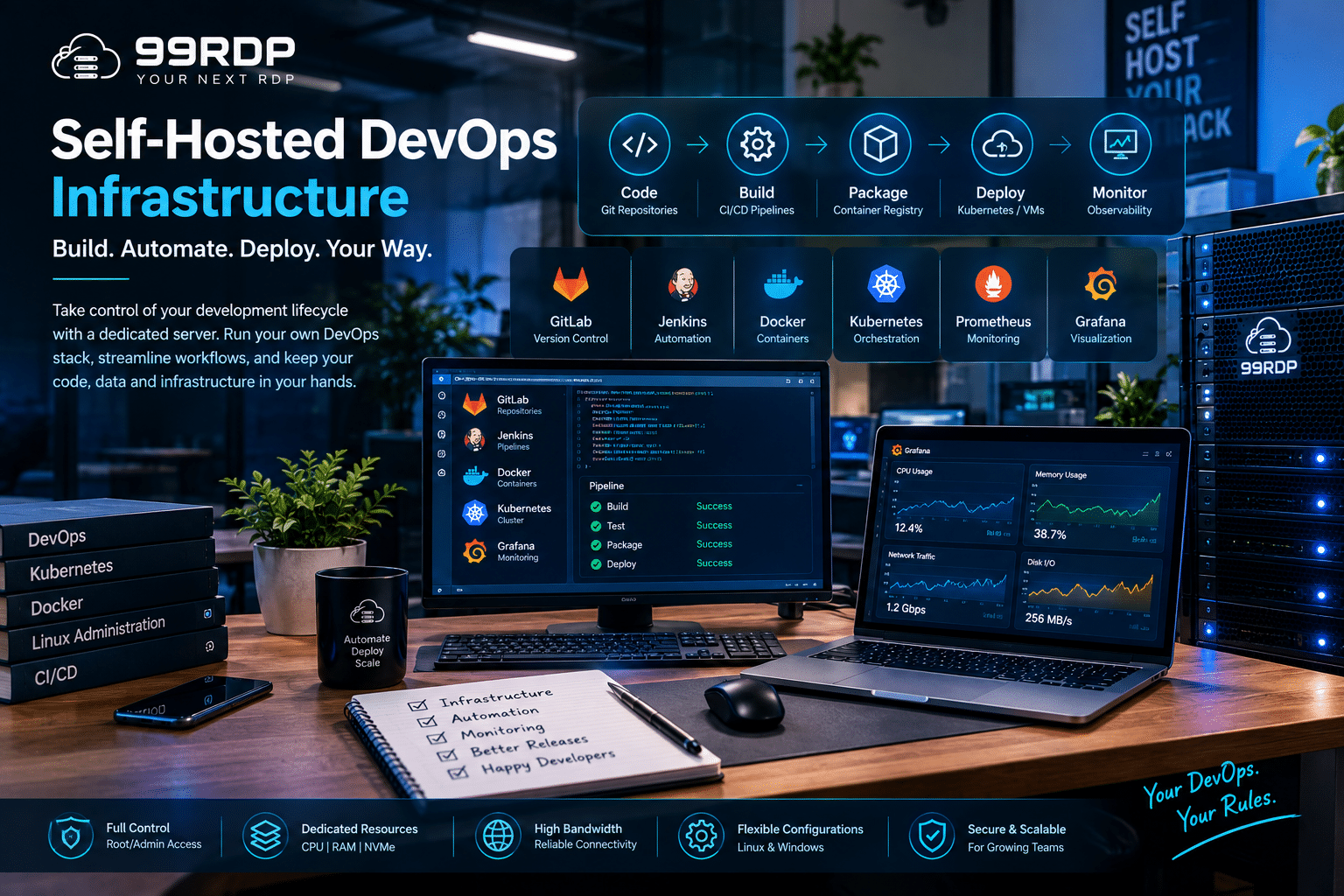
Modern software development depends heavily on automation.
Development teams continuously:
- Write code
- Commit changes
- Run automated tests
- Build applications
- Create containers
- Deploy services
- Monitor infrastructure
A dedicated server can host much of this workflow internally.
Popular self-hosted DevOps tools include:
- GitLab
- Jenkins
- Gitea
- Drone CI
- Harbor
- Sonatype Nexus
A self-hosted DevOps environment gives teams greater control over their development infrastructure.
For example, an organization might create a dedicated server environment containing:
- Git repositories
- CI/CD runners
- Container registries
- Artifact storage
- Monitoring systems
This can be particularly useful for teams with sustained build workloads.
Instead of launching temporary infrastructure every time a build starts, organizations with predictable workloads can maintain dedicated compute capacity.
6. Hosting Large Databases
Databases are often among the most demanding components of modern applications.
A database server may need to process:
- Thousands of queries
- Large indexes
- Complex analytics
- Transaction workloads
- Replication
- Caching
Performance depends on several factors, including:
- CPU performance
- Available memory
- Disk latency
- Storage throughput
- Network performance
Dedicated infrastructure allows database administrators to allocate resources specifically for the database.
Popular database workloads include:
- MySQL
- PostgreSQL
- MariaDB
- MongoDB
- Redis
- ClickHouse
NVMe storage can be particularly valuable for workloads where storage latency affects application performance.
For data-intensive applications, separating the database from the application server can also improve infrastructure organization.
7. Creating a Private Cloud
Many organizations want cloud-like convenience without placing every workload on a third-party SaaS platform.
A dedicated server can become the foundation for a private cloud environment.
Teams can deploy platforms for:
- File storage
- Collaboration
- Object storage
- Backup
- Internal applications
Popular technologies include:
- Nextcloud
- ownCloud
- Seafile
- MinIO
A self-hosted private cloud gives administrators more control over:
- Storage architecture
- User access
- Security policies
- Data retention
- Application integrations
This approach can work well for businesses that want to centralize services while maintaining infrastructure control.
8. Video Encoding and Media Processing
Video processing requires substantial computing resources.
A media workflow might involve:
- Video transcoding
- Format conversion
- Resolution scaling
- Thumbnail generation
- Audio extraction
- Batch processing
These tasks can consume CPU resources for extended periods.
A dedicated server allows organizations to run long processing jobs without competing with unrelated tenants for compute capacity.
Common tools include:
- FFmpeg
- HandBrake automation
- Custom media pipelines
Dedicated infrastructure can support:
- Video platforms
- Media agencies
- Educational platforms
- Streaming services
- Content production workflows
The more predictable the processing workload, the easier it becomes to size dedicated infrastructure appropriately.
9. Hosting Multiplayer Game Servers
Multiplayer games depend on responsive infrastructure.
Players expect:
- Low latency
- Stable connections
- Consistent server performance
- Reliable uptime
Dedicated servers are commonly used for hosting gaming communities and multiplayer environments.
Potential examples include servers for:
- Minecraft
- ARK
- Valheim
- FiveM-based communities
- Custom multiplayer applications
The important factor is not simply raw hardware specifications.
Administrators should also consider:
- Geographic server location
- Player distribution
- Network capacity
- CPU performance
- Memory requirements
A dedicated environment gives game administrators the flexibility to optimize the entire stack around the specific game server.
10. Running Monitoring and Observability Platforms
Modern infrastructure generates an enormous amount of operational data.
Teams need to monitor:
- CPU utilization
- Memory consumption
- Network traffic
- Application errors
- Response times
- Database performance
A dedicated server can host an internal observability platform.
Common technologies include:
- Prometheus
- Grafana
- Zabbix
- Elastic Stack
- Loki
For example, a development organization might collect metrics from dozens of servers into a centralized monitoring environment.
As infrastructure grows, monitoring systems can consume significant storage and processing capacity.
Dedicated resources help administrators build predictable monitoring platforms without mixing observability workloads with production applications.
11. Building a Remote Development Environment
Remote development has become increasingly practical.
Developers can connect to powerful remote infrastructure while using lightweight local devices.
A dedicated server can become a centralized development workstation.
Possible use cases include:
- VS Code remote environments
- JetBrains remote development
- Docker development
- Large compilation workloads
- Cross-platform testing
This model can provide several advantages.
Developers can maintain a consistent environment regardless of which laptop they use.
Instead of configuring multiple local machines, teams can standardize their development environment.
A powerful remote server can also handle workloads that would overwhelm older laptops.
12. Hosting Big Data and Analytics Workloads
Data-driven organizations increasingly process large volumes of information.
Workloads may include:
- Log analysis
- ETL pipelines
- Business intelligence
- Data aggregation
- Event processing
Dedicated infrastructure can support platforms such as:
- Apache Spark
- ClickHouse
- Elasticsearch
- Apache Kafka
Data processing workloads often benefit from large memory pools and fast storage.
The exact infrastructure requirements depend heavily on dataset size, concurrency, and processing patterns.
For sustained workloads, a dedicated server gives engineers the ability to configure resources around known requirements.
13. Running 24/7 Automation Infrastructure
Automation is no longer limited to enterprise companies.
Developers and businesses automate:
- Data synchronization
- Scheduled reports
- API workflows
- File processing
- Monitoring
- Deployment pipelines
A dedicated server can act as a permanent automation engine.
For example, teams can run:
- Cron jobs
- Python automation scripts
- API integrations
- Background workers
- Queue processors
The benefit is persistence.
Instead of depending on a local computer that may shut down, automation can operate continuously on remotely hosted infrastructure
This makes dedicated servers useful for organizations with mission-critical background processes.
14. Building a Self-Hosted SaaS Platform
Startups often begin with managed platforms.
As applications grow, however, infrastructure requirements can become more specialized.
A dedicated server can support a self-hosted SaaS architecture.
Examples include:
- CRM software
- Project management platforms
- Analytics applications
- Customer portals
- Internal business tools
Developers can combine:
- Web servers
- Databases
- Redis
- Docker
- Kubernetes
- Monitoring
The infrastructure can evolve alongside the application.
The most important consideration is operational maturity.
Running infrastructure independently requires teams to manage:
- Security updates
- Backups
- Monitoring
- Disaster recovery
- Access control
Dedicated infrastructure provides control, but that control comes with responsibility.
15. Building a Cybersecurity and Testing Lab
Dedicated servers can also support isolated environments for authorized security research and defensive testing.
Security professionals can create labs for:
- Vulnerability testing
- Security monitoring
- SIEM experimentation
- Network simulations
- Incident response training
Virtual machines and containers allow multiple isolated environments to run on the same physical hardware.
This makes dedicated infrastructure useful for:
- Cybersecurity education
- Internal security testing
- Blue-team labs
- Security tool evaluation
All testing should remain authorized and isolated from systems that researchers do not own or have permission to test.
How to Choose the Right Dedicated Server
Choosing a dedicated server should begin with the workload—not with the biggest available specification.
Ask the following questions.
1. How CPU-intensive is the workload?
AI processing, video encoding, compilation, and analytics can require significant processing power.
Look for:
- Modern CPU architecture
- Higher core counts
- Strong multi-threaded performance
2. How much memory does the application need?
Databases, analytics platforms, and Kubernetes clusters can consume substantial RAM.
Measure current memory usage and leave capacity for growth.
3. Does storage performance matter?
Applications with high I/O requirements can benefit from NVMe SSD storage.
Examples include:
- Databases
- Container platforms
- CI/CD systems
- Analytics workloads
4. How important is network performance?
Network-intensive workloads include:
- Video streaming
- Gaming
- Large downloads
- High-traffic websites
Bandwidth capacity and port speed should align with expected traffic patterns.
5. Do you need root-level control?
Advanced projects often require:
- Custom kernel settings
- Firewall configuration
- Custom virtualization
- Specialized software
Root access gives administrators flexibility but also requires careful security management.
99RDP’s dedicated server offerings include root or administrator-level access, allowing users to configure and manage their environments according to workload requirements. Its dedicated server options also advertise configurations with NVMe storage, multi-core processors, high-bandwidth connectivity, and specialized server categories.

Where 99RDP Dedicated Servers Fit Into Modern Infrastructure
Choosing infrastructure is ultimately about matching resources to workloads.
A lightweight blog may not need a dedicated machine.
However, organizations running sustained compute workloads, multiple services, large databases, container clusters, or intensive development pipelines may benefit from greater control over infrastructure resources.
99RDP Dedicated Server solutions provide options aimed at resource-intensive projects and give administrators the flexibility to build customized environments.
Depending on the selected configuration and project requirements, dedicated infrastructure can support:
- AI and machine learning environments
- Kubernetes clusters
- Private clouds
- Database servers
- DevOps pipelines
- High-traffic websites
- Remote development systems
- Media processing
- Monitoring platforms
99RDP also offers specialized dedicated server categories, including GPU-oriented systems and high-performance configurations, which can help teams match hardware more closely to demanding workloads.
For technically experienced users, the biggest advantage is flexibility.
You can design the environment around your project rather than forcing the project to fit within a restrictive hosting plan.
Dedicated Server vs VPS: When Should You Upgrade?
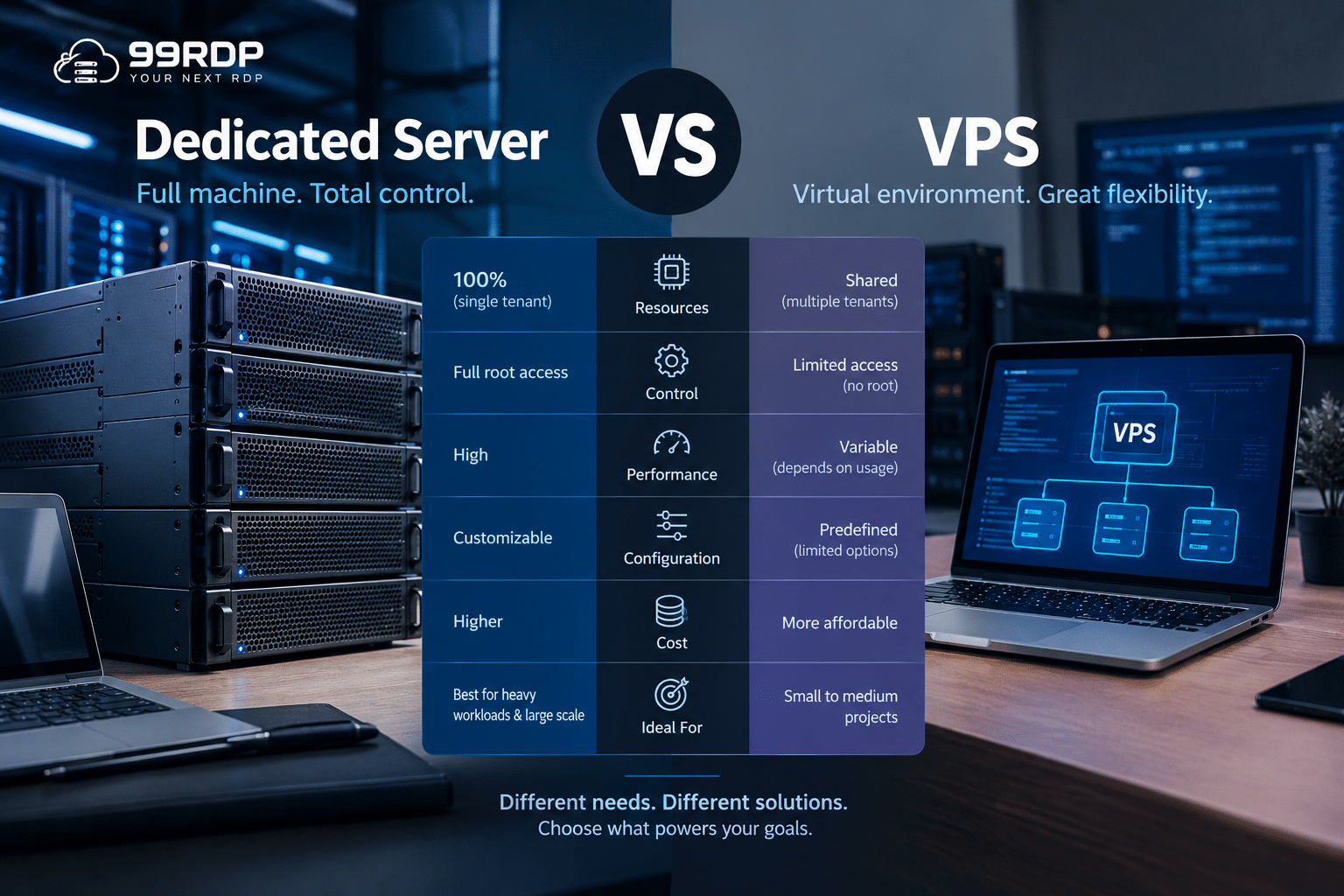
A VPS remains an excellent choice for many workloads.
However, it may be time to consider dedicated infrastructure when you experience:
- Persistent CPU saturation
- Memory limitations
- Storage bottlenecks
- Performance inconsistency
- Increasing application complexity
- Multiple production services on one environment
- Large database workloads
- Heavy CI/CD pipelines
The decision should be based on actual measurements.
Monitor:
- CPU utilization
- RAM consumption
- Disk IOPS
- Network throughput
- Application response times
Infrastructure decisions based on monitoring data are usually more effective than decisions based purely on hardware specifications.
Best Practices for Managing Dedicated Infrastructure
Owning powerful infrastructure is only the first step.
Administrators should also establish operational discipline.
Keep Software Updated
Apply security patches regularly.
Unpatched software remains one of the most common infrastructure risks.
Automate Backups
A dedicated server should never be the only location where important data exists.
Maintain independent backups.
Test restoration procedures regularly.
Monitor Resource Usage
Use monitoring tools to identify:
- CPU bottlenecks
- Memory leaks
- Storage problems
- Network anomalies
Apply Access Controls
Avoid using a single administrator account for everything.
Use:
- SSH keys
- Role-based access
- Multi-factor authentication where available
- Firewall rules
Plan for Failure
A dedicated server is powerful, but a single server can still represent a single point of failure.
Critical production workloads should consider:
- Redundant infrastructure
- Replication
- Backup servers
- Load balancing
- Disaster recovery procedures
Kubernetes documentation similarly emphasizes that production systems require planning for availability, scaling, security, resource limits, and failure recovery rather than simply deploying applications onto a machine.
The Future of Dedicated Infrastructure
Dedicated servers are not disappearing in the cloud era.
Instead, their role is evolving.
Modern infrastructure increasingly combines different deployment models:
- Public cloud for elasticity
- Dedicated servers for predictable workloads
- Containers for application portability
- Kubernetes for orchestration
- Edge infrastructure for latency-sensitive applications
This hybrid approach allows organizations to place workloads where they make the most technical and economic sense.
Artificial intelligence, large-scale data processing, media workloads, and self-hosted infrastructure continue to create demand for powerful compute environments.
At the same time, automation tools have made dedicated infrastructure easier to manage.
Terraform can provision environments.
Ansible can configure servers.
Docker can package applications.
Kubernetes can orchestrate workloads.
Monitoring platforms can provide real-time visibility.
Together, these technologies transform a dedicated server from a simple hosting machine into a flexible infrastructure building block.
Final Thoughts
Dedicated servers are no longer reserved exclusively for large enterprises.
Developers, startups, SaaS companies, DevOps teams, researchers, and technology enthusiasts can use dedicated infrastructure to build sophisticated environments.
The possibilities extend far beyond website hosting.
A properly configured dedicated server can power:
- AI and machine learning workloads
- Kubernetes clusters
- Cloud homelabs
- High-traffic websites
- DevOps platforms
- Large databases
- Private clouds
- Video processing pipelines
- Multiplayer game servers
- Monitoring platforms
- Remote development environments
- Big data analytics
- Automation systems
- Self-hosted SaaS platforms
- Cybersecurity labs
The most important step is understanding your workload.
Measure what your application actually needs. Identify CPU, memory, storage, and networking bottlenecks. Then choose infrastructure that gives you enough capacity to operate reliably while leaving room for growth.
For projects that need sustained performance, deep customization, and direct infrastructure control, dedicated servers remain a powerful option. Kubernetes itself highlights the importance of appropriately sizing CPU, memory, storage, networking, security, and resilience for production workloads—considerations that make infrastructure design as important as application design.
As AI, containers, automation, and self-hosted platforms continue to reshape technology, the dedicated server is evolving from a traditional hosting product into a flexible foundation for modern computing.
And for developers looking to build that foundation, exploring a purpose-built 99RDP Dedicated Server can be a practical starting point for evaluating configurations that match demanding technical workloads.
EXPLORE MORE ; Top 10 Use Cases for a Windows Botting RDP in 2026

READ OUR BLOGS


