
BleachBit TUI vs Traditional Linux Cleaners: What Changed?

Linux system cleaning tools have existed for decades, but 2026 is shaping up to be a turning point for how users manage performance, storage, and privacy on Linux systems. The release of BleachBit TUI is not just another feature update — it represents a deeper transformation in Linux computing itself.
For years, Linux cleaners focused heavily on graphical interfaces designed for desktop users. They worked well for casual maintenance, but modern infrastructure has changed dramatically. Developers now spend more time inside terminals, remote servers, containers, cloud desktops, and SSH sessions than traditional desktop environments.
That is exactly why BleachBit’s new Text User Interface (TUI) is generating major attention across the Linux ecosystem. Instead of depending entirely on graphical interfaces, BleachBit now offers a lightweight interactive terminal experience optimized for remote administration, automation, and low-resource systems.
The shift may seem small on the surface, but it reflects one of the biggest Linux workflow changes in years.
The Evolution of Linux Cleaning Utilities
Before understanding why BleachBit TUI matters, it helps to understand how Linux cleaners evolved.
Early Linux maintenance was almost entirely command-line based. Administrators manually cleaned:
- package caches
- log files
- temporary directories
- browser leftovers
- unused dependencies
using commands like:
apt autoremove
apt clean
journalctl --vacuum-time
rm -rf /tmp/*
As Linux desktops became more mainstream, graphical cleaners emerged. Applications like BleachBit gained popularity because they simplified maintenance tasks into clickable checkboxes.
Traditional Linux cleaners focused on:
| Traditional Linux Cleaner Goals | Typical Features |
|---|---|
| Desktop cleanup | Browser cache removal |
| Privacy cleaning | Cookie deletion |
| Disk optimization | Temporary file cleanup |
| Simplicity | GUI-based operation |
| Casual users | One-click cleaning |
That model worked well for personal computers.
But Linux itself changed.
Linux in 2026 Is No Longer Just a Desktop OS
Modern Linux usage looks completely different from ten years ago.
Today Linux powers:
- cloud servers
- DevOps infrastructure
- Kubernetes clusters
- VPS hosting
- AI systems
- CI/CD runners
- edge devices
- embedded systems
- remote development workstations
In many of these environments, graphical interfaces are unnecessary overhead.
A developer managing a remote Ubuntu server over SSH does not want to launch a heavy GTK application just to clear caches.
This is precisely the gap BleachBit TUI solves.
According to the official BleachBit announcement, the TUI version is specifically designed for users who:
- manage remote servers using SSH
- automate cleaning tasks
- use systems with limited resources
- prefer keyboard-driven workflows
- run headless or embedded Linux systems
That positioning reflects the modern Linux landscape perfectly.
What Makes BleachBit TUI Different?
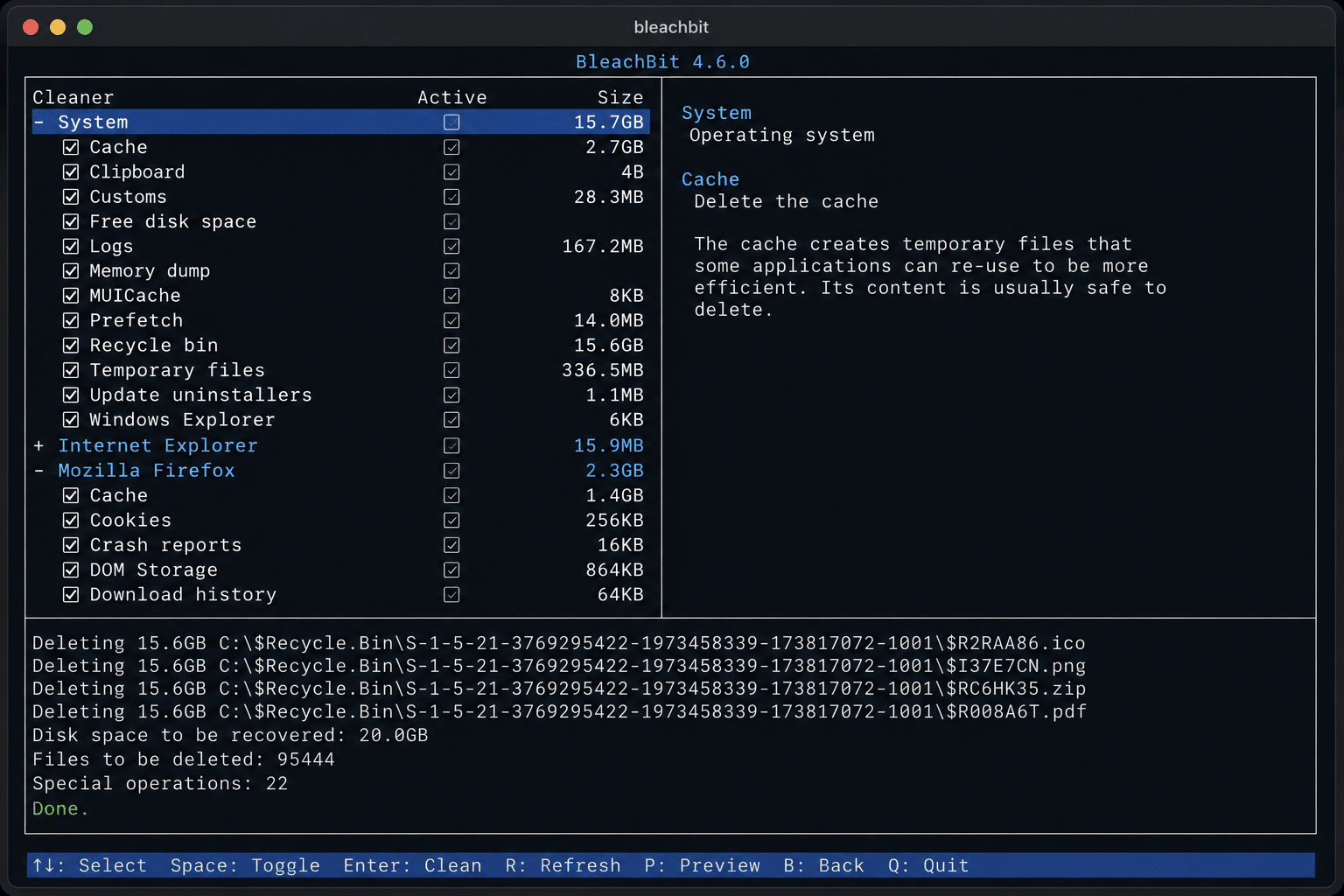
Traditional Linux cleaners usually fall into two categories:
- Full graphical applications
- Raw command-line utilities
BleachBit TUI sits in the middle.
It combines:
- interactive navigation
- keyboard-first workflows
- visual menus
- lightweight operation
- terminal compatibility
while still remaining efficient enough for remote environments.
Unlike standard CLI tools that require memorizing commands, BleachBit TUI provides:
- selectable cleaning categories
- interactive previews
- cleaner toggles
- deletion confirmation
- keyboard navigation
- mouse wheel support
This makes it far more user-friendly than pure shell commands while remaining dramatically lighter than GUI alternatives.
TUI Applications Are Becoming the New Linux Trend
BleachBit TUI is part of a larger movement happening across Linux.
Terminal User Interfaces are rapidly gaining popularity because they balance usability with performance.
Recent Linux TUI projects include:
| Tool | Purpose |
|---|---|
| btop | System monitoring |
| lazygit | Git management |
| k9s | Kubernetes management |
| ranger | File browsing |
| APTUI | Package management |
| BleachBit TUI | System cleanup |
Community interest in tools like APTUI shows how quickly terminal-first workflows are growing again.
The reasons are simple:
- lower RAM usage
- faster execution
- better SSH compatibility
- easier automation
- fewer dependencies
- cleaner workflows
Modern developers increasingly want software that works equally well:
- locally
- remotely
- inside containers
- over SSH
- inside tmux sessions
- on headless systems
Traditional GUI cleaners simply do not adapt well to these environments.
Resource Efficiency Is the Biggest Change
One of the most important differences between BleachBit TUI and traditional Linux cleaners is resource efficiency.
GUI applications consume resources continuously:
- GTK libraries
- display rendering
- window managers
- graphical dependencies
- desktop services
That overhead matters on:
- low-end VPS systems
- ARM devices
- cloud servers
- remote desktops
- lightweight Linux distributions
BleachBit TUI dramatically reduces this overhead because it operates directly inside the terminal.
This is especially valuable for:
- Debian minimal installations
- Ubuntu Server
- Arch Linux setups
- Alpine Linux systems
- containerized environments
where every megabyte matters.
Why SSH Compatibility Changes Everything
Traditional GUI cleaners are awkward in remote environments.
System administrators often manage Linux infrastructure through:
- SSH
- Mosh
- tmux
- screen
- remote terminals
Graphical applications either:
- require X forwarding
- need full desktop environments
- consume unnecessary bandwidth
- introduce latency
BleachBit TUI removes these problems completely.
The TUI runs natively inside SSH sessions while still offering interactive functionality.
That changes how remote system maintenance works.
Instead of memorizing long cleanup commands, administrators can interactively manage cleanup tasks from anywhere.
Traditional Linux Cleaners Were Built for Desktops
Many classic Linux cleaning tools assumed users were operating local desktop machines.
That assumption no longer fits reality.
Today many Linux users never interact directly with the physical hardware at all.
Instead they use:
- cloud VPS instances
- remote desktops
- hosted development servers
- virtual machines
- browser-based Linux systems
This creates entirely new infrastructure requirements.
Modern users prioritize:
| Old Linux Priorities | New Linux Priorities |
|---|---|
| Desktop simplicity | Remote accessibility |
| GUI convenience | Terminal efficiency |
| One-click cleanup | Automation |
| Local storage cleanup | Cloud optimization |
| Personal systems | Fleet management |
BleachBit TUI aligns directly with these new priorities.
Automation Is Now Essential
Automation is another major reason traditional cleaners are becoming outdated.
Modern DevOps teams automate nearly everything:
- deployments
- testing
- backups
- monitoring
- maintenance
- cleanup tasks
BleachBit has long supported command-line automation.
But the TUI adds a more flexible interactive layer for administrators who need both:
- manual control
- automation compatibility
This hybrid model is extremely important.
Not every cleanup task should be fully automated.
Sometimes administrators need to:
- preview deletions
- verify caches
- inspect temporary files
- selectively clean applications
BleachBit TUI provides that balance.
BleachBit 6.0 Made the Platform Much Stronger
The TUI launch arrives alongside the major BleachBit 6.0 release.
According to the official release notes, BleachBit 6.0 includes:
- over 100 improvements and fixes
- deeper Chromium cleaning
- Firefox enhancements
- cookie manager support
- Vivaldi browser cleaning
- Zen browser cleaning
- improved privacy controls
This matters because the TUI inherits the same backend as the GUI version.
That means users get enterprise-grade cleaning capabilities without needing graphical overhead.
The Rise of Cloud Workstations and Remote Linux Systems
Another reason BleachBit TUI matters is the explosive growth of cloud-based development environments.
Developers increasingly use remote infrastructure for:
- software development
- AI workloads
- browser automation
- CI/CD pipelines
- penetration testing labs
- container orchestration
- GPU computing
This shift has made remote system maintenance more important than ever.
Large remote environments accumulate:
- temporary build artifacts
- browser caches
- package leftovers
- deployment logs
- container junk
- unused dependencies
Over time, these reduce:
- storage efficiency
- system responsiveness
- deployment speed
- backup performance
BleachBit TUI offers a lightweight way to maintain these environments efficiently.
Why BleachBit TUI Fits Perfectly with 99RDP
The rise of remote-first Linux workflows directly connects with modern cloud desktop services like 99RDP.
Remote desktop infrastructure is becoming critical for:
- developers
- remote teams
- cybersecurity professionals
- agencies
- cloud engineers
- Linux enthusiasts
Using BleachBit TUI on remote cloud systems helps maintain:
- cleaner environments
- lower storage usage
- faster remote sessions
- better system responsiveness
This becomes especially useful on long-running remote instances where temporary files continuously accumulate.
When paired with scalable cloud infrastructure from 99RDP, BleachBit TUI becomes part of a broader optimization strategy.
TUI Tools Improve Focus and Workflow Speed
Many Linux power users prefer terminal workflows because they reduce distractions.
GUI applications encourage constant context switching:
- mouse interaction
- window management
- graphical clutter
- desktop overhead
TUI applications keep users focused inside the terminal ecosystem.
This is one reason developers increasingly prefer:
- terminal IDEs
- terminal Git clients
- terminal package managers
- terminal monitoring tools
BleachBit TUI fits naturally into this workflow philosophy.
Security and Privacy Remain Critical
BleachBit has always emphasized privacy and secure cleanup.
The software removes:
- browser traces
- cookies
- temporary files
- logs
- cached data
- application leftovers
The TUI retains support for important cleaning controls including overwrite preferences for more secure deletion.
For organizations running remote infrastructure, privacy cleanup is increasingly important because cloud systems often store:
- browser sessions
- authentication tokens
- deployment artifacts
- cached credentials
- temporary development files
Cleaning these efficiently helps improve operational hygiene.
Why Traditional GUI Cleaners Are Losing Momentum
Traditional graphical cleaners are not disappearing completely.
They still work well for:
- beginner Linux users
- desktop PCs
- occasional maintenance
- graphical distributions
But they increasingly feel disconnected from how Linux is actually used in 2026.
Modern Linux users prioritize:
- terminal integration
- remote access
- speed
- lightweight software
- automation
- SSH compatibility
This is why TUIs are rapidly gaining traction across the ecosystem.
BleachBit TUI Is Also a Cultural Shift
The rise of BleachBit TUI reflects something deeper in Linux culture.
Linux users increasingly value:
- efficiency over visual complexity
- modularity over bloat
- keyboard workflows over mouse dependence
- portability over heavyweight software
This philosophy is returning strongly across the open-source ecosystem.
Even Reddit discussions around new TUI projects show growing enthusiasm for keyboard-first Linux utilities.
The Linux community is rediscovering that fast, minimal tools often outperform feature-heavy graphical software.
The Biggest Winner: Developers
Developers benefit the most from this transition.
Modern development environments generate enormous amounts of temporary data:
- dependency caches
- package archives
- browser artifacts
- build outputs
- logs
- container layers
Without maintenance, systems become slower and harder to manage.
BleachBit TUI helps developers:
- maintain cleaner systems
- reduce storage waste
- optimize remote servers
- streamline maintenance
- stay inside terminal workflows
That combination is extremely powerful in modern cloud-native development environments.
Final Thoughts
BleachBit TUI is not merely a new interface.
It represents a major evolution in Linux maintenance philosophy.
Traditional Linux cleaners were designed for an era dominated by desktop computing. But Linux itself has evolved into a platform centered around:
- cloud infrastructure
- remote development
- automation
- containers
- SSH workflows
- lightweight environments
BleachBit TUI adapts perfectly to this reality.
By combining:
- interactive terminal usability
- low resource usage
- SSH compatibility
- automation support
- modern privacy tools
BleachBit has transformed from a desktop cleaner into a true infrastructure-friendly maintenance platform.
For developers, sysadmins, and remote infrastructure users, this shift matters enormously.
And when combined with scalable cloud desktop platforms like 99RDP, the result is a faster, cleaner, and far more efficient Linux workflow for 2026 and beyond.
The Linux ecosystem is clearly moving toward terminal-first computing again.
BleachBit TUI may become one of the clearest examples of that transformation.
EXPLORE MORE ; GNU Linux-libre 7.0 vs Standard Linux
READ OUR BLOGS


