CachyOS vs Arch Linux
Which is Better for Performance, Developers, and Cloud Workflows?
The Linux world has long been shaped by choice — from bleeding-edge distributions to minimalist systems that give you total control. Among these, Arch Linux remains a pillar of simplicity, flexibility, and rolling-release freshness. But in recent years, derivatives like CachyOS have emerged with a bold claim: optimize Arch’s raw power and make it more performant out of the box.
In this post, we’ll explore how Arch Linux and CachyOS differ, where each shines, and how modern developers can enhance their workflows using 99RDP’s Linux remote desktop solutions — especially when testing or deploying optimized distributions at scale.
What Are Arch Linux and CachyOS?
Arch Linux: The DIY Powerhouse
Arch Linux is a lightweight, rolling-release distribution that emphasizes simplicity, control, and minimalism. It doesn’t add defaults or unnecessary packages — instead, it gives users complete freedom to configure every aspect of the system.
- Uses the Pacman package manager and the official repositories.
- Provides access to the Arch User Repository (AUR) — a community repository with thousands of packages.
- Requires a manual installation process, giving advanced users the ability to tailor every component.
This philosophy makes Arch ideal for users who want complete customization and are comfortable managing every detail of their system setup.
CachyOS: Arch With Performance Enhancements
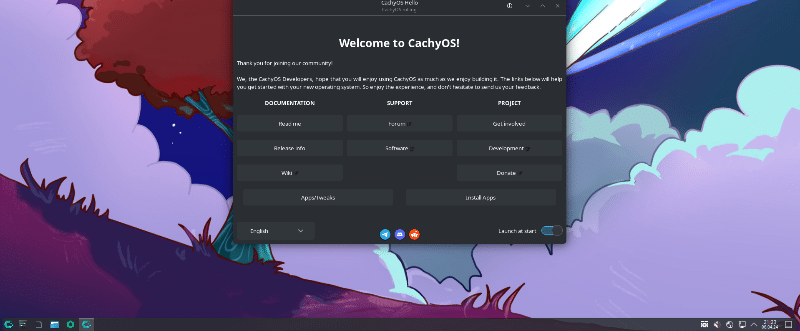
CachyOS is an Arch Linux derivative built with performance and usability in mind. It retains compatibility with Arch’s packages and rolling-release model but adds optimizations that reduce setup friction and deliver better performance on modern hardware.
Key differentiators include:
- Optimized Kernels: CachyOS ships its own kernel (
linux-cachyos) compiled with performance patches and multiple scheduler options (e.g., BORE, EEVDF).
- CPU-Specific Packages: Packages are compiled for modern instruction sets like
x86-64-v3,x86-64-v4, and even Zen4, which can yield measurable performance uplifts over generic builds.
- Graphical Installer & Preconfigured Environments: Unlike Arch’s command-line install, CachyOS provides a graphical installer (Calamares) and pre-optimized desktop environments.
- Value-Added Tools: CachyOS includes tools for kernel management, snapshots, and system updates to simplify maintenance.
Performance Comparison: Real Data Insights
Performance is often the most discussed reason for choosing CachyOS over vanilla Arch Linux — but what does the data say?
1. Benchmarks and Package Optimizations
CachyOS’s repositories recompile standard packages with aggressive compiler flags and architecture-specific optimizations. According to the distro’s documentation, these changes can deliver 5%–20% performance gains on supported instruction sets compared to generic builds.
Independent tests and community benchmarks reinforce this idea: many CachyOS users report faster boot times, snappy responsiveness, and better performance on compiled workloads, especially when using optimized schedulers and CPU instructions.
For example:
- Custom kernels like those with the BORE scheduler can reduce boot times and improve interactivity.
- Profile-Guided Optimization (PGO) and Link-Time Optimization (LTO) help critical packages perform better by tailoring builds based on real use patterns.
2.Server and High-Performance Tests
Recent server tests show CachyOS outperforming mainstream distributions — including vanilla Arch — on high-core-count AMD EPYC hardware, with gains of ~5% in aggregated benchmarks while maintaining the same power usage.
This demonstrates that CachyOS’s optimizations translate beyond desktops — making it a contender for compute-intensive workloads, provided users understand the trade-offs with stability and custom configurations.
3 .Real-World Usage Variance
However, not all benchmarks show dramatic wins — and some tests indicate performance is similar to other top distributions when averaged across workloads.
In everyday tasks like browsing, code editing, or standard development work, the differences might be modest. Yet for compilation tasks, gaming performance, or heavy server loads, optimized builds can deliver tangible improvements — especially with hardware that supports the extended instruction sets CachyOS targets.
Installation & User Experience
One of Arch Linux’s biggest barriers is its manual installation process. New users must partition disks, mount filesystems, and install packages using the command line. This fosters learning and maximum control — but it’s time-consuming.
CachyOS simplifies this substantially. It offers a graphical installer with guided options, preconfigured desktops, and default tools that make the system usable right after install.
This ease of use is attractive for:
- Developers looking to spin up new environments quickly.
- Users who want Arch’s benefits without an intense initial setup.
- Teams or learners seeking a gentler entry point into rolling-release workflows.
Stability, Control & Community Considerations
Arch Linux Purists Win on Control
If you want maximum control, minimal default settings, and a pristine base, Arch Linux is unmatched. Its repositories are curated and synchronized directly from upstream. Users fine-tune each component and enjoy total transparency.
CachyOS Adds Assumptions for Speed
CachyOS chooses defaults and patches that may depart slightly from upstream Arch packages. While this accelerates performance and usability, it can introduce occasional conflicts — especially when mixing CachyOS-specific repos with vanilla Arch.
Rolling Releases Align But Diverge Slightly
Both distributions follow a rolling model, meaning updates arrive continuously — no major upgrades every few years. But CachyOS’s own mirrors and curated packages might lag or diverge slightly for optimization and testing purposes.
Why Developers & Remote Users Should Care
For hackers, engineers, and cloud professionals, the choice between CachyOS and Arch Linux goes beyond benchmarks. It’s about workflow efficiency, environment consistency, and scalability.
That’s where 99RDP’s remote Linux services bring massive value.
Supercharge Your Linux Workflows With 99RDP

1. Ready-Made Linux RDP Environments
99RDP provides remote Linux desktops with root access, allowing developers to experiment with different distributions, including Arch and CachyOS, without dedicating local hardware.
This means you can:
- Instantly launch an Arch or CachyOS environment.
- Test performance optimizations on real workloads.
- Switch kernels, schedulers, and package sets without risking your workstation.
Cloud-based RDP instances remove barriers to experimentation and help teams maintain consistent environments across geographies.
2 .GPU-Optimized Remote Desktops
For workloads like:
- Graphical development
- Linux gaming
- Multimedia production
- GPU-accelerated builds
99RDP’s GPU RDP plans deliver the horsepower developers need — accessible from anywhere with low latency.
Pairing an optimized Linux distro like CachyOS with GPU-accelerated cloud desktops lets you build, test, and run demanding applications without bottlenecks.
3 .Cost-Effective Scaling
Instead of buying high-end local machines, developers can subscribe to 99RDP’s Linux RDP plans (ranging from affordable entry-level to enterprise-grade). This flexibility helps individuals and teams scale their compute power according to project demand.
4. Root Control for True Customization
99RDP doesn’t lock you into rigid environments. With full root access, you can:
- install custom kernels
- configure scheduler options
- tweak repositories
- compile specialized packages
This level of control mirrors the freedom you get with Arch but in a managed, global cloud environment — ideal for teams who want reproducibility without setup complexity.
When to Choose Which Distribution
Choose Arch Linux if:
- You want maximum configurability from scratch.
- You enjoy hands-on system assembly and maintenance.
- You prioritize minimal defaults without preconfigured tools.
Choose CachyOS if:
- You want performance-tuned builds out of the box.
- You prefer a smoother installation experience.
- You need optimized kernels and desktop environments preconfigured.
And if you want to experiment with both distributions easily, 99RDP’s remote Linux desktops let you spin up and switch between environments in minutes.
Conclusion
Both Arch Linux and CachyOS occupy important places in the Linux ecosystem:
- Arch represents pure flexibility and control, ideal for expert users who want to build from the foundation up.
- CachyOS prioritizes optimizations and user experience without abandoning Arch’s spirit.
The real power lies in combining these distributions with modern cloud capabilities. Using 99RDP’s high-performance Linux RDP services, developers can harness optimized environments, benchmark configurations in real time, and scale their infrastructure without hardware constraints.
Whether you’re building remote dev servers, experimenting with kernels, or deploying performance-critical applications, a flexible RDP solution backed by optimized Linux distros gives you the best of both worlds.
EXPLORE MORE ; WSL vs Linux Desktop
READ OUR BLOGS