Superfile vs Ranger vs Yazi: Which Terminal File Manager Wins in 2026?

Modern software development is no longer confined to graphical desktop environments. Whether you’re deploying applications to cloud servers, managing Docker containers, editing configuration files over SSH, or maintaining production infrastructure, the terminal has become the primary workspace for millions of developers and system administrators.
Yet, despite remarkable advances in terminal emulators, shells, and command-line utilities, one area has historically lagged behind: file management.
For decades, developers have relied on a combination of commands like cd, ls, cp, mv, find, and rm to navigate and manipulate files. While these tools remain indispensable, they can become inefficient when working with large projects, deeply nested directories, or multiple repositories. Repeatedly typing paths, switching between folders, and juggling terminal windows consumes valuable time and interrupts focus.
This gap has fueled the rise of terminal file managers—applications that combine the speed of command-line workflows with intuitive navigation, keyboard shortcuts, previews, and powerful file operations. Rather than replacing traditional Unix commands, they enhance them by providing a faster and more organized way to interact with the file system.
Among the growing list of terminal file managers, three names dominate conversations in 2026:
- Superfile – the modern, visually polished newcomer.
- Ranger – the classic tool trusted by Linux veterans.
- Yazi – the high-performance Rust-based contender built for speed.
Each tool has earned a loyal following, but they cater to different workflows, preferences, and technical requirements. Choosing the right one depends on what you value most: simplicity, customization, performance, or extensibility.
In this comprehensive comparison, we’ll evaluate Superfile, Ranger, and Yazi across critical areas such as performance, usability, customization, plugin ecosystems, remote server management, and productivity. We’ll also explore which file manager is best suited for developers, DevOps engineers, Linux enthusiasts, and enterprise IT professionals in 2026.
Why Terminal File Managers Still Matter
Some developers wonder why terminal file managers are relevant when modern operating systems include capable graphical file explorers.
The answer lies in today’s development environment.
Most professional software projects involve technologies that naturally live in the terminal, including:
- Git repositories
- Docker containers
- Kubernetes clusters
- SSH sessions
- Linux servers
- Cloud virtual machines
- Continuous integration pipelines
- Configuration management tools
Switching between a graphical file explorer and the terminal introduces unnecessary context changes. Every time a developer leaves the command line to locate a file visually, productivity suffers.
Terminal file managers solve this problem by allowing developers to:
- Browse directories without leaving the terminal.
- Copy, rename, and move files quickly.
- Preview source code and text files instantly.
- Search for files efficiently.
- Navigate massive projects using only the keyboard.
- Integrate seamlessly with editors like Vim and Neovim.
For developers who spend hours every day inside terminal windows, these seemingly small improvements compound into significant productivity gains.
Meet the Contenders
Superfile
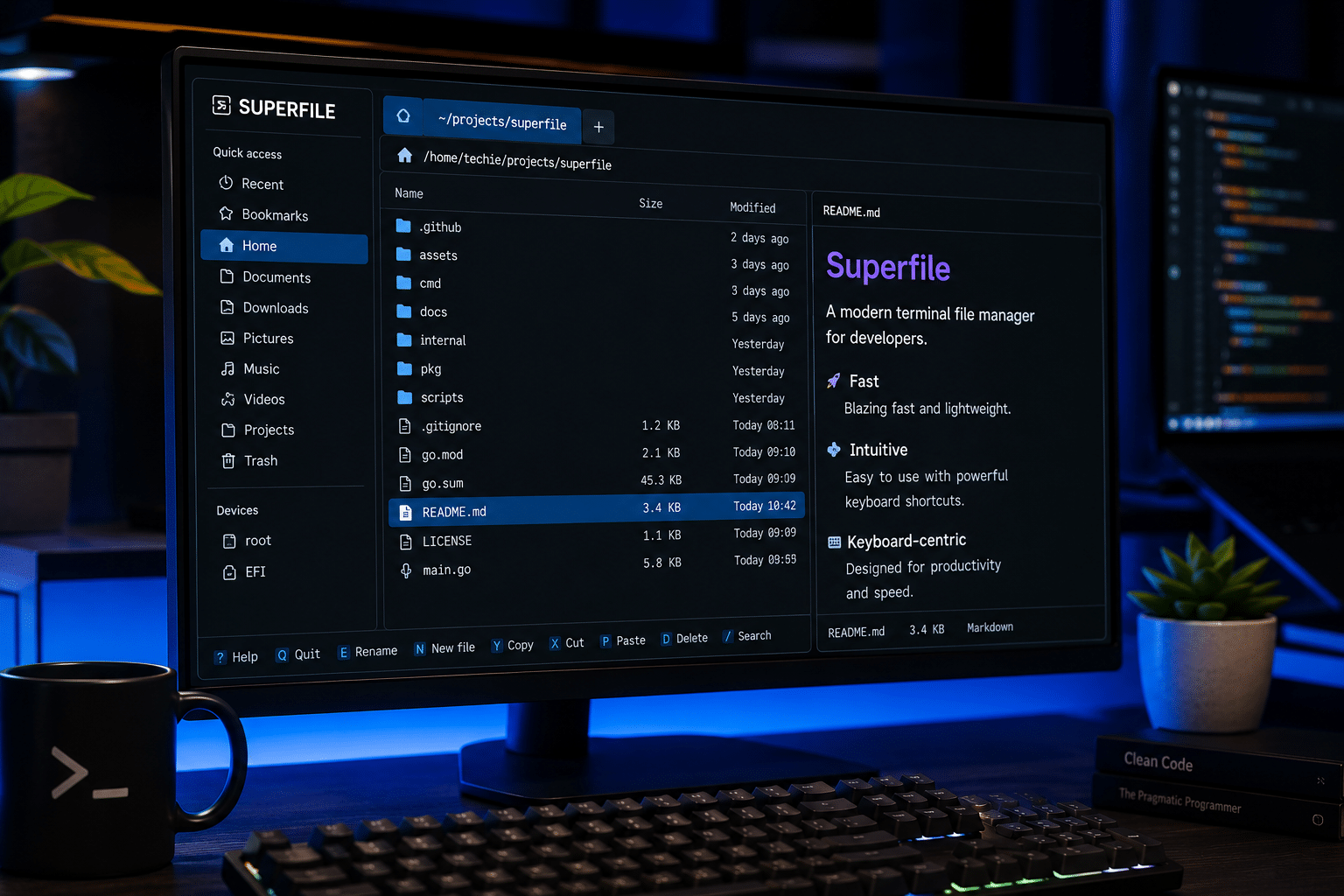
Superfile has emerged as one of the most exciting open-source terminal tools of 2026. Built with Go and the Bubble Tea framework, it combines modern design principles with a highly responsive keyboard-driven interface.
Unlike many older terminal file managers, Superfile prioritizes visual clarity. Its clean layout, multi-panel navigation, customizable themes, image previews (where supported), and intuitive shortcuts make it approachable even for developers who are new to terminal-based workflows.
Key strengths include:
- Modern interface
- Multi-panel browsing
- Rich previews
- Theme customization
- Keyboard-centric navigation
- Cross-platform support
Its growing popularity on Product Hunt and GitHub reflects a broader trend: developers increasingly expect command-line tools to be both functional and visually refined.
Ranger
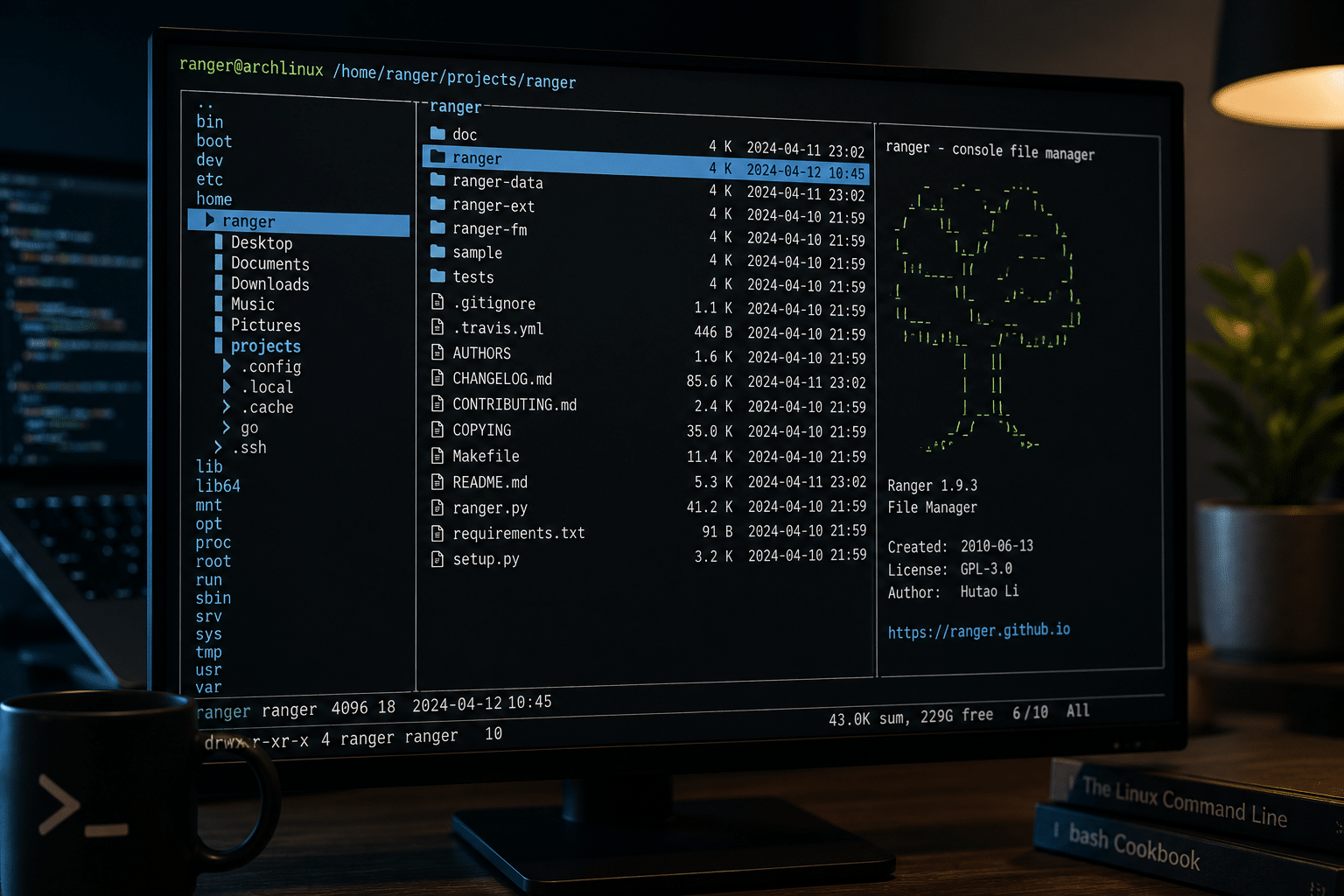
Ranger is one of the longest-standing and most respected terminal file managers in the Linux ecosystem.
Inspired by the file manager found in the Vim editor, Ranger adopts a minimalist three-column layout that displays the parent directory, current directory, and selected file simultaneously. This design has stood the test of time and remains highly efficient for keyboard users.
Written in Python, Ranger offers exceptional flexibility through configuration files, custom commands, and scripting support. Many experienced Linux users continue to rely on Ranger because of its maturity, stability, and extensive documentation.
Its strengths include:
- Proven reliability
- Lightweight operation
- Strong keyboard shortcuts
- Extensive customization
- Mature plugin ecosystem
- Excellent Vim integration
Although its interface appears dated compared to newer competitors, Ranger remains a favorite among seasoned Linux professionals.
Yazi
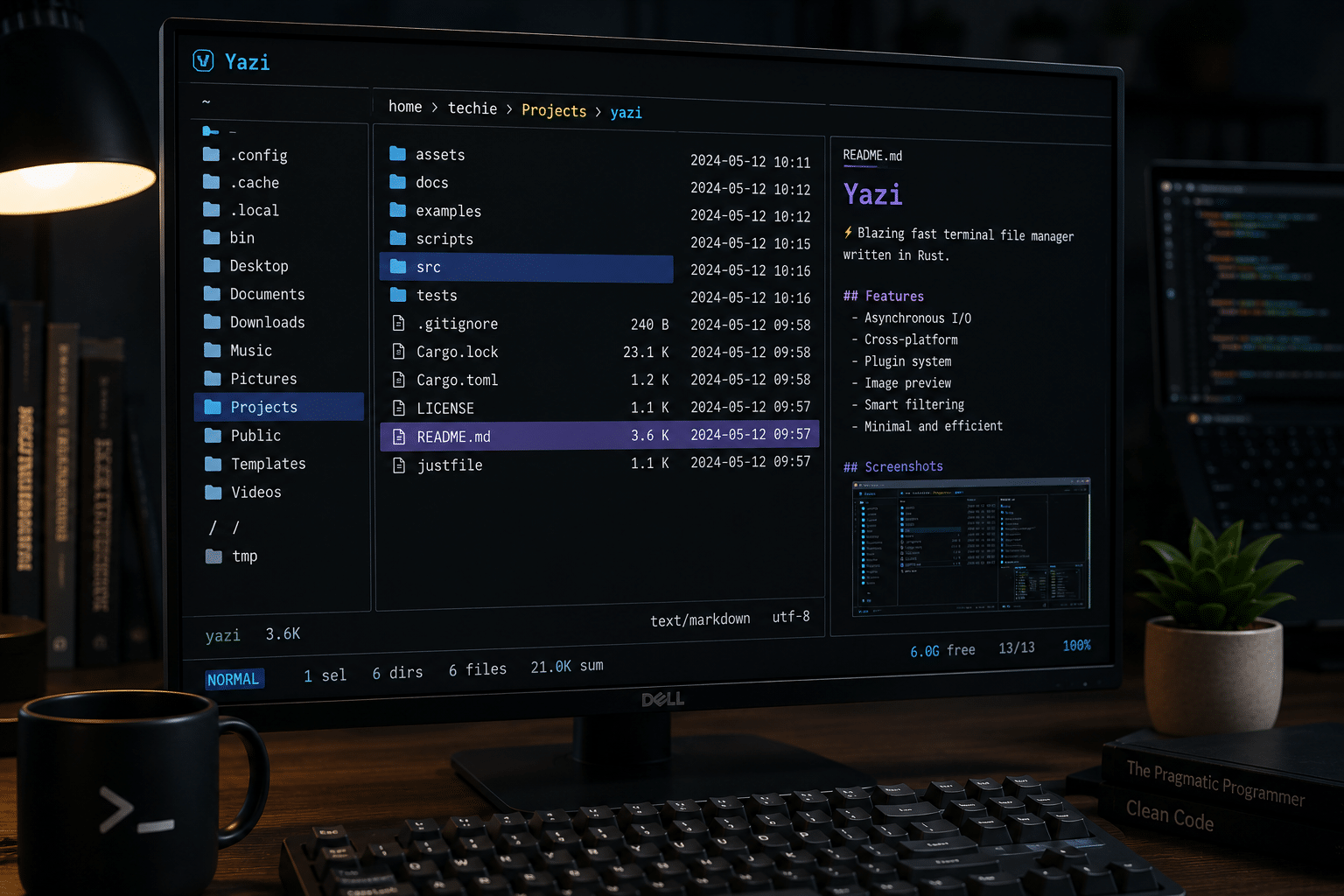
Yazi represents the next generation of terminal file managers.
Developed in Rust, Yazi focuses relentlessly on speed. It leverages asynchronous processing to deliver smooth navigation even in directories containing tens of thousands of files.
Performance is where Yazi truly distinguishes itself. Large repositories that may slow down older file managers remain highly responsive, making it especially appealing to developers working with monorepos, multimedia collections, or enterprise-scale projects.
Beyond raw speed, Yazi offers:
- Blazing-fast directory traversal
- Asynchronous operations
- Plugin architecture
- Lua scripting support
- Image previews
- Modern configuration system
- Native cross-platform compatibility
Many developers who prioritize responsiveness consider Yazi one of the fastest terminal file managers available today.
Quick Feature Comparison
| Feature | Superfile | Ranger | Yazi |
|---|---|---|---|
| User Interface | Modern | Classic | Modern |
| Performance | Excellent | Very Good | Outstanding |
| Language | Go | Python | Rust |
| Image Preview | Yes | Yes | Yes |
| Multi-Panel Layout | Yes | Limited | Yes |
| Plugin Support | Growing | Mature | Growing Rapidly |
| Learning Curve | Easy | Moderate | Moderate |
| Customization | High | Very High | High |
| Best For | Modern developers | Linux veterans | Performance-focused users |
Performance Comparison: Which File Manager Is Fastest?
Performance is often the deciding factor when choosing a terminal file manager. Developers working with thousands of files, large Git repositories, or remote servers need a tool that responds instantly to keyboard commands and directory changes.
Although Superfile, Ranger, and Yazi all provide fast navigation compared to traditional graphical file explorers, they achieve their performance in different ways.
Startup Speed
Startup time affects how quickly you can begin working, especially if you frequently open and close terminal sessions.
Yazi generally launches the fastest thanks to its Rust-based architecture and efficient asynchronous processing.
Superfile starts quickly as well. Its Go foundation enables low memory overhead while delivering a polished user interface.
Ranger, written in Python, remains reasonably responsive but typically starts slightly slower than its Go- and Rust-based competitors.
For most users, the difference is measured in fractions of a second, but developers who repeatedly launch terminal sessions throughout the day may appreciate Yazi’s advantage.
Large Directory Performance
Modern software projects often contain tens of thousands of files.
Examples include:
- Node.js projects
- Python virtual environments
- Kubernetes configurations
- Vendor libraries
- Git repositories
- Docker volumes
Handling these directories smoothly requires efficient indexing and rendering.
Yazi
Yazi shines in this area.
Its asynchronous architecture prevents the interface from freezing while loading large directories, allowing users to continue navigating almost immediately.
Superfile
Superfile performs exceptionally well for everyday development workloads.
Its optimized rendering keeps navigation smooth even in sizeable repositories, making it an excellent balance between performance and usability.
Ranger
Ranger remains reliable but can feel slower when opening extremely large directories because of Python’s runtime characteristics.
However, for typical development environments, Ranger continues to deliver a dependable experience.
User Interface and Design
The visual experience differs dramatically among these three file managers.
Superfile
Superfile embraces modern terminal design.
Highlights include:
- Elegant layouts
- Clear typography
- Beautiful themes
- Intuitive icons
- Rich file previews
- Multi-panel navigation
Its interface feels approachable, even for developers who have never used a terminal file manager before.
Ranger
Ranger focuses almost entirely on efficiency.
Its familiar three-column layout displays:
- Parent directory
- Current directory
- Selected file preview
This minimalist design has remained largely unchanged for years because it works remarkably well.
Experienced Linux users often appreciate its simplicity more than flashy visuals.
Yazi
Yazi combines modern aesthetics with exceptional responsiveness.
Animations remain subtle.
Navigation feels fluid.
Preview rendering is fast.
The result is a terminal experience that feels contemporary without becoming distracting.
Keyboard Workflow
Terminal file managers live or die by keyboard efficiency.
All three applications support keyboard-first navigation.
However, their philosophies differ.
Ranger
Ranger closely follows Vim conventions.
Users already familiar with Vim typically become productive within minutes.
Commands feel natural.
Movement is predictable.
Customization is extensive.
Superfile
Superfile simplifies navigation.
Its shortcuts are easy to understand, reducing the learning curve for developers transitioning from graphical file managers.
Many users describe Superfile as one of the most beginner-friendly terminal file managers available.
Yazi
Yazi adopts many familiar keyboard conventions while introducing workflow optimizations designed for speed.
Power users benefit from:
- Fast searching
- Efficient previews
- Smooth navigation
- Low-latency interactions
Customization
Customization determines whether a tool adapts to your workflow—or forces you to adapt to it.
Ranger
Ranger remains the customization champion.
Developers can modify nearly everything:
- Keybindings
- Colors
- Commands
- File previews
- Scripts
- External integrations
Its maturity has produced an enormous library of community configurations.
Superfile
Superfile prioritizes simplicity while still offering meaningful customization.
Users can personalize:
- Themes
- Layouts
- Keyboard shortcuts
- Display preferences
The configuration process is cleaner than many older terminal applications.
Yazi
Yazi offers extensive customization through Lua scripting and configuration files.
As its community continues growing, new plugins and workflow enhancements appear regularly.
Plugin Ecosystem
A healthy plugin ecosystem extends a file manager far beyond its default capabilities.
Ranger
Because Ranger has existed for many years, it enjoys the largest collection of community-developed extensions.
Examples include:
- Git integration
- Archive browsing
- Media previews
- Fuzzy search
- Batch operations
Superfile
Superfile’s ecosystem is younger but expanding rapidly.
Its active open-source community continues adding integrations, themes, and workflow improvements.
Yazi
Yazi has experienced remarkable community growth.
Rust developers actively contribute plugins focused on:
- Performance
- Cloud workflows
- Developer productivity
- Modern terminal capabilities
Resource Usage
Efficient resource consumption matters when working on lightweight Linux distributions or cloud virtual machines.
| File Manager | CPU Usage | Memory Usage | Large Directory Handling |
|---|---|---|---|
| Superfile | Low | Low | Excellent |
| Ranger | Low–Moderate | Moderate | Good |
| Yazi | Very Low | Very Low | Outstanding |
Although all three applications remain lightweight compared to graphical alternatives, Yazi generally consumes the fewest resources under demanding workloads.
Which Tool Is Easier to Learn?
Beginners
Superfile offers the smoothest onboarding experience.
Its interface explains itself naturally, reducing the need to memorize commands immediately.
Intermediate Linux Users
Yazi provides an excellent balance between modern features and high performance.
Its workflow feels intuitive after only a short learning period.
Advanced Users
Ranger rewards experienced Linux users with nearly unlimited flexibility.
Those comfortable editing configuration files often appreciate the depth of control it provides.
Remote Development: Why Terminal File Managers Matter More Than Ever
Software development increasingly happens on remote infrastructure instead of local machines.
Developers routinely manage:
- Cloud virtual machines
- Docker hosts
- Kubernetes clusters
- Linux VPS instances
- Remote build servers
- Continuous integration environments
In these scenarios, graphical file explorers are unavailable or impractical.
A terminal file manager becomes an essential productivity tool.
Instead of repeatedly typing lengthy file paths, developers can quickly browse directories, inspect configuration files, move deployment assets, and review logs—all without leaving the terminal.
This streamlined workflow reduces context switching and minimizes errors, particularly during server administration and production deployments.

Building a Hybrid Workflow with 99RDP Windows VPS
While Linux dominates cloud-native development, many organizations continue to rely on Windows-based environments for enterprise applications, testing, and administration.
A hybrid workflow often delivers the best of both worlds.
For example, a developer might:
- Write code locally on Linux or macOS.
- Use Superfile, Ranger, or Yazi to manage project files.
- Push changes to a Git repository.
- Connect to a Windows VPS for application testing, database management, or Windows-specific software.
This is where 99RDP Windows VPS fits naturally into the workflow.
A managed Windows VPS enables developers to:
- Access Windows Server remotely through Remote Desktop.
- Test applications in a dedicated Windows environment.
- Run Visual Studio and other Windows-only development tools.
- Host IIS-based web applications.
- Perform software demonstrations and QA testing.
- Maintain isolated development environments without dedicated hardware.
When combined with a modern terminal file manager, developers can efficiently navigate Linux-based projects while still benefiting from a reliable Windows workspace for platform-specific tasks.
Rather than replacing local development, this approach complements it, allowing teams to work seamlessly across operating systems and deployment targets.
Real-World Use Cases
Choosing the best terminal file manager depends less on feature lists and more on how you work every day. Below are common scenarios and the tool that fits each one best.
Scenario 1: Open-Source Developer
An open-source contributor typically spends time navigating multiple Git repositories, reviewing pull requests, editing configuration files, and switching between projects.
Recommended: Superfile
Why?
- Clean interface reduces navigation time.
- Multi-panel layout makes comparing repositories easier.
- Rich previews help inspect Markdown, source code, and configuration files.
- Cross-platform support enables a consistent experience across Linux, macOS, and Windows.
Scenario 2: Linux System Administrator
System administrators often manage production servers over SSH, edit configuration files, monitor logs, and maintain user permissions.
Recommended: Ranger
Why?
- Mature and extremely stable.
- Excellent keyboard workflow.
- Powerful scripting capabilities.
- Integrates well with existing Unix utilities.
- Minimal dependencies.
For administrators who have used Linux for years, Ranger feels like a natural extension of the command line.
Scenario 3: DevOps Engineer
DevOps engineers work across cloud infrastructure, CI/CD pipelines, containers, and automation platforms.
Recommended: Yazi
Why?
- Exceptional performance.
- Handles very large directories efficiently.
- Responsive while browsing container volumes.
- Excellent for infrastructure-as-code repositories.
- Modern architecture built for demanding workloads.
Scenario 4: Students Learning Linux
Beginners often find terminal navigation intimidating.
Superfile lowers that barrier by providing visual feedback without sacrificing keyboard efficiency.
Students can learn directory structures while gradually becoming comfortable with command-line workflows.
Scenario 5: Enterprise Development Teams
Enterprise teams frequently maintain hybrid environments consisting of Linux servers, Windows infrastructure, Git repositories, and cloud deployments.
A practical workflow may look like this:
- Develop applications locally.
- Organize project files with Superfile or Yazi.
- Commit code to Git.
- Deploy to Linux servers.
- Test Windows-specific applications on a dedicated remote Windows environment.
Using a managed 99RDP Windows VPS enables developers to securely access Windows Server environments for IIS deployments, Visual Studio testing, SQL Server administration, or legacy application validation while continuing to use their preferred terminal file manager for Linux-based workflows. This combination helps reduce hardware costs, supports remote collaboration, and keeps development environments available from virtually anywhere with an internet connection.
Security Considerations
No matter which terminal file manager you choose, security should remain a priority.
Best practices include:
- Verify downloads from official project sources.
- Keep software updated.
- Limit permissions when working on production servers.
- Review plugins before installing them.
- Use SSH keys instead of passwords where possible.
- Back up important configuration files before making significant changes.
Terminal file managers improve productivity, but they should be incorporated into an overall secure development workflow.
Community and Long-Term Development
An active community is one of the strongest indicators of a healthy open-source project.
Superfile
Superfile’s community is growing rapidly. Frequent updates, active discussions, and modern design decisions suggest a promising future.
Ranger
Ranger benefits from years of community knowledge, tutorials, and user-contributed configurations. It remains one of the most trusted choices in the Linux ecosystem.
Yazi
Yazi has attracted strong interest from developers who value Rust-based software. Its ecosystem continues to expand with plugins, themes, and integrations contributed by an active community.
Each project appears well-positioned to remain relevant throughout 2026 and beyond.
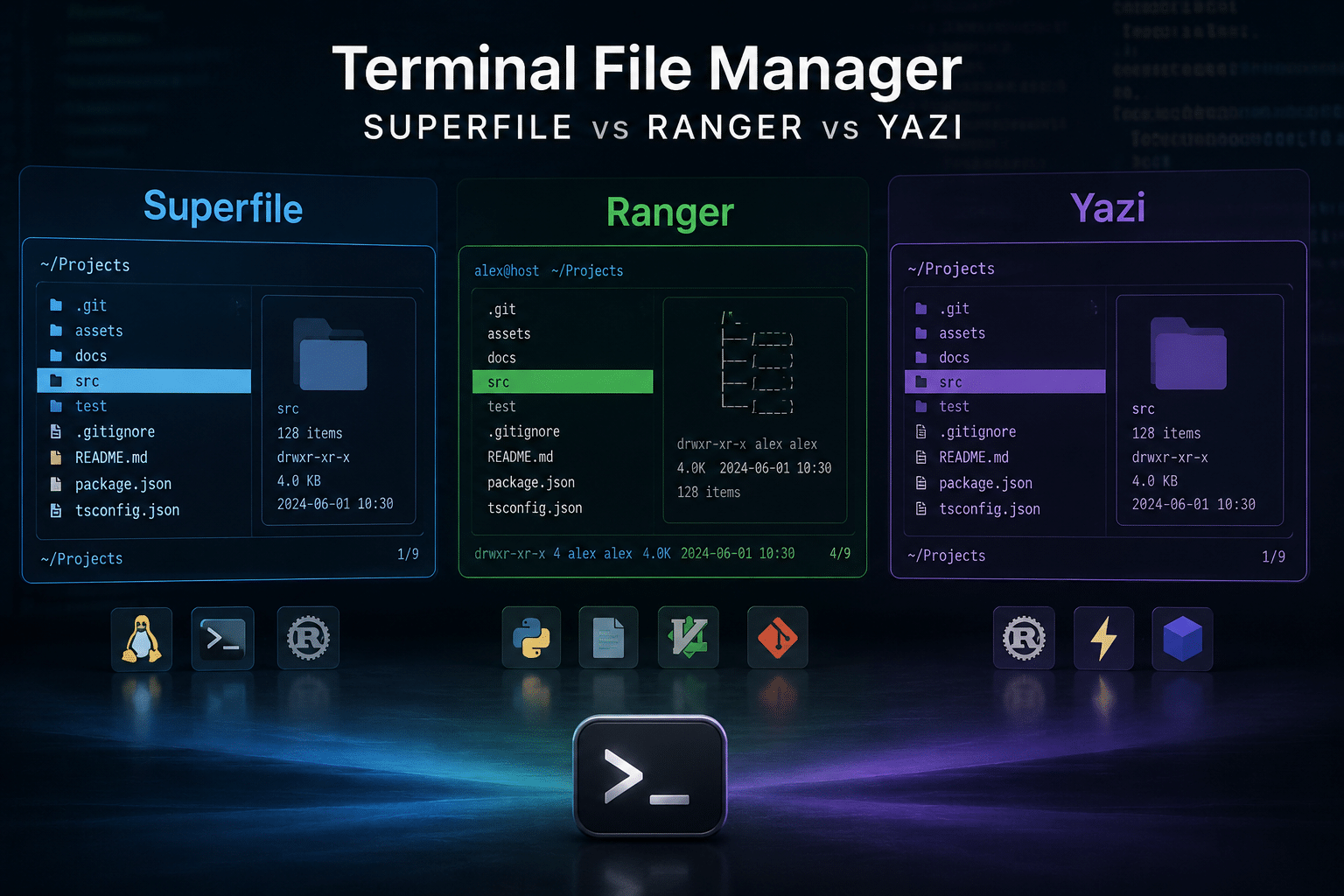
Which Terminal File Manager Should You Choose?
Choose Superfile if you:
- Prefer a polished modern interface.
- Want an easier learning curve.
- Like visual file previews.
- Work across multiple operating systems.
- Value usability alongside performance.
Choose Ranger if you:
- Already use Vim extensively.
- Enjoy deep customization.
- Need a battle-tested tool.
- Prefer traditional Linux workflows.
- Depend on mature community resources.
Choose Yazi if you:
- Prioritize maximum speed.
- Handle very large repositories.
- Work extensively with cloud-native projects.
- Want a modern Rust-based application.
- Need excellent responsiveness on demanding workloads.
Final Verdict
Rather than declaring a single universal winner, the comparison reveals that each application excels in a different category.
| Category | Winner |
|---|---|
| Best Overall User Experience | Superfile |
| Best Performance | Yazi |
| Best Customization | Ranger |
| Best for Beginners | Superfile |
| Best for Linux Professionals | Ranger |
| Best for DevOps | Yazi |
| Best Modern Design | Superfile |
| Best Large Repository Performance | Yazi |
If you’re trying a terminal file manager for the first time, Superfile offers the most approachable experience without compromising productivity.
If you manage Linux systems professionally and appreciate complete control, Ranger remains an outstanding option.
If raw speed and scalability matter most, Yazi is difficult to beat.
The good news is that all three are open source, actively maintained, and capable of dramatically improving how developers interact with the file system.
EXPLORE MORE ; How to Fix “Read-only File System” Error in Linux
READ OUR BLOGS