
HTTPDirFS vs. Traditional Downloads: A Better Way to Browse Web Resources on Linux?

Do You Really Need to Download Every File You Want to Browse?
Downloading files from the internet is one of the most familiar tasks in computing. You find a document, image, video, or software package, click Download, and save it to your computer.
But what happens when you want to explore a remote directory containing hundreds or thousands of files? Downloading everything can consume storage, waste bandwidth, and create unnecessary work when you only need a handful of resources.
Linux offers several ways to approach this problem. You can use command-line utilities such as curl and wget, mirror websites with specialized tools, or explore remote resources through filesystem-based utilities.
One particularly interesting option is HTTPDirFS, an open-source tool that allows Linux users to mount supported HTTP resources as a virtual filesystem using FUSE.
Instead of treating every remote resource as a separate download, HTTPDirFS can make compatible remote directories and linked website resources accessible through familiar filesystem paths. Its caching capabilities can also help reduce repeated downloads of previously accessed data.
This creates an interesting question for Linux users: Is mounting remote resources with HTTPDirFS better than downloading files the traditional way?
The answer depends on what you want to accomplish.
If you need one file immediately, a traditional download is usually simpler. If you regularly explore large remote collections, HTTPDirFS may provide a more convenient workflow. If you need an offline website archive, a mirroring tool may be the better choice.
In this guide, we’ll examine the differences, explore practical examples, explain the limitations, and show how a Linux VPS from 99RDP can support more advanced Linux development and automation workflows.
1. What Is HTTPDirFS, and Why Does It Matter?
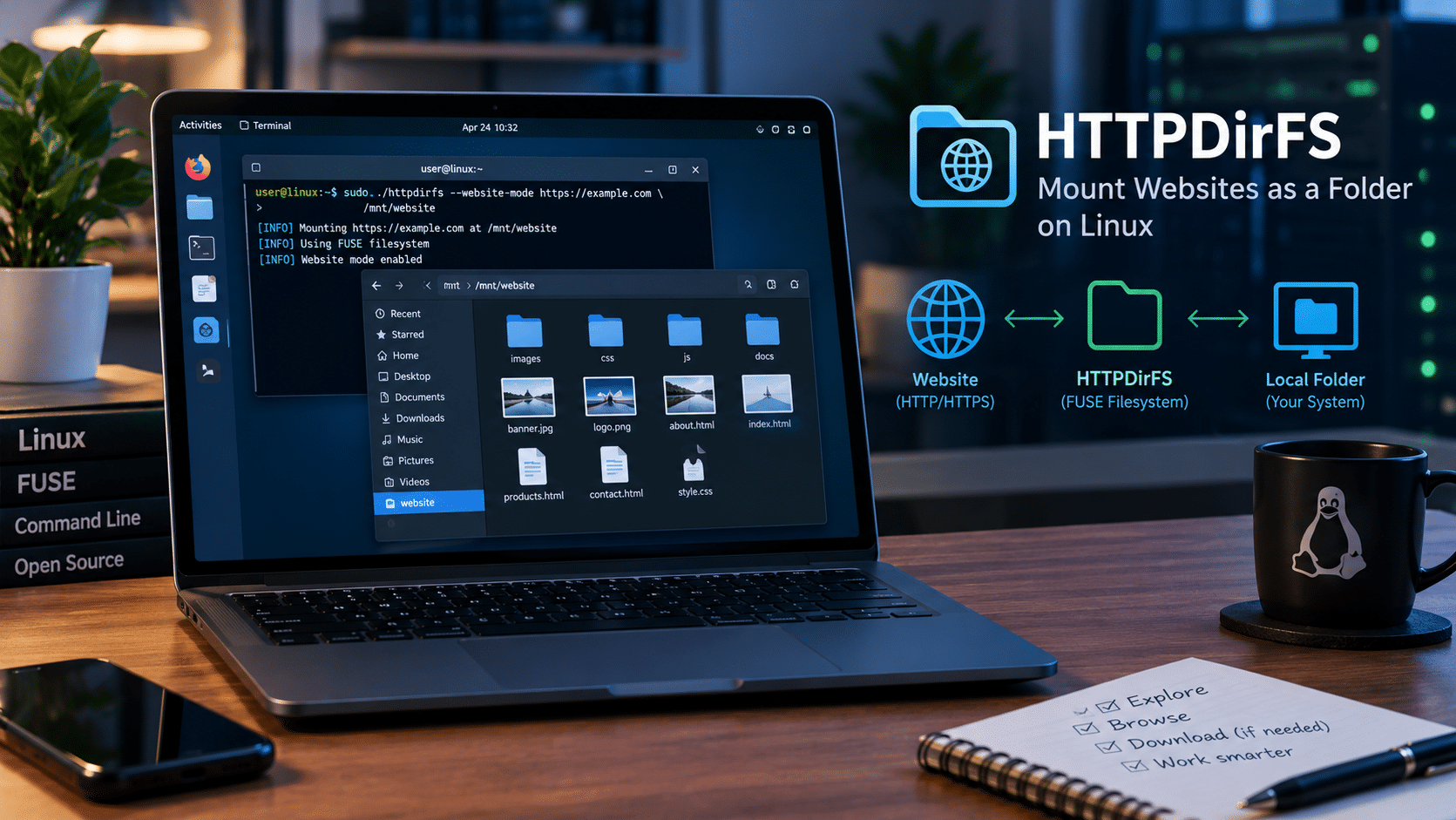
HTTPDirFS stands for Hyper Text Transfer Protocol Directory Filesystem. It uses FUSE, or Filesystem in Userspace, to expose supported HTTP resources through a filesystem interface.
FUSE allows programs to implement filesystems without requiring a traditional kernel filesystem driver. Applications can then interact with supported remote resources using familiar file operations.
HTTPDirFS focuses on HTTP-based resources, including compatible directory listings and individual files. It also supports website mode, which can represent certain HTML pages as browsable directories. The precise behavior depends on the server, its responses, and the version of HTTPDirFS you use.
How HTTPDirFS works
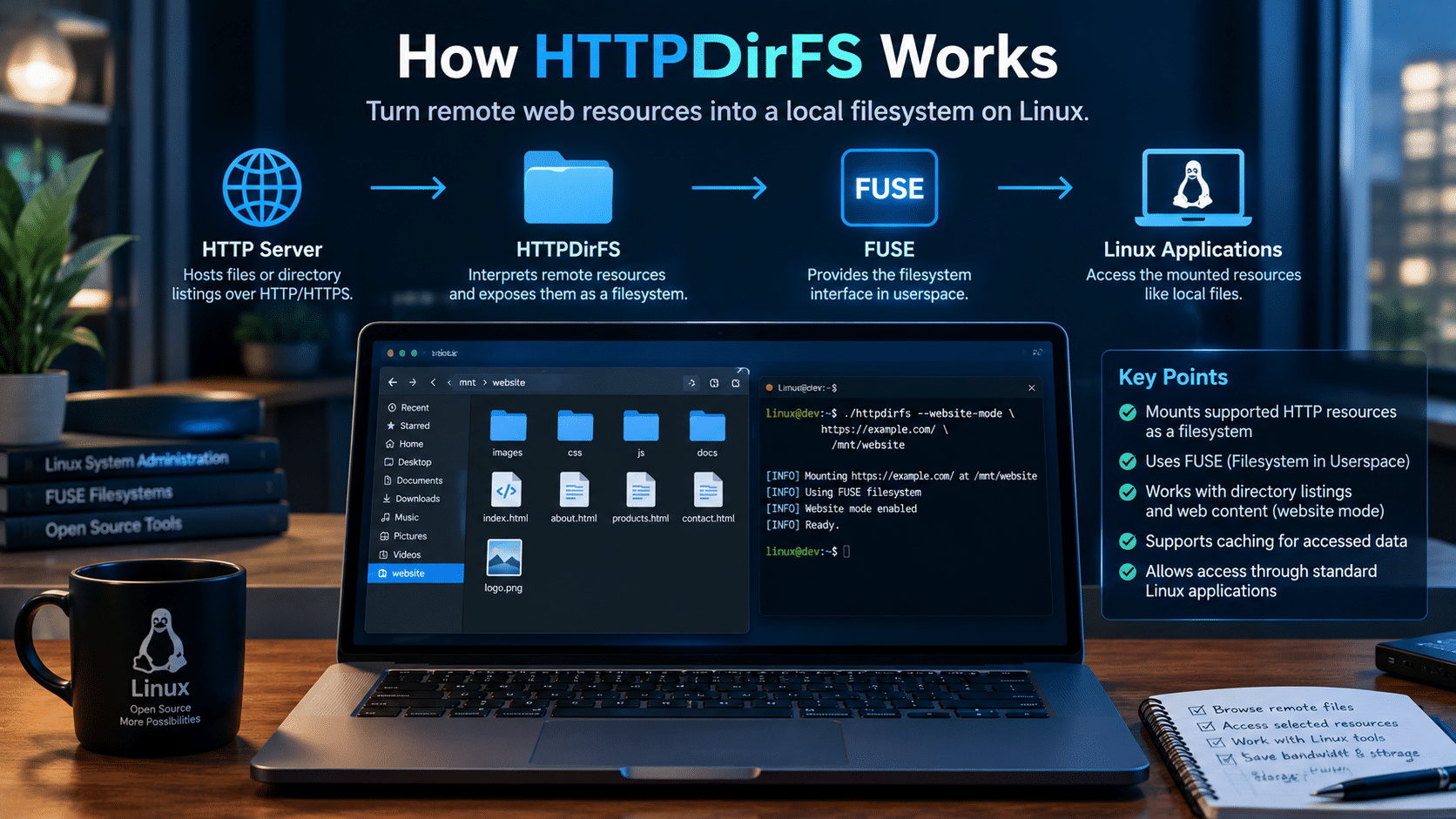
Consider a remote server hosting a collection of Linux installation images.
Normally, you might open the website in a browser, locate an ISO file, and download it to your computer.
With HTTPDirFS, you can mount a compatible server directory and access the exposed resources through a local mount point.
The workflow looks like this:
- Remote HTTP server: Hosts files or a compatible directory listing.
- HTTPDirFS: Communicates with the server and interprets supported resources.
- FUSE: Presents those resources through a filesystem interface.
- Linux applications: Access the mounted resources using paths, just as they access other files.
For example, a mounted directory might let you browse available ISO images before deciding which one to download.
You can then access a selected resource without first downloading the entire directory.
Why this approach is useful
HTTPDirFS offers several practical advantages:
- Browse supported remote resources through filesystem paths.
- Inspect collections before downloading their contents.
- Access remote files through compatible file-oriented applications.
- Use caching to avoid repeatedly downloading previously accessed data when the cache remains valid.
- Integrate remote-resource access into certain Linux workflows.
However, HTTPDirFS is not a complete web browser, and it does not turn every website into a fully functional local copy.
Its value comes from making supported remote resources easier to access, not from replacing every existing internet tool.
2. Traditional Downloads: Simple, Reliable, and Still Essential
Before comparing HTTPDirFS with conventional downloads, it is worth understanding why downloading remains the right choice for many tasks.
Traditional downloads transfer remote content to local storage. Once the transfer finishes, you can use the downloaded file without maintaining an active connection to the original server.
Linux provides several tools for this purpose.
Option A: Download with curl
The curl command retrieves data from supported network protocols, including HTTP and HTTPS.
For example:
curl -L -o example.iso \
  "https://example.com/files/example.iso"
Here:
-Lfollows HTTP redirects.-o example.isosaves the response to a local file.
This approach works well when you know the resource’s URL and want to save it locally.
Option B: Download with wget
The wget utility provides another straightforward way to retrieve files.
wget -O example.iso \
  "https://example.com/files/example.iso"
For larger collections or more complex retrieval tasks, wget also supports additional options for recursive downloading and other behaviors.
Use these capabilities carefully: downloading multiple files or entire websites may consume significant bandwidth and storage, and you should respect the server’s usage policies.
Option C: Download first, then process
Traditional downloads are especially useful when you need to:
- Keep a permanent local copy.
- Work offline.
- Verify a file’s checksum.
- Archive a specific version of a resource.
- Process files repeatedly without depending on a remote server.
- Transfer data into another application or environment.
For example, if you download a Linux ISO to create a bootable USB drive, you generally want the complete local file.
Mounting a remote directory may help you find the ISO, but it does not eliminate the need to retrieve the image before writing it to a USB drive.
The key advantage of traditional downloads is independence: after a successful download, the file remains available locally, even when the original website becomes inaccessible.
3. HTTPDirFS vs. Traditional Downloads: The Key Differences
HTTPDirFS and traditional downloads solve related but different problems.
A download retrieves a file. HTTPDirFS provides a filesystem view of supported remote resources, allowing you to browse and access them as needed.
The distinction becomes clearer when you compare their capabilities.
| Feature | HTTPDirFS | Traditional Downloads |
|---|---|---|
| Primary purpose | Expose supported remote resources through a filesystem | Retrieve remote content to local storage |
| Initial storage requirements | Can avoid storing an entire collection locally | Requires local space for downloaded files |
| Browsing large collections | Convenient when the server and resource structure are compatible | May require browsing remotely and downloading selected files |
| Offline access | Depends on cached data and available local resources | Available for successfully downloaded files |
| Network dependency | Generally requires connectivity for uncached remote data | Not required after the file has been downloaded |
| Access through file-oriented applications | Yes, for resources exposed by the mount | Yes, through ordinary local paths |
| Cache support | Supports caching of accessed file segments | Depends on the download tool and workflow |
| Website compatibility | Depends on server responses and supported resource structures | Depends on whether the requested resources can be retrieved |
| Writing to remote files | Provides a read-only filesystem view | Uploading requires a separate tool or workflow |
| Best use case | Exploring supported remote collections and accessing selected resources | Saving, archiving, distributing, or processing specific files |
HTTPDirFS’s caching system can retain accessed file segments, allowing valid cached data to be reused. It does not automatically mean that an entire remote collection becomes available offline.
Which option uses less storage?
There is no universal winner.
Suppose a remote collection contains 500 files, but you only need three.
Downloading the entire collection would require storage for all the downloaded files. If you only access a few resources through HTTPDirFS, you may avoid storing the entire collection.
However, HTTPDirFS can still consume local storage through its cache, and the actual savings depend on how much content you access and whether you later download the files.
If you intend to use all 500 files repeatedly, downloading them in advance may be more practical.
Choose based on your workload, not on the assumption that mounting is always more efficient.
4. Five Situations Where HTTPDirFS Can Beat Traditional Downloads
HTTPDirFS becomes particularly interesting when you regularly browse remote resources without needing to keep a complete local copy.
Here are five situations where its approach may offer a practical advantage.
1. Exploring large public file directories
Some websites expose directories containing hundreds of documents, images, archives, or software packages.
Downloading the entire collection simply to identify a few files would be unnecessary.
HTTPDirFS can expose compatible directory listings through a mounted filesystem, allowing you to explore the available resources before retrieving selected files.
This can be useful for:
- Public software repositories.
- Download directories containing multiple versions of an application.
- Collections of documentation.
- Publicly accessible image libraries.
- Other HTTP directories you are authorized to access.
The server must expose resources in a format HTTPDirFS can handle. A website with a conventional directory listing is not equivalent to an arbitrary interactive website.
2. Browsing linked images and documents
A traditional workflow may involve opening a webpage, following links, and downloading each required resource.
HTTPDirFS website mode offers another possibility.
It can expose certain HTML pages as virtual directories, allowing compatible linked resources to appear through filesystem paths.
For example, you might explore a sample website containing book categories, listings, and cover images.
Instead of downloading the entire website first, you can inspect the resources exposed by the mounted filesystem.
This is particularly useful when the purpose is browsing rather than creating a complete offline copy.
3. Accessing large files without immediately saving everything
Imagine a remote directory containing several Linux installation images.
You want to inspect the available versions before deciding which one to download.
HTTPDirFS can make compatible resources available through a mount point, reducing the need to download every file simply to explore the collection.
If you eventually need an ISO for installation, you should still download the complete image and verify its integrity according to the publisher’s instructions.
4. Reusing previously accessed data
HTTPDirFS supports a persistent cache that can store file segments accessed from the remote server.
When the cached segments remain valid, subsequent reads can reuse them rather than downloading those segments again.
This can benefit workflows in which you repeatedly inspect the same remote files.
However, caching behavior depends on the tool’s configuration and whether the remote server provides metadata that allows the cache to be validated.
A cache is not a substitute for a verified offline backup.
5. Integrating remote resources into Linux workflows
Linux users often prefer command-line tools and file-oriented applications because they are easy to combine.
A mounted filesystem can provide an interface through which compatible applications access remote resources.
Depending on your requirements, you might use a file manager to browse a collection, a media player to access supported media, or a copy command to retrieve a selected file.
The benefit is not necessarily fewer commands. It is the ability to use filesystem-oriented tools for resources that would otherwise require separate download steps.
5. When Traditional Downloads Are the Better Choice
HTTPDirFS is useful, but it is not the best solution for every task.
In several common situations, a direct download remains simpler and more reliable.
Situation 1: You need just one file
If you know the exact URL of a document or archive, using curl or wget is usually more straightforward than creating a filesystem mount.
For example:
wget "https://example.com/files/report.pdf"
You can retrieve the file, inspect it, and continue working.
There is little reason to introduce a mount when the task involves one known resource.
Situation 2: You need complete offline access
If you plan to travel, work without an internet connection, or maintain an offline archive, download the resources you need.
HTTPDirFS’s cache only retains accessed data. It does not guarantee that every file in the remote collection is stored locally.
A complete offline workflow should also include appropriate integrity checks and backup procedures.
Situation 3: You need predictable data processing
Suppose you want to process thousands of documents using a Python script.
Downloading the required files to a known directory may simplify error handling, retry logic, data validation, and reproducibility.
A mounted remote filesystem can work in some automated workflows, but network interruptions and remote metadata changes can introduce additional complications.
Situation 4: You need to mirror an entire website
If your goal is to maintain a local copy of a website, a dedicated mirroring tool is generally a better choice.
Website mirroring aims to retrieve a local copy of supported content. HTTPDirFS instead exposes remote resources through a filesystem interface.
These are different objectives.
Situation 5: The website relies heavily on interactive functionality
Modern websites may depend on JavaScript, client-side routing, dynamic APIs, or interactive authentication.
HTTPDirFS does not provide a full browser engine. Its website mode depends on the resources it can discover and interpret.
For interactive websites, a browser or a suitable browser-automation framework may be more appropriate.
The bottom line: HTTPDirFS is an alternative for specific browsing and access workflows, not a universal replacement for downloading.
6. How to Mount a Website as a Folder Using HTTPDirFS
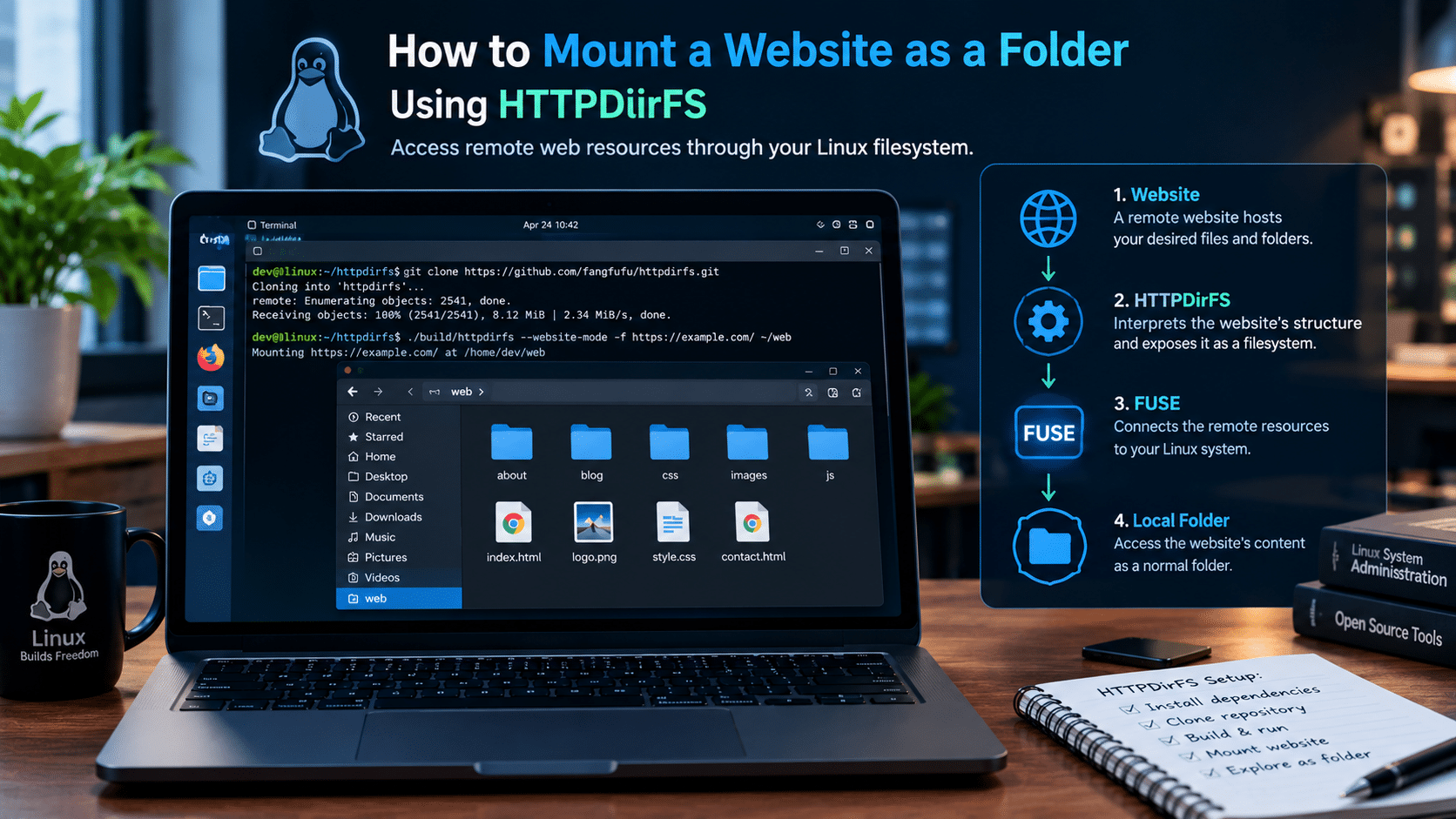
If you want to try HTTPDirFS, begin with a compatible Linux environment and a test website you are authorized to access.
The following example uses a development build on Debian- or Ubuntu-based Linux. Check the project’s current installation instructions before running the commands, as dependencies and build requirements can change.
Step 1: Install the development dependencies
Update your package lists:
sudo apt update
Install the tools and libraries used by the documented build process:
sudo apt install git build-essential meson ninja-build \
  libfuse3-dev libcurl4-openssl-dev libgumbo-dev
If a package is unavailable or the build reports a missing dependency, consult your distribution’s package documentation and the project’s README.
Step 2: Download the source code
Clone the official repository:
git clone https://github.com/fangfufu/httpdirfs.git
Enter the source directory:
cd httpdirfs
Step 3: Configure and compile the program
Configure the build:
meson setup build
Compile the program:
meson compile -C build
If both commands complete successfully, the executable should be available at:
build/httpdirfs
Step 4: Check the available options
Run:
./build/httpdirfs --help
Look for the options supported by your installed version, including --website-mode if you intend to browse HTML pages as directories.
You can also consult the official HTTPDirFS repository for usage instructions and updates.
Step 5: Create a mount point
Create a directory in your home folder:
mkdir -p "$HOME/httpdirfs-test"
This directory will be the entry point for the mounted resources.
Step 6: Mount a compatible website
For a website-oriented experiment, you can use:
./build/httpdirfs --website-mode -f \
  https://books.toscrape.com/ "$HOME/httpdirfs-test"
This example uses Books to Scrape, a sample website used to demonstrate the behavior of HTTPDirFS website mode.
The command includes:
--website-modeto enable website-oriented resource handling.-fto keep the process in the foreground.- The website URL as the remote resource.
- The directory in your home folder as the mount point.
Keep the terminal open while testing the mount.
Note: The command assumes your build supports website mode and that your environment permits FUSE mounting. Actual results depend on the site’s structure and HTTP responses.
Step 7: Browse the mounted resources
Open your file manager and navigate to:
~/httpdirfs-test
If the mount succeeds, inspect the resources that HTTPDirFS exposes.
Depending on the website, you may find HTML pages represented as directories alongside linked images and other assets.
Try opening a few resources to confirm that the behavior matches your expectations.
Step 8: Unmount when finished
If HTTPDirFS is running in the foreground, press:
Ctrl+C
The mount should be released when the process exits normally.
If it remains mounted, consult the project’s documentation and your Linux distribution’s FUSE instructions.
HTTPDirFS vs. Rclone vs. Traditional Downloads
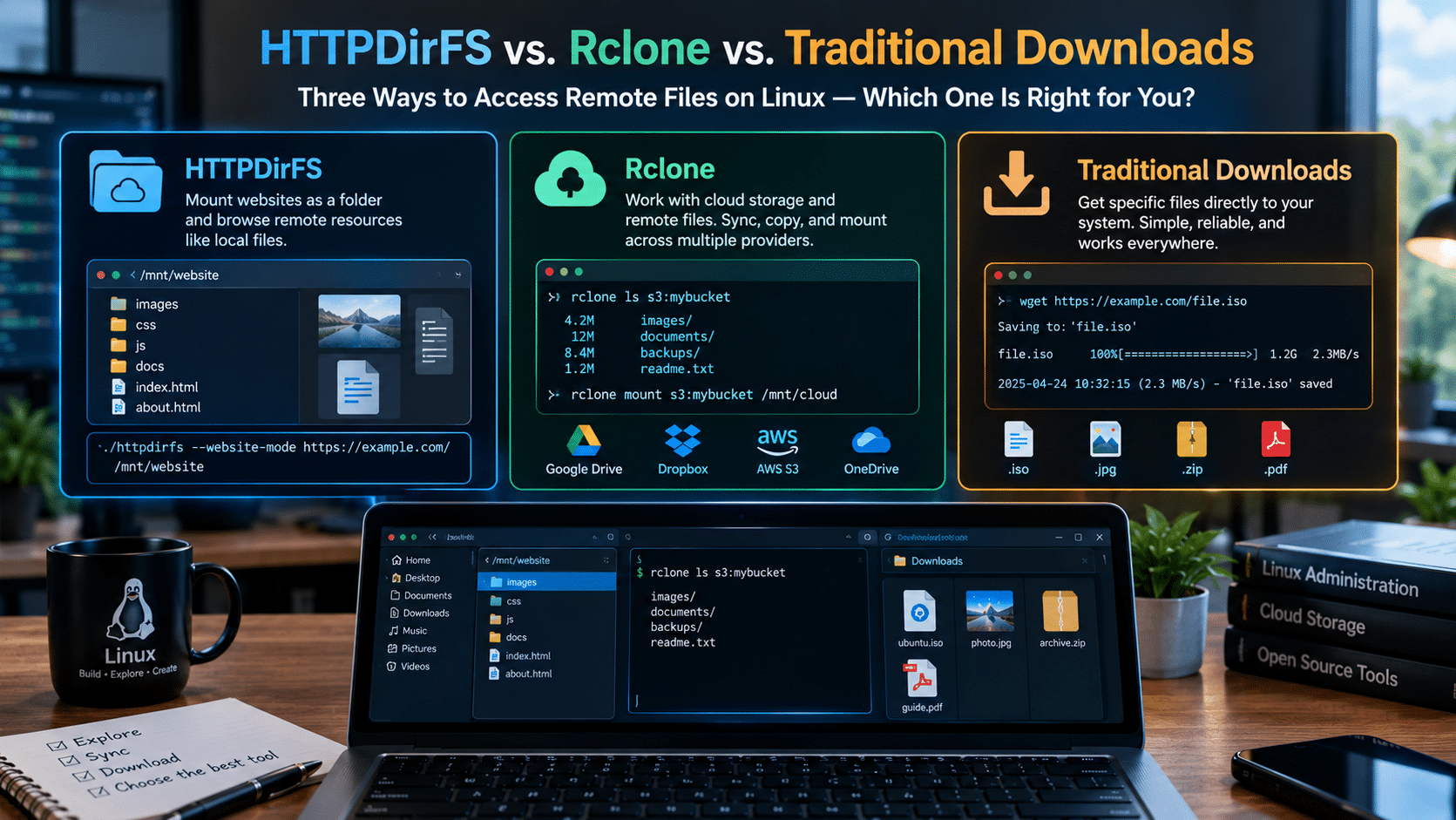
HTTPDirFS is not the only tool that connects remote resources to Linux workflows.
Rclone supports a wide range of cloud storage services and provides commands for copying, synchronizing, and mounting remote files.
Traditional download utilities remain useful for retrieving specific resources directly.
Understanding the differences helps you choose the appropriate solution.
| Capability | HTTPDirFS | Rclone | curl / wget |
|---|---|---|---|
| Main purpose | Mount supported HTTP resources as a filesystem | Manage remote storage and transfer files | Retrieve remote resources |
| Filesystem mounting | Yes, through FUSE | Yes, for supported backends | No built-in filesystem mount |
| Cloud storage support | Not its primary purpose | Broad backend support | Depends on the remote protocol and configuration |
| Website-oriented browsing | Supported in compatible configurations | HTTP backend can access compatible web servers | Requires direct requests or additional scripting |
| File synchronization | Not its main purpose | Supports synchronization workflows | Requires additional scripting or tools |
| Single-file retrieval | Possible, but may be unnecessary | Supported through transfer commands | Straightforward |
| Best suited for | Exploring supported remote resources as filesystem paths | Remote storage management | Direct file downloads |
Rclone documents its HTTP backend separately from its broader remote-storage capabilities. The right choice depends on the type of server and the task you need to perform.
Which tool should you choose?
Choose HTTPDirFS when you want to browse supported HTTP resources through filesystem paths.
Choose Rclone when you need to manage supported cloud storage, copy files between remotes, or build synchronization workflows.
Choose curl or wget when you know which files you want to retrieve and prefer a direct download.
These tools can complement one another. You do not need to choose one utility for every networking task.
Can a Linux VPS Make HTTPDirFS Workflows More Useful?
A local Linux computer is sufficient for many HTTPDirFS experiments.
However, if you regularly test open-source tools, run scripts, or maintain development environments, a Linux VPS can provide a dedicated remote workspace.
A Virtual Private Server gives you a virtualized Linux environment in which you can install compatible software, manage files, and run supported applications.
For developers and system administrators, this can make experimentation easier to organize.
Four advantages of using a Linux VPS
1. Separate experiments from your primary computer
You can install dependencies, test command-line utilities, and troubleshoot configurations in a dedicated environment.
This reduces the need to modify your everyday Linux installation.
2. Maintain a consistent development environment
A VPS can provide a persistent place for your scripts, configuration files, and development tools.
You can reconnect to the same environment from different devices using suitable remote-access software.
3. Develop repeatable workflows
If you regularly inspect authorized remote resources, a VPS can host compatible scripts and other server-side tools.
You can build workflows around the tools that best fit the task, whether that involves downloading specific files, processing documents, or mounting supported HTTP resources.
4. Expand your Linux administration skills
A VPS offers a practical environment for learning about Linux packages, permissions, networking, filesystem mounts, and automation.
These skills are useful beyond HTTPDirFS and apply to many development and server-administration tasks.

Why consider 99RDP Linux VPS hosting?
If you need a dedicated environment for Linux experimentation, explore the available 99RDP Linux VPS plans.
A Linux VPS may be useful for:
- Testing open-source utilities.
- Compiling and running Linux applications.
- Practicing server administration.
- Developing compatible automation scripts.
- Maintaining a remote development environment.
Before selecting a plan, check the available CPU, RAM, storage, operating-system options, and bandwidth limits against your actual requirements.
One important technical consideration: HTTPDirFS depends on FUSE. Before using it on a VPS, confirm that your hosting configuration permits the necessary filesystem operations. Do not assume every virtualized environment supports every mounting feature.
For a simple test, your local Linux machine may be all you need. A VPS becomes more attractive when you need a persistent remote environment for several related projects.
Performance: Which Approach Is Faster?
The performance comparison between HTTPDirFS and traditional downloads depends on the workload.
Neither approach is universally faster.
Several factors determine the result.
Network latency
HTTPDirFS accesses remote resources over the network. Opening a resource may involve additional requests, depending on the server, the cache, and the requested data.
A direct download also depends on the network, but once the file is downloaded, subsequent access occurs locally.
Number of files
If you need one file, a direct download is usually the simplest option.
If you want to explore a large collection and access only a few items, a filesystem mount may avoid retrieving unnecessary files.
However, browsing remote directories can generate many requests, particularly when a file manager inspects directory contents.
Cache behavior
HTTPDirFS supports caching accessed file segments. Reusing valid cached segments can reduce repeated network transfers.
The actual benefit depends on which resources you revisit and whether their remote metadata allows the cache to remain valid.
Server response time
A slow remote server can affect both browsing and downloading.
HTTPDirFS may feel less responsive when directory listings are large or remote resources take a long time to load.
A traditional download may be more predictable if you can retrieve the required files in advance.
Storage and bandwidth
Mounting can reduce unnecessary downloads, but it does not guarantee lower total network usage.
If you eventually access every file, the amount of transferred data may approach what you would have downloaded directly.
Likewise, a cache consumes storage as you access remote content.
How to evaluate performance
Rather than relying on broad claims, test the approaches using the same remote collection.
Record:
- Time required to locate a file.
- Time required to open or retrieve it.
- Total data transferred.
- Local storage consumed.
- Number of failed requests.
- Performance when revisiting previously accessed resources.
This simple comparison can reveal which approach works best for your environment.
Security and Reliability: What You Should Know
Filesystem-based access can be convenient, but it does not eliminate the security considerations associated with remote content.
Follow these practices when experimenting with HTTPDirFS.
Use trusted sources
A remote file does not become safe because it appears in a mounted directory.
Treat unknown executables, scripts, archives, and documents with appropriate caution.
Respect website policies
Access only resources you are authorized to use. Follow applicable copyright requirements, terms of service, and server access policies.
Avoid sending excessive requests to remote servers.
Protect credentials
If your workflow requires authentication, avoid exposing passwords or tokens in shell history, scripts, or publicly accessible configuration files.
Use the authentication mechanisms supported by your installed version and protect any files containing credentials.
Plan for network interruptions
A mounted remote filesystem depends on remote availability for uncached content.
If the server becomes unavailable, resources that are not available locally may stop working.
For critical files, maintain a verified local copy or another suitable backup.
Keep your software and cache configuration current
Review the project’s documentation when upgrading HTTPDirFS.
Cache behavior and compatibility can change between versions. Follow the upgrade instructions for your installed release, especially if you rely on cached resources.
Avoid treating a mount as a backup
A mounted website is not the same as a verified backup.
If you need to preserve important documents, download them, verify their integrity, and store them in an appropriate backup location.
A Practical Decision Guide: Which Approach Is Right for You?
The easiest way to choose between HTTPDirFS and traditional downloads is to begin with your actual objective.
Use this guide as a starting point.
| Your requirement | Recommended approach | Why |
|---|---|---|
| Download one document | curl or wget |
Simple and direct |
| Browse a compatible remote directory | HTTPDirFS | Exposes supported resources through filesystem paths |
| Inspect linked images before downloading them | HTTPDirFS website mode, when compatible | Allows filesystem-oriented exploration |
| Keep files available offline | Traditional downloads | Saves complete files locally |
| Create a local website archive | A suitable mirroring tool | Designed for retrieving website content |
| Manage cloud storage | Rclone | Supports many remote-storage workflows |
| Extract structured information from a complex website | An appropriate parser or scraping framework | Provides more control over data extraction |
| Maintain a remote Linux development environment | A suitable Linux VPS | Provides a persistent workspace for compatible tools |
Three questions to ask before choosing
Question 1: Do I need the entire file or just access to it?
If you need a permanent local copy, download it.
If you only want to browse supported resources, HTTPDirFS may be more convenient.
Question 2: Will I need the resources offline?
If the answer is yes, download and verify the files you need.
Do not rely on a filesystem cache as your only copy.
Question 3: Will I repeat this task regularly?
For occasional one-file downloads, a simple command is sufficient.
For recurring work involving remote directories, a mounted filesystem or automated workflow may save time.
Answering these questions before choosing a tool can prevent unnecessary configuration and improve reliability.
The Future of Flexible File Access on Linux
HTTPDirFS illustrates an important characteristic of the Linux ecosystem: users can combine specialized utilities to change how they interact with remote resources.
A conventional browser presents information as webpages. A download utility retrieves individual files. A filesystem mount exposes supported resources through paths that other applications can use.
Each approach has its own strengths.
The larger lesson is that the most efficient workflow often comes from matching the right abstraction to the task.
When you need a complete local copy, downloading remains practical. When you need to explore compatible remote resources, filesystem-based access can provide a useful alternative. When you need synchronization or cloud-storage integration, a dedicated remote-storage utility may be the better fit.
HTTPDirFS does not eliminate the need for these other tools. It adds another option to the Linux toolkit.
For developers who want to experiment with these approaches, a dedicated Linux environment can make it easier to test different configurations and build repeatable workflows.
A Linux VPS from 99RDP is worth considering if your work extends beyond occasional desktop experiments into ongoing development, server administration, or compatible automation tasks.
Start with the simplest tool that solves your problem, measure the results, and introduce additional infrastructure only when it provides a clear benefit.
Frequently Asked Questions
1. What is HTTPDirFS in Linux?
HTTPDirFS is an open-source FUSE filesystem that exposes supported HTTP resources through a mounted directory. It supports compatible directory listings, single-file mode, caching, and other features documented by the project.
2. Is HTTPDirFS better than downloading files?
It depends on the task. HTTPDirFS can be convenient for browsing supported remote collections without downloading everything first. Traditional downloads are usually better when you need a complete local file, offline access, or a permanent archive.
3. Can HTTPDirFS mount any website?
Not in the sense of reproducing every website completely. Its behavior depends on the server’s responses, the resources it can discover, and the capabilities of the installed version. Websites that rely heavily on JavaScript or complex authentication may not work as expected.
4. Does HTTPDirFS download files to my computer?
HTTPDirFS retrieves remote data as needed and supports caching accessed file segments. The amount of local storage used depends on the resources you access and your configuration. It does not guarantee a complete offline copy of the website.
5. Can I use HTTPDirFS on a Linux VPS?
Potentially, yes, provided the VPS environment supports the necessary FUSE operations and your installed HTTPDirFS version supports the intended workflow. Check the hosting configuration before relying on filesystem mounting.
6. Is HTTPDirFS a replacement for Rclone?
No. HTTPDirFS focuses on mounting supported HTTP resources. Rclone provides broader remote-storage management, including file transfers, synchronization, and mounting supported storage backends.
7. Is HTTPDirFS suitable for beginners?
Beginners can experiment with it, but compiling software, configuring FUSE, and troubleshooting network-dependent mounts may require some Linux command-line experience. Starting with a test website and following the official documentation makes the process easier.
Final Verdict: Browse Smarter, Download When Necessary
HTTPDirFS offers a useful alternative to traditional downloads when you want to explore supported remote resources through a Linux filesystem.
Its main advantage is convenience: you can browse compatible collections, access selected resources, and potentially reuse cached data without first downloading an entire directory.
Traditional downloads remain essential for offline access, permanent storage, verification, and predictable data processing.
The smartest approach is not to abandon downloads. It is to recognize when mounting remote resources provides a better fit.
Use HTTPDirFS to explore, download files when you need local copies, and choose dedicated tools for mirroring or synchronization.
If you want a dedicated environment to test these Linux workflows, develop scripts, or practice server administration, explore 99RDP’s Linux VPS hosting and select a configuration that fits your technical requirements.
Linux gives you the flexibility to build your own workflow. HTTPDirFS is one more tool that helps put that flexibility into practice.
EXPLORE MORE ; Linux “Everything Is a File”

READ OUR BLOGS


