
Raspberry Pi 5 Meets GMSL2: A New Era for Robotics and Computer Vision

The Raspberry Pi 5 has become considerably more capable than the compact single-board computers that first made the Raspberry Pi name famous. Its stronger CPU, improved I/O, PCIe connectivity, and increasingly broad ecosystem have made it attractive for robotics, edge computing, automation, and computer-vision projects.
Now, a new dual-GMSL2 camera solution adds another important capability to the platform.
The BE-IIS-GMSL2-2CAM HAT brings two GMSL2 camera interfaces to the Raspberry Pi 5 using the Analog Devices MAX96716A deserializer. The manufacturer has demonstrated the platform with two 12-megapixel Sony IMX708 cameras, including operation over 10-meter coaxial connections.
That combination matters because camera placement often becomes a limiting factor in robotics and machine-vision systems. A camera cannot always sit directly next to the computer processing its images. Robots, vehicles, industrial machines, and inspection systems frequently need cameras positioned several meters away from the main computing unit.
GMSL2 provides a practical way to address that problem.
Instead of treating the Raspberry Pi 5 simply as a desktop-sized computer with a camera attached, developers can use it as an edge-vision controller connected to remote cameras.
What Is GMSL2?
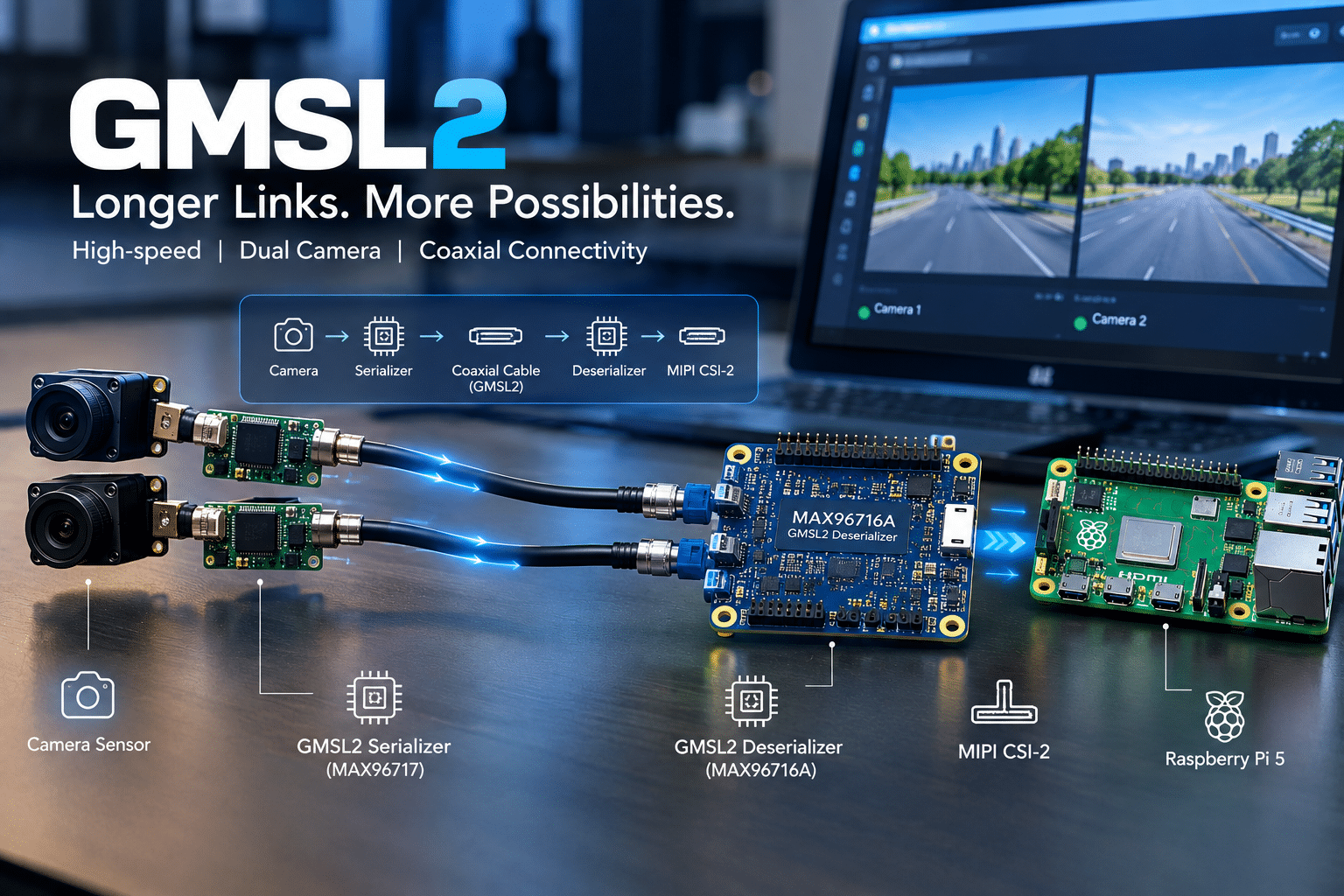
GMSL2, or Gigabit Multimedia Serial Link 2, is a high-speed serial communication technology designed to transport data between cameras and processing systems over longer physical connections.
It is particularly relevant to automotive and embedded vision applications, where cameras may sit away from the main processing computer.
A conventional Raspberry Pi camera setup generally works best when the camera and Raspberry Pi remain physically close. GMSL2 changes the architecture.
The basic signal path looks like this:
Camera sensor → GMSL2 serializer → coaxial cable → GMSL2 deserializer → MIPI CSI-2 → Raspberry Pi 5
The camera-side serializer converts the camera’s data into a GMSL2 stream. The coaxial cable carries that stream to the Raspberry Pi. At the Raspberry Pi side, the deserializer converts the incoming data into a format that can enter the board through its MIPI CSI-2 camera interfaces.
This approach makes much longer camera connections practical.
The New Dual-GMSL2 HAT Explained
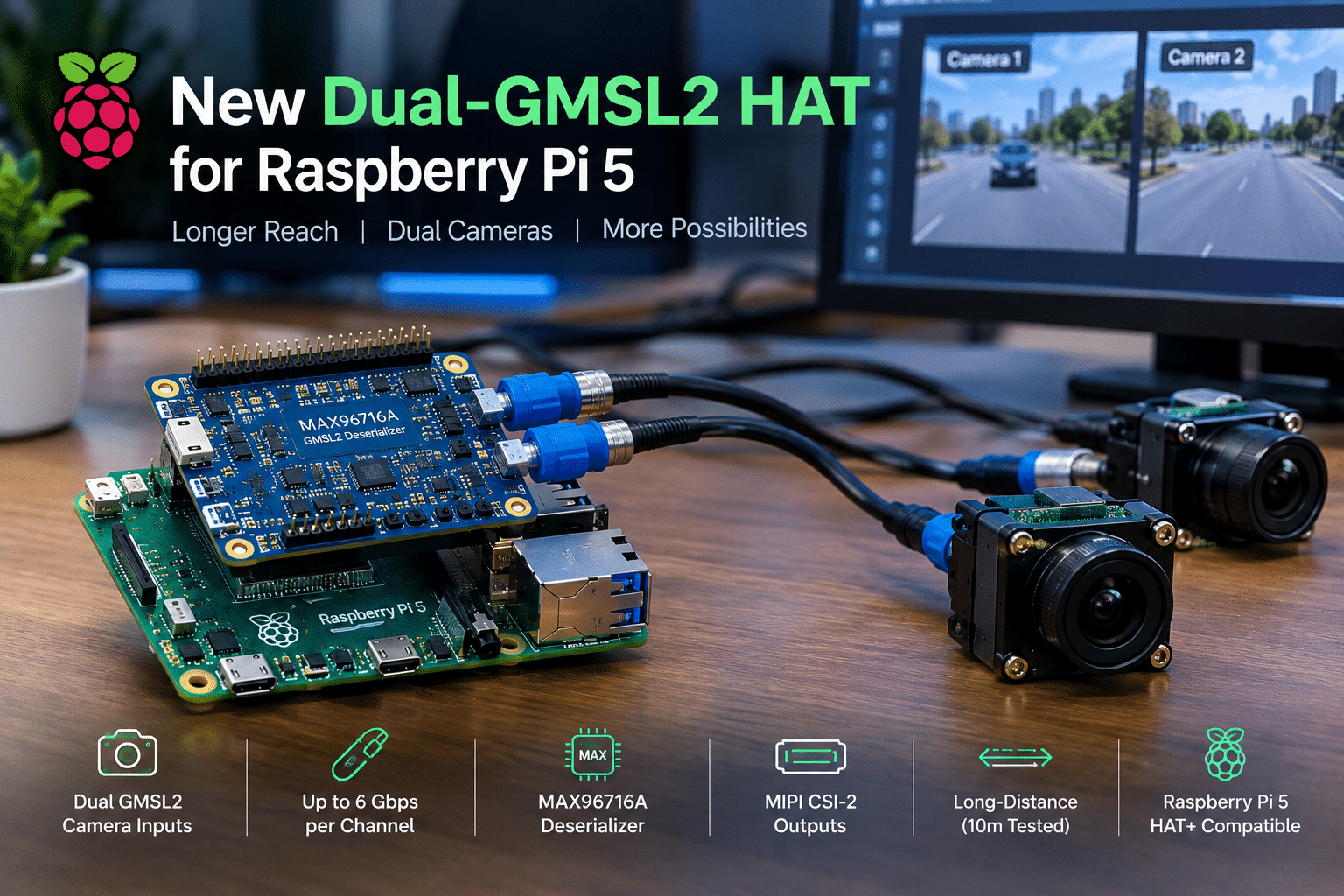
The BE-IIS-GMSL2-2CAM is designed specifically to connect two GMSL2 camera streams to a Raspberry Pi 5.
Its central component is the MAX96716A, a GMSL2 deserializer from Analog Devices.
The board provides:
- Two GMSL2 camera inputs
- Two MIPI CSI-2 outputs
- A MAX96716A GMSL2 deserializer
- Two FAKRA coaxial connectors
- Raspberry Pi HAT+ compatibility
- A 40-pin GPIO interface
- USB-C power input
- GPIO power input
- Multiple camera-power options
- Linux support for Raspberry Pi OS
According to the manufacturer’s specifications, each GMSL2 channel supports data rates of up to 6 Gbps.
That makes the HAT particularly interesting for developers working with high-resolution camera streams.
Two Cameras From One Raspberry Pi 5
One of the most important features is the ability to connect two GMSL2 cameras through a single HAT.
That opens the door to applications that depend on multiple viewpoints.
For example, a robotics platform could use one camera facing forward and another facing sideways. A stereo-vision system could position two cameras next to each other to estimate depth. An industrial inspection system could observe two different sections of a production line.
The Raspberry Pi 5 then acts as the central processing platform.
This is much more flexible than designing a system around a single short camera cable.
10-Meter Camera Connections Demonstrate the Advantage
One of the most significant demonstrations involves the physical distance between the cameras and Raspberry Pi.
BE-IIS has tested the system using camera connections extending to 10 meters.
That distance is important because it changes where developers can place their cameras.
A Raspberry Pi does not necessarily need to sit directly beside the sensor.
Instead, engineers can place the camera:
- On a robot arm
- At the front of a mobile robot
- Above an inspection line
- On a vehicle
- At a remote observation point
- Inside an industrial enclosure
while keeping the Raspberry Pi 5 in a more convenient or protected location.
The actual usable distance and reliability will depend on the complete GMSL2 implementation, cabling, camera hardware, serializer, environment, and application.
Nevertheless, the 10-meter demonstration provides a useful indication of the platform’s potential.
Sony IMX708 Cameras Make the Demonstration Especially Interesting
The system has been demonstrated using two Sony IMX708 12MP camera sensors.
The IMX708 is already familiar to Raspberry Pi users because it forms the basis of Raspberry Pi Camera Module 3.
That makes the demonstration particularly relevant to developers who already understand the Raspberry Pi camera ecosystem.
The reported test configuration used:
- Two IMX708 cameras
- 12MP sensors
- 2304 × 1296 resolution
- RAW10 pixel format
- Two CSI-2 lanes per camera
- 10-meter coaxial connections
This configuration demonstrates that the GMSL2 architecture can transport substantial camera data between remote sensors and a Raspberry Pi 5.
Why RAW10 Matters
The use of RAW10 is significant for computer-vision applications.
RAW image data gives image-processing software access to sensor data before many of the transformations applied to conventional finished images.
That can be useful for applications involving:
- Computer vision
- Machine learning
- Object detection
- Stereo matching
- Image analysis
- Scientific imaging
- Industrial inspection
Developers can build their own processing pipelines around the incoming sensor information.
However, RAW data also places additional demands on the processing pipeline. Capturing an image is only the first step. Software still needs to process, transform, analyze, compress, store, or transmit the resulting data.
Why Dual Cameras Matter for Robotics
Robotics represents one of the clearest use cases for this technology.
A robot often needs to understand its surroundings.
A single camera can provide valuable visual information, but two cameras can provide additional spatial information.
Stereo vision
Two cameras separated by a known baseline can observe the same scene from slightly different perspectives.
Software can compare the two images to estimate depth.
That can support:
- Obstacle detection
- Navigation
- Object positioning
- 3D reconstruction
- Distance estimation
The GMSL2 HAT provides a convenient physical interface for bringing two remote camera feeds into a Raspberry Pi 5.
Mobile robotics
Consider a mobile robot with cameras mounted at the front.
The cameras could sit several meters of cable away from the central processing board.
The robot can therefore keep the Raspberry Pi and other electronics inside a protected enclosure while routing camera cables toward the sensor positions.
Robotic arms
Robotic arms can also benefit.
A camera mounted above or near a work area does not necessarily need the computing hardware located beside it.
The camera can remain at the required viewing position while the Raspberry Pi performs the processing elsewhere.
Industrial Computer Vision Could Be Another Major Application
Industrial inspection systems frequently depend on cameras.
Manufacturers use vision systems to inspect:
- Products
- Components
- Labels
- Packaging
- Assembly operations
- Defects
- Dimensions
- Machine states
The camera needs to occupy the correct physical position, which may be several meters from the computer.
GMSL2 helps solve that physical-layout challenge.
A Raspberry Pi 5 could process camera streams at the edge while the cameras remain positioned exactly where the inspection process requires them.
This approach could make experimentation more accessible for smaller engineering teams and research projects.
GMSL2 Is Particularly Useful When Camera Placement Matters
The biggest advantage isn’t necessarily resolution.
It is flexibility.
A camera interface becomes much more useful when engineers can separate the camera from the processor without making the connection impractical.
That changes the design possibilities for:
- Factory automation
- Autonomous machines
- Robotics
- Smart infrastructure
- Agricultural machines
- Vehicle prototypes
- Security research
- Remote monitoring
- Laboratory equipment
Understanding the MAX96716A
The MAX96716A is the critical bridge between the GMSL2 camera connections and the Raspberry Pi’s CSI-2 interfaces.
It acts as a deserializer.
The camera-side hardware first serializes the image data. The signal then travels through the GMSL2 connection.
The MAX96716A receives that serialized stream and makes it available to the host system through MIPI CSI-2.
This architecture lets the Raspberry Pi 5 work with remote cameras without requiring the Raspberry Pi itself to sit next to every sensor.
The Camera Also Needs a Serializer
There is an important part of the system that new users should understand.
The HAT does not make an ordinary camera automatically compatible with GMSL2.
The camera side needs a compatible serializer.
BE-IIS provides a corresponding GMSL2 serializer board based on the MAX96717.
The complete system therefore consists of both sides:
Camera + MAX96717 serializer → GMSL2 coax → MAX96716A deserializer → Raspberry Pi 5
For a dual-camera installation, developers need the appropriate hardware for both cameras.
That increases the system’s total cost, but it also provides considerably more flexibility than a conventional short camera connection.
Linux Support Makes the Hardware Easier to Experiment With
Hardware is only useful when developers can actually control it.
The BE-IIS platform has been designed to work with the Raspberry Pi OS Linux environment.
According to the published information, users can install the necessary drivers through a Bash script without rebuilding the entire Raspberry Pi kernel.
The system can then be accessed through the Raspberry Pi camera software ecosystem.
This matters because developers can concentrate on their applications rather than building an entirely new embedded Linux distribution just to test the camera interface.
The Linux environment also makes it easier to integrate:
- Python
- C/C++
- OpenCV
- AI frameworks
- Web services
- Databases
- Automation scripts
- Monitoring software
That software flexibility is one of the Raspberry Pi ecosystem’s biggest advantages.
Raspberry Pi 5 Is Becoming an Edge-AI Platform
The combination of Raspberry Pi 5 and GMSL2 also reflects a broader trend.
Edge computing is moving intelligence closer to the sensors.
Instead of sending every raw camera frame to a remote server, developers can process information locally.
A Raspberry Pi 5 can potentially:
- Receive camera data.
- Process frames locally.
- Run computer-vision algorithms.
- Detect objects.
- Extract useful metadata.
- Send selected information to a remote server.
This approach can reduce bandwidth requirements and potentially lower response times for applications that need local decisions.
For example, instead of continuously uploading raw video, a robotics system might send only:
- Object detections
- Coordinates
- Alerts
- Selected images
- Event metadata
- Compressed video clips
to a remote application.
Where 99RDP Fits Into the Picture
The Raspberry Pi 5 can handle the edge side of the system, but developers often need additional computing infrastructure.
This is where a Linux VPS can complement the hardware.
99RDP’s Linux VPS service provides a remote Linux environment that can be used for development, application hosting, APIs, dashboards, databases, automation, and other server-side workloads.
Rather than forcing the Raspberry Pi to perform every task, developers can divide workloads between the edge device and remote infrastructure.
A possible architecture could look like this:
GMSL2 Cameras
↓
Raspberry Pi 5
↓
Local Computer Vision / AI Processing
↓
Internet or Private Network
↓
99RDP Linux VPS
↓
API / Dashboard / Database / Monitoring
This architecture gives each component a clear responsibility.
The Raspberry Pi handles the physical camera pipeline.
The VPS handles supporting services that do not need to run directly beside the camera.
Why This Separation Can Be Useful
Suppose a developer builds a robotic inspection system.
The Raspberry Pi could handle:
- Camera capture
- Image preprocessing
- Object detection
- Sensor integration
- Robot control
Meanwhile, a remote VPS could host:
- A monitoring dashboard
- An API
- Historical inspection data
- User authentication
- Device-management software
- Development services
This division can simplify the overall system.
99RDP’s Linux VPS offering provides different configurations, giving developers the option to select resources based on their application requirements.
The company also advertises features such as root access, SSD storage, dedicated IP addresses, multiple server locations, and 24/7 support on its Linux VPS service.
Developers should select resources according to actual CPU, memory, storage, bandwidth, and workload requirements rather than assuming every vision workload belongs on a VPS.

A Practical Raspberry Pi 5 + 99RDP Workflow
A real-world development workflow could follow several stages.
Step 1: Connect the cameras
Connect two compatible GMSL2 cameras to the camera-side serializers.
Step 2: Run coaxial connections
Connect the serializers to the BE-IIS HAT using suitable GMSL2 coaxial cables.
Step 3: Install the Raspberry Pi software
Configure Raspberry Pi OS and install the required camera drivers and software.
Step 4: Validate both cameras
Use Raspberry Pi camera tools to confirm that the two camera streams are working correctly.
Step 5: Build the vision application
Use tools such as OpenCV or an appropriate AI framework to process the images.
Step 6: Optimize edge processing
Keep time-sensitive operations close to the camera.
Step 7: Send useful results remotely
Transmit selected images, metadata, events, or application results to a remote server.
Step 8: Host supporting services
Use a Linux VPS such as a 99RDP environment for APIs, dashboards, databases, or monitoring.
This architecture can provide a practical separation between hardware experimentation and server-side development.
GMSL2 vs Traditional Raspberry Pi Camera Connections

The technology isn’t necessarily a replacement for ordinary Raspberry Pi camera modules.
Instead, it serves a different purpose.
| Feature | Traditional CSI Camera | GMSL2 Camera Architecture |
|---|---|---|
| Short-distance connection | Excellent | Excellent |
| Long-distance camera placement | Limited | Designed for it |
| Multi-camera applications | Possible | Strong use case |
| Coaxial connectivity | No | Yes |
| Remote camera positioning | More difficult | More practical |
| Hardware complexity | Lower | Higher |
| Cost | Generally lower | Generally higher |
| Industrial applications | Possible | Particularly relevant |
| Automotive-style applications | Limited | Stronger fit |
For a simple camera project, a conventional Raspberry Pi camera remains easier.
For a multi-camera system where physical distance matters, GMSL2 becomes much more interesting.
What Developers Should Watch Before Building a System
The new HAT provides exciting possibilities, but developers should evaluate the complete system carefully.
Camera compatibility
Not every CSI camera automatically works with a GMSL2 serializer.
Verify compatibility before purchasing hardware.
Driver support
Camera sensors, serializers, deserializers, and Linux drivers must work together.
Check the manufacturer’s current software documentation.
Cable quality
GMSL2 depends on suitable high-speed coaxial connections.
Cable selection and physical installation matter.
Processing performance
Two cameras can generate a substantial amount of data.
A Raspberry Pi 5 may need careful optimization when running high-resolution capture and computer-vision algorithms simultaneously.
AI workloads
Object detection, segmentation, stereo depth, and other AI workloads can be computationally demanding.
Developers should benchmark their actual models instead of relying solely on theoretical hardware specifications.
Network design
If the Raspberry Pi sends processed information to a VPS, network reliability becomes another part of the system.
The best design generally keeps latency-sensitive operations local and moves non-critical services to the remote infrastructure.
The Cost Question
GMSL2 hardware sits in a different category from basic Raspberry Pi camera accessories.
CNX Software reports pricing of approximately $229 for the BE-IIS-GMSL2-2CAM through Tindie, while a Lectronz configuration was reported at approximately $300, before applicable taxes.
The camera-side serializer boards add additional cost, reported at approximately $79 each through Tindie or around $100 each through Lectronz.
Developers also need to account for:
- Raspberry Pi 5
- Camera sensors
- Serializer boards
- Coaxial cables
- Storage
- Power supplies
- Enclosures
- Cooling
- Optional networking equipment
Therefore, this solution targets specialized development rather than the lowest-cost Raspberry Pi camera projects.
Why This Development Matters
The significance of the BE-IIS HAT extends beyond a single accessory.
It demonstrates how the Raspberry Pi 5 can connect with technologies associated with professional embedded vision.
That creates a bridge between the Raspberry Pi ecosystem and more advanced camera architectures.
For students and hobbyists, it provides a way to experiment with long-distance multi-camera systems.
For researchers, it can provide a compact platform for computer-vision experiments.
For engineers, it can accelerate prototyping before moving a design toward more specialized hardware.
For robotics developers, it provides greater freedom over camera placement.
The Future of Raspberry Pi Computer Vision
Computer vision is becoming increasingly important across robotics, automation, manufacturing, transportation, agriculture, and smart infrastructure.
The computing hardware is only one piece of that ecosystem.
Camera connectivity matters just as much.
A powerful processor cannot compensate for a camera architecture that cannot reach the required physical location.
That is why GMSL2 is so relevant.
It addresses the physical relationship between sensor and processor.
The Raspberry Pi 5 provides the processing platform.
The GMSL2 HAT provides the long-distance camera interface.
Linux provides the software foundation.
And remote infrastructure such as a 99RDP Linux VPS can provide additional services around the edge device.
Together, these components create a modular architecture for modern computer-vision systems.

Final Verdict
The Raspberry Pi 5 Meets GMSL2 story is ultimately about more than adding another camera accessory.
The BE-IIS dual-GMSL2 HAT gives developers a way to connect two remote cameras to the Raspberry Pi 5 through a MAX96716A-based interface, with the manufacturer demonstrating 10-meter coaxial connections and dual Sony IMX708 cameras operating at 2304 × 1296 RAW10.
That combination makes the platform particularly interesting for robotics, stereo vision, industrial inspection, autonomous systems, and other applications where camera placement matters.
The architecture also highlights an important direction in edge computing: putting cameras and immediate processing close to the physical environment while moving supporting infrastructure to remote Linux systems.
A Raspberry Pi 5 can therefore become the visual intelligence layer, while a service such as 99RDP’s Linux VPS can provide a separate environment for APIs, dashboards, databases, monitoring, development, and other server-side workloads.
As Raspberry Pi continues to move into more sophisticated embedded applications, interfaces such as GMSL2 could help close the gap between inexpensive development boards and specialized multi-camera platforms.
For developers building the next generation of robotic and computer-vision systems, that is a significant step forward.
EXPLORE MORE ; Alpine Linux vs Tiny Core
READ OUR BLOGS


