RAID (Redundant Array of Independent Disks) combines several physical drives into one logical volume to make storage faster, more reliable, or both. Choosing the right RAID level matters when you buy a dedicated server or build a NAS: it decides how much usable space you get, how fast reads and writes are, and how many drives can fail before you lose data. This guide explains RAID 0, 1, 5, 6 and 10 with their advantages, disadvantages and best uses, compares them side by side, and covers hardware vs software RAID.
Quick answer RAID 0 stripes data for speed with no protection. RAID 1 mirrors two drives for simple redundancy. RAID 5 uses one drive's worth of parity and survives one drive failure. RAID 6 uses two drives of parity and survives two failures. RAID 10 mirrors and stripes for both speed and redundancy. For most servers with databases or virtual machines, RAID 10 (or RAID 1 with two drives) is the safest fast choice. RAID is not a backup.
What does RAID stand for and why use it?
RAID stands for Redundant Array of Independent (originally "Inexpensive") Disks. It is used to:
- Keep a server running when a drive fails (redundancy).
- Increase read and write speed by spreading data across drives.
- Present several drives as one large volume.
RAID protects against drive failure, not against deletion, ransomware, corruption or the loss of the whole server. Always keep separate backups.
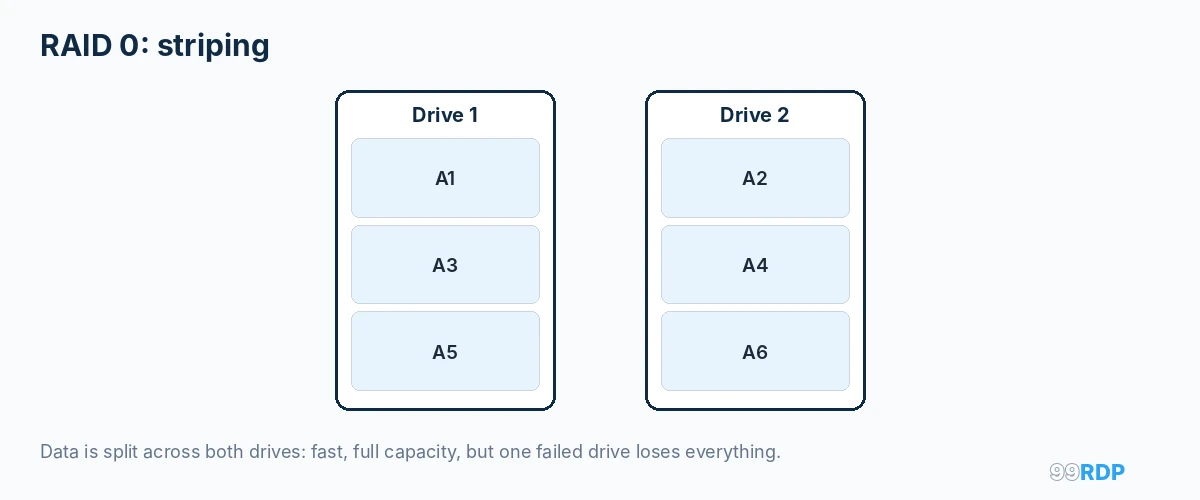
RAID 0: Striping
Data is split into blocks and written across all drives in turn. With two drives, each file is half on one drive and half on the other, so reads and writes can be close to twice as fast.
- Minimum drives: 2. Usable capacity: 100% of all drives.
- Advantages: best performance and full capacity.
- Disadvantages: no redundancy. If any single drive fails, all data on the array is lost, and the risk grows with every drive you add.
- Best for: scratch space, caches, video editing working files and other data you can easily recreate.
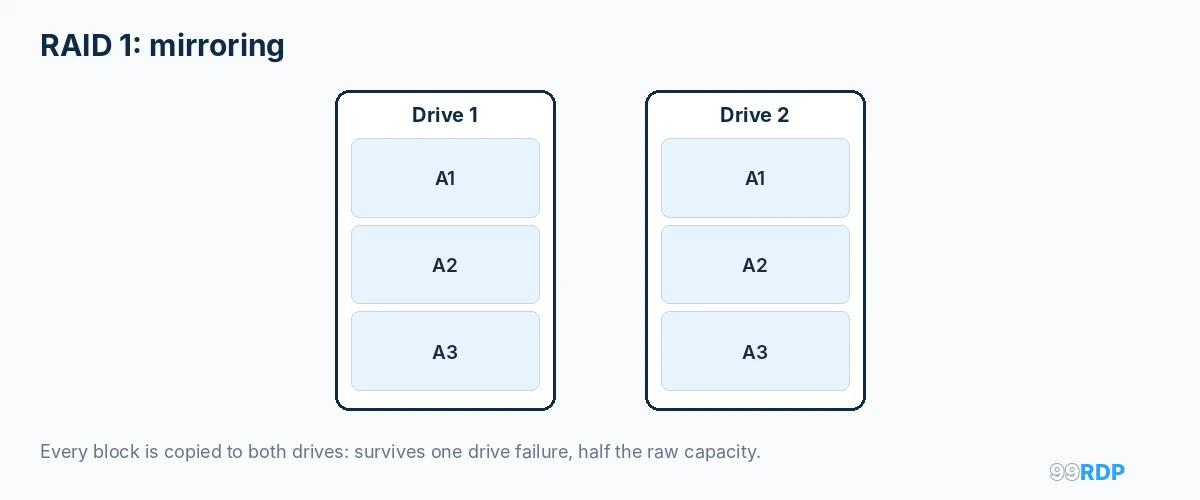
RAID 1: Mirroring
The same data is written to two (or more) drives. Each drive is a complete copy.
- Minimum drives: 2. Usable capacity: 50% with two drives (the size of one drive).
- Advantages: simple and reliable; survives the failure of one drive; reads can be faster because either drive can serve them; rebuilds are quick (a straight copy).
- Disadvantages: half the raw capacity; no write speed gain.
- Best for: operating system drives and small servers with two disks.
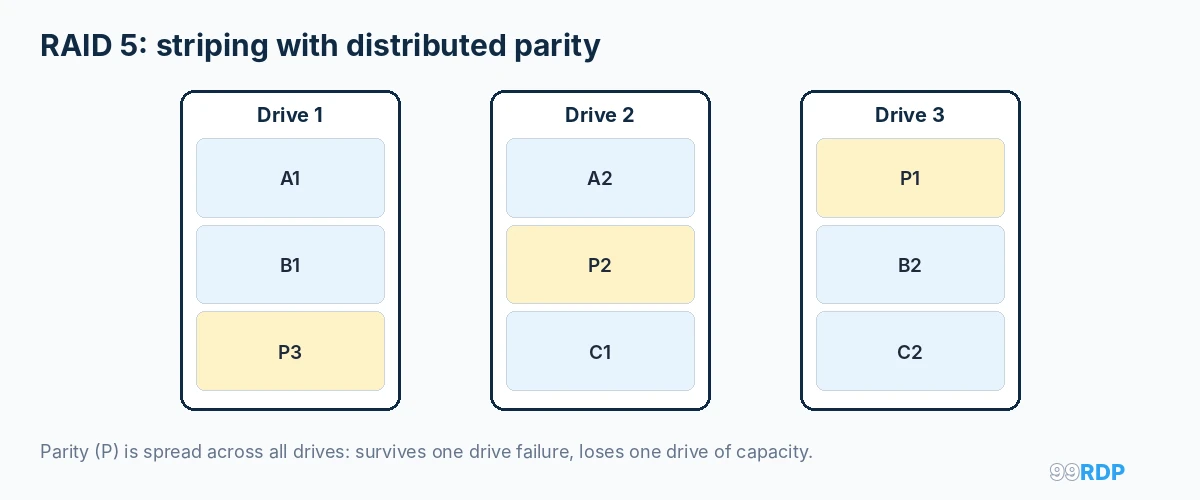
RAID 5: Striping with single parity
Data and parity information are striped across all drives. Parity lets the array rebuild the contents of any one failed drive from the others.
- Minimum drives: 3. Usable capacity: total minus one drive (for example 3 × 4 TB gives 8 TB).
- Advantages: good capacity efficiency and fast reads; survives one drive failure.
- Disadvantages: slower writes, because parity must be calculated and updated. During a rebuild the array is unprotected and every remaining drive is read in full; with today's large drives, a second failure or unreadable sector during that long rebuild can lose the array.
- Best for: read-heavy file storage with smaller drives. For large drives, RAID 6 is usually preferred.
RAID 6: Striping with double parity
Like RAID 5, but with two independent parity blocks, so any two drives can fail at the same time.
- Minimum drives: 4. Usable capacity: total minus two drives.
- Advantages: survives two drive failures, including a second failure during a rebuild; good read performance.
- Disadvantages: slower writes than RAID 5; two drives' worth of space used for parity.
- Best for: large archives, backup targets and NAS systems with big hard drives.
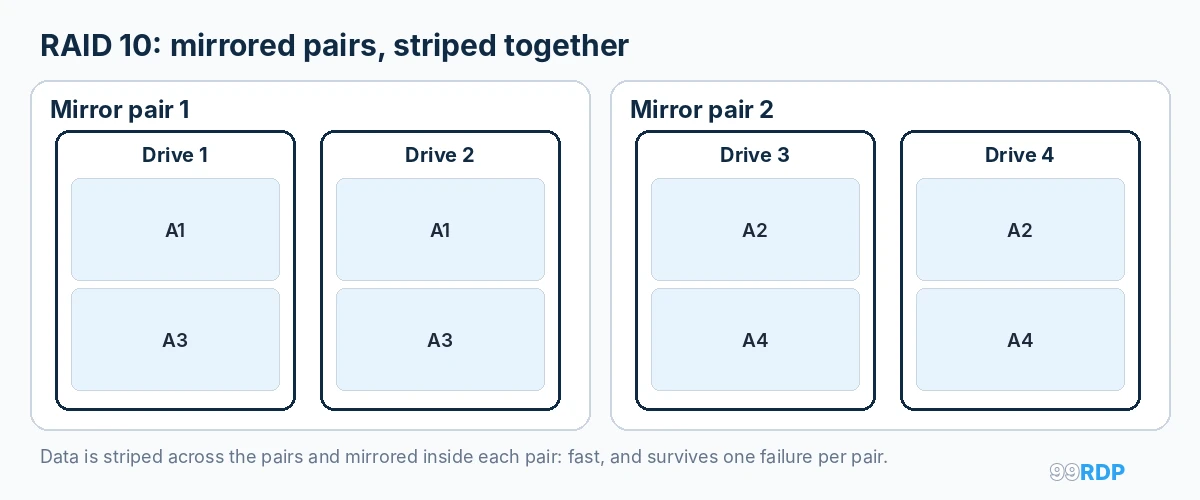
RAID 10 (RAID 1+0): Mirroring and striping
Drives are first paired into mirrors (RAID 1), and the mirrors are then striped (RAID 0).
- Minimum drives: 4. Usable capacity: 50%.
- Advantages: excellent read and write performance with no parity overhead; fast rebuilds; survives one drive failure in each mirror pair (so up to half the drives, if they are in different pairs).
- Disadvantages: only half the raw capacity; losing both drives of the same pair loses the array.
- Best for: databases, virtual machine hosts, busy web servers and anything with lots of random writes.
RAID levels compared
| Level | Min drives | Usable capacity | Drive failures tolerated | Read speed | Write speed |
|---|---|---|---|---|---|
| RAID 0 | 2 | 100% | 0 | Very high | Very high |
| RAID 1 | 2 | 50% | 1 (of 2) | High | Normal |
| RAID 5 | 3 | (n−1)/n | 1 | High | Moderate |
| RAID 6 | 4 | (n−2)/n | 2 | High | Lower |
| RAID 10 | 4 | 50% | 1 per mirror pair | Very high | High |
RAID 0 vs RAID 1
RAID 0 gives you speed and all the space but no protection; RAID 1 gives you protection but half the space and no write speed gain. For anything you care about, RAID 1 is the right one of the two. RAID 10 combines their strengths when you have four or more drives.
Hardware RAID vs software RAID
- Hardware RAID uses a dedicated controller card, often with battery- or flash-backed cache that speeds up writes. The operating system sees one disk. The downside is dependence on that controller model if it fails.
- Software RAID is handled by the operating system:
mdadmon Linux, ZFS (which adds checksums and self-healing), and Storage Spaces on Windows. With modern CPUs it is fast, flexible and not tied to specific hardware. It is the usual choice on Linux servers and for NVMe drives.
Check the state of a Linux software RAID with:
cat /proc/mdstat
sudo mdadm --detail /dev/md0
Choosing a RAID level for a server
- Two drives: RAID 1.
- Four or more drives for databases, VMs or busy sites: RAID 10.
- Many large drives for storage and backups: RAID 6 (or ZFS RAIDZ2).
- Temporary or easily recreated data where speed matters most: RAID 0.
Whatever you choose, monitor drive health (SMART and RAID status alerts), replace failed drives promptly, and keep off-server backups.
Frequently asked questions
What is the best RAID level?
There is no single best. RAID 10 is the best all-round choice for performance and safety; RAID 6 is best for large-capacity storage; RAID 1 is best with only two drives.
Is RAID 0 safe?
No. It has no redundancy, so one failed drive destroys all the data on the array.
Is RAID a backup?
No. RAID keeps a server running when a drive fails, but deleted, corrupted or encrypted files are deleted, corrupted or encrypted on every drive at once.
What is the difference between RAID 1 and RAID 10?
RAID 1 mirrors two drives. RAID 10 stripes across several mirrored pairs, giving more capacity and much higher performance with the same 50% efficiency.