Remote Desktop (RDP) listens on port 3389 by default, over TCP and UDP. This guide shows how to check which port RDP uses on a Windows PC or server, how to test whether the port is reachable from outside, and how to change it safely without locking yourself out. It works on Windows 10, Windows 11 and Windows Server 2016 to 2025.
Quick answer
# check the current RDP port (PowerShell)
Get-ItemProperty 'HKLM:\SYSTEM\CurrentControlSet\Control\Terminal Server\WinStations\RDP-Tcp' -Name PortNumber

# test from another computer
Test-NetConnection your-server-ip -Port 3389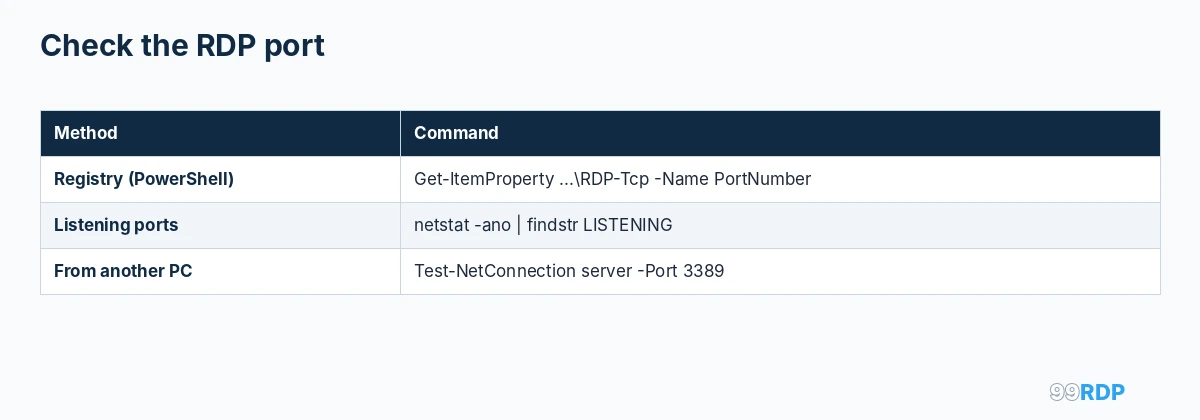
What is the default RDP port?
- TCP 3389: the main RDP connection.
- UDP 3389: used alongside TCP for smoother video and lower latency on modern Windows versions. If UDP is blocked, RDP still works over TCP.
- When you connect through an RD Gateway, the client uses HTTPS on port 443 instead.
How to check the RDP port
In the registry
reg query "HKLM\SYSTEM\CurrentControlSet\Control\Terminal Server\WinStations\RDP-Tcp" /v PortNumberThe value is shown in hexadecimal: 0xd3d is 3389. The PowerShell command in the quick answer shows it in decimal.
See what is listening
netstat -ano | findstr :3389
Get-NetTCPConnection -State Listen | Where-Object OwningProcess -eq (Get-CimInstance Win32_Service -Filter "Name='TermService'").ProcessId
The second command shows the port the Remote Desktop service is really listening on, even if it isn't 3389.
Test from another computer
# Windows
Test-NetConnection 203.0.113.10 -Port 3389
# Linux / macOS
nc -zv 203.0.113.10 3389
TcpTestSucceeded : True (or succeeded from nc) means the port is open end to end. If it fails, check that Remote Desktop is enabled, that the Windows Firewall allows it, and that your provider's or router's firewall forwards the port.
How to change the RDP port
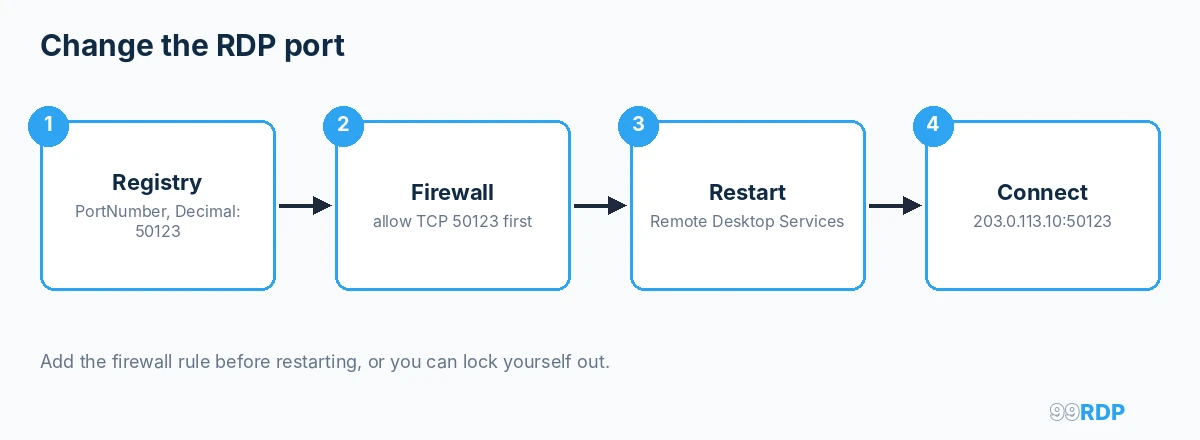
Do the steps in this order so you don't lose access. Keep your current RDP session open until you've tested the new port, and make sure you have console or VNC access from your provider in case something goes wrong.
Step 1: Allow the new port in Windows Firewall
$port = 50123
New-NetFirewallRule -DisplayName "RDP $port TCP" -Direction Inbound -Protocol TCP -LocalPort $port -Action Allow
New-NetFirewallRule -DisplayName "RDP $port UDP" -Direction Inbound -Protocol UDP -LocalPort $port -Action Allow
Pick a port between 1024 and 65535 that no other service uses. Also open it in your hosting provider's firewall or your router if there is one.
Step 2: Change the port in the registry
Set-ItemProperty -Path 'HKLM:\SYSTEM\CurrentControlSet\Control\Terminal Server\WinStations\RDP-Tcp' -Name PortNumber -Value $portOr in regedit: open the key above, double-click PortNumber, choose Decimal and enter the new port.
Step 3: Restart the Remote Desktop service
Restart-Service TermService -ForceThis disconnects current RDP sessions. Rebooting the server has the same effect.
Step 4: Connect on the new port
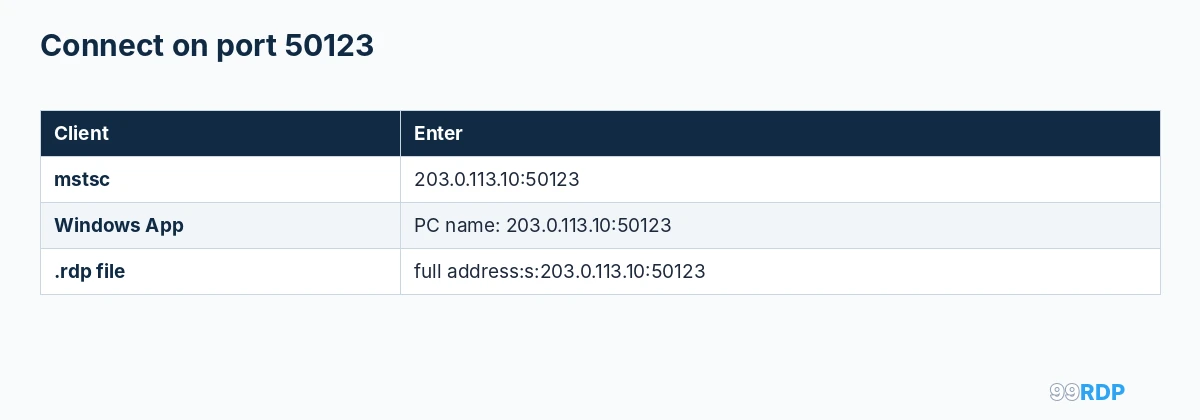
Add the port after the address with a colon:
mstsc /v:203.0.113.10:50123In the Remote Desktop app or Windows App, enter 203.0.113.10:50123 as the PC name. Once it works, remove the old 3389 rule if you no longer need it.
Does changing the RDP port improve security?
It cuts down the automated login attempts that scan port 3389, which keeps logs cleaner, but it isn't real protection: scanners find RDP on any port. Also:
- Keep Network Level Authentication turned on.
- Use strong, unique passwords and an account lockout policy.
- Restrict RDP to your own IP addresses in the firewall, or use a VPN or RD Gateway.
- Keep Windows updated.
Frequently asked questions
What port does RDP use?
TCP and UDP 3389 by default. Through an RD Gateway, the client connects on HTTPS port 443.
How do I check if the RDP port is open?
From another computer, run Test-NetConnection <ip> -Port 3389 in PowerShell or nc -zv <ip> 3389 on Linux or macOS.
How do I connect to RDP on a different port?
Add the port after the address with a colon, for example mstsc /v:server.example.com:50123.
I changed the RDP port and now can't connect. What now?
The new port is usually blocked by a firewall. Use your provider's console (VNC) to sign in, then either add the firewall rule for the new port or set PortNumber back to 3389 and restart TermService.