A Telegram bot running on your laptop stops when the laptop sleeps. On a VPS it runs 24/7, restarts itself after a crash or reboot, and responds instantly. This guide creates a bot with BotFather, writes a small Python bot with the python-telegram-bot library, and runs it as a systemd service on an Ubuntu or Debian VPS.
Quick answer
- Create the bot with @BotFather in Telegram and copy its token.
- On the VPS: create a virtual environment and
pip install python-telegram-bot. - Save your bot script, store the token in an environment file, and run the bot as a systemd service so it starts on boot and restarts on failure.
Step 1: Create the bot with BotFather
- In Telegram, open a chat with @BotFather (check for the verification tick).
- Send
/newbot, choose a display name, then a username ending inbot. - BotFather replies with an HTTP API token. Treat it like a password: anyone with it controls your bot. If it leaks, use
/revoketo get a new one.
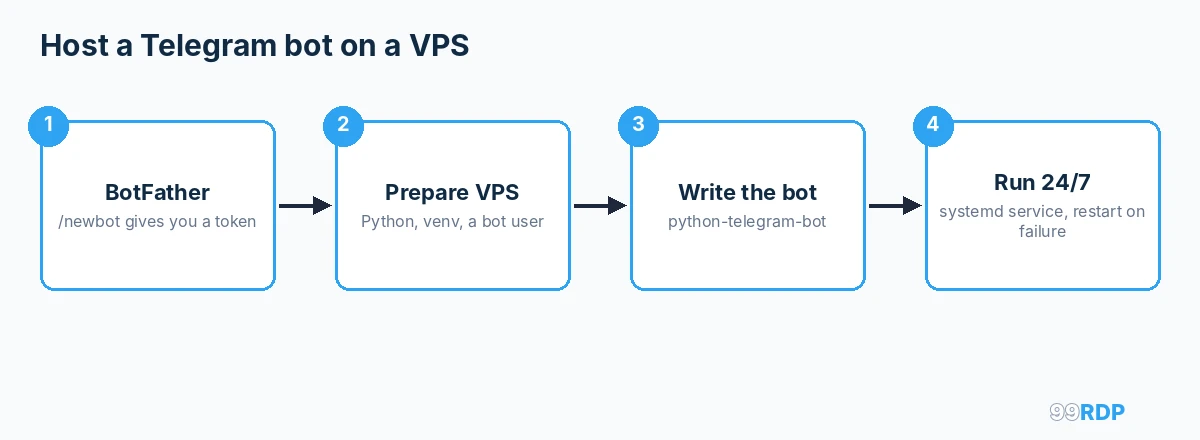
Step 2: Prepare the VPS
sudo apt update && sudo apt install -y python3-venv
sudo adduser --system --group --home /opt/mybot mybot
sudo -u mybot python3 -m venv /opt/mybot/venv
sudo -u mybot /opt/mybot/venv/bin/pip install python-telegram-bot
Running the bot as its own system user keeps it separate from the rest of the server. Using a virtual environment avoids the "externally-managed-environment" error on current Ubuntu and Debian.
Step 3: Write the bot
Create /opt/mybot/bot.py:
import os
from telegram import Update
from telegram.ext import Application, CommandHandler, MessageHandler, ContextTypes, filters

async def start(update: Update, context: ContextTypes.DEFAULT_TYPE) -> None:
    await update.message.reply_text("Hi! I'm running on a VPS. Send me any text.")

async def echo(update: Update, context: ContextTypes.DEFAULT_TYPE) -> None:
    await update.message.reply_text(update.message.text)

def main() -> None:
    app = Application.builder().token(os.environ["BOT_TOKEN"]).build()
    app.add_handler(CommandHandler("start", start))
    app.add_handler(MessageHandler(filters.TEXT & ~filters.COMMAND, echo))
    app.run_polling()

if __name__ == "__main__":
    main()
Store the token outside the code, readable only by the bot user:
echo 'BOT_TOKEN=123456789:ABC...your-token' | sudo tee /opt/mybot/.env
sudo chown mybot:mybot /opt/mybot/.env /opt/mybot/bot.py
sudo chmod 600 /opt/mybot/.env
Step 4: Run the bot 24/7 with systemd
Create /etc/systemd/system/mybot.service:
[Unit]
Description=My Telegram bot
After=network-online.target
Wants=network-online.target

[Service]
User=mybot
WorkingDirectory=/opt/mybot
EnvironmentFile=/opt/mybot/.env
ExecStart=/opt/mybot/venv/bin/python /opt/mybot/bot.py
Restart=always
RestartSec=5

[Install]
WantedBy=multi-user.target
sudo systemctl daemon-reload
sudo systemctl enable --now mybot
systemctl status mybot
journalctl -u mybot -f # live logsSend /start to your bot in Telegram. The bot now starts at boot and restarts automatically if it crashes.
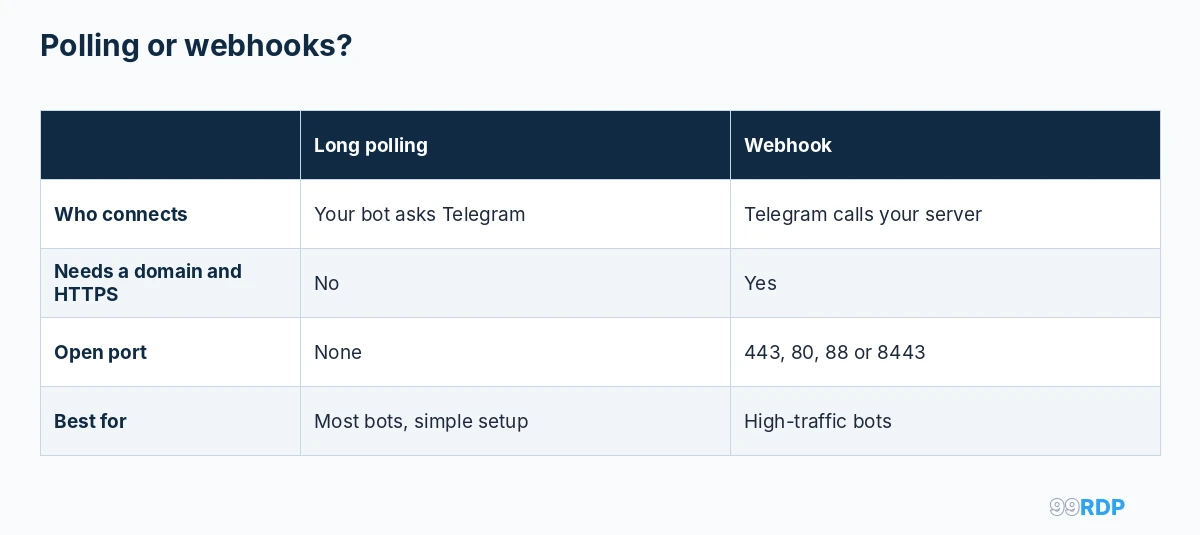
Polling or webhooks?
- Polling (used above): the bot asks Telegram for new messages. Simplest; no domain, certificate or open port needed.
- Webhooks: Telegram sends updates to your server over HTTPS. More efficient for busy bots, but needs a domain, a valid TLS certificate and an open port (443, 80, 88 or 8443).
python-telegram-botsupports both.
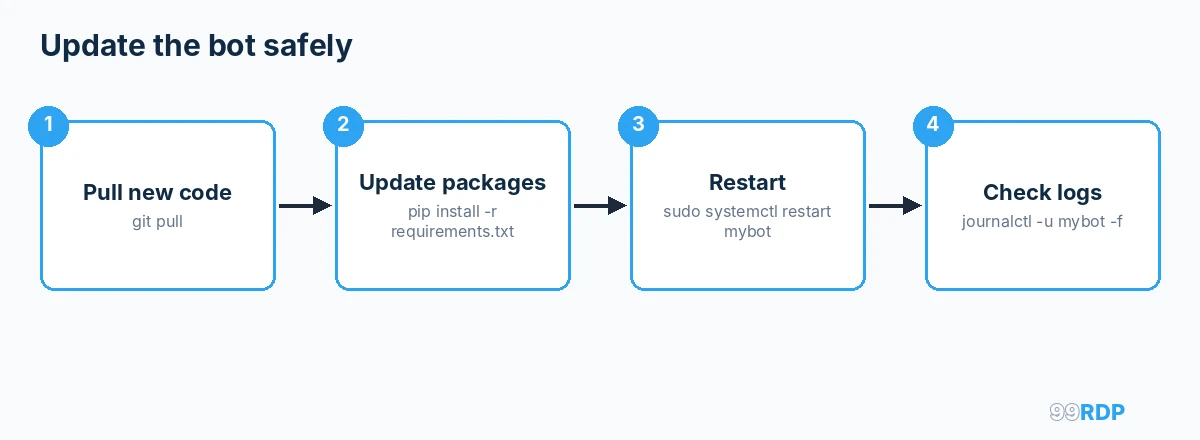
Updating the bot
sudo -u mybot /opt/mybot/venv/bin/pip install -U python-telegram-bot
sudo systemctl restart mybot
Check the library's changelog before major upgrades, since Telegram Bot API updates sometimes bring breaking changes.
Frequently asked questions
Can I host a Telegram bot on a VPS?
Yes. Even a small VPS with 1 GB of RAM can run several simple bots. Run each one as a systemd service so it stays up 24/7.
Does a Telegram bot need a public IP or open port?
Not with polling: the bot connects out to Telegram. Webhooks need a public HTTPS endpoint.
Why does my bot stop when I close SSH?
Because it ran in your SSH session. Run it as a systemd service (or at least inside tmux) so it keeps running.
Which Python library should I use for a Telegram bot?
python-telegram-bot is the most widely used, with good documentation and async support. aiogram is a popular alternative.