Any server with SSH open to the internet receives thousands of automated password-guessing attempts a day. Fail2ban watches your log files for repeated failures and temporarily blocks the offending IP addresses in the firewall. This guide shows how to install Fail2ban on Ubuntu, Debian, Rocky Linux and AlmaLinux, configure a jail for SSH, protect web servers and other services, manage bans, and what to use on Windows servers, which Fail2ban does not support.
Quick answer
sudo apt install fail2ban
sudo tee /etc/fail2ban/jail.local >/dev/null <<'EOF'
[DEFAULT]
bantime  = 1h
findtime = 10m
maxretry = 5

[sshd]
enabled = true
EOF
sudo systemctl enable --now fail2ban
sudo fail2ban-client status sshd
Step 1: Install Fail2ban
# Ubuntu / Debian
sudo apt update
sudo apt install fail2ban

# Rocky Linux / AlmaLinux (from EPEL)
sudo dnf install epel-release
sudo dnf install fail2ban fail2ban-firewalld
On Rocky and AlmaLinux, fail2ban-firewalld makes Fail2ban add its bans through firewalld.
Step 2: Create jail.local
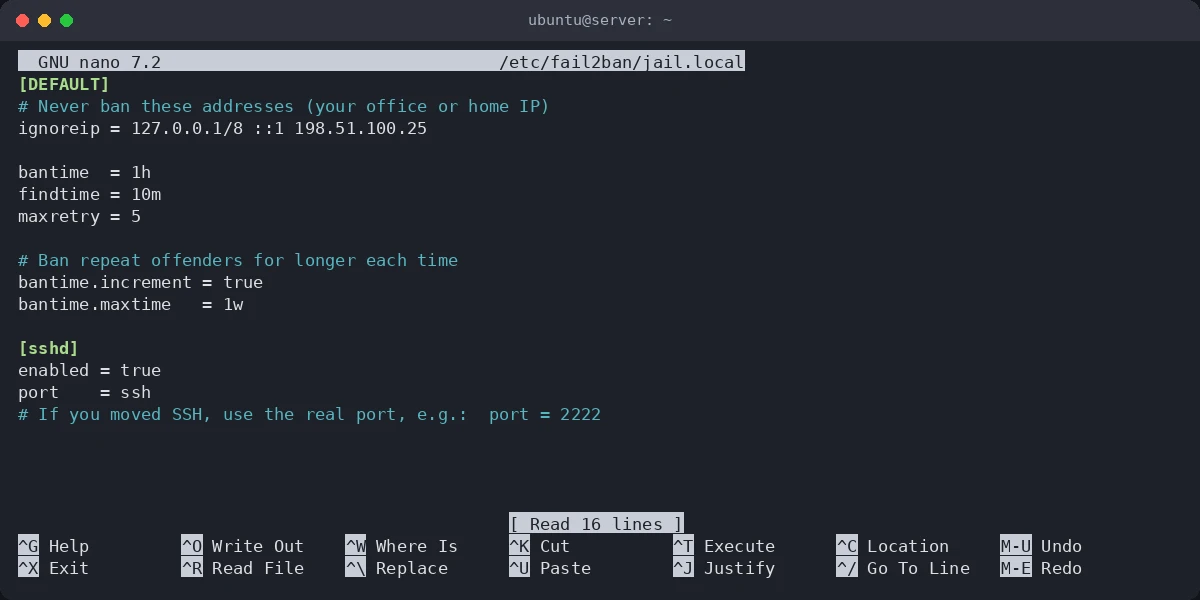
Do not edit /etc/fail2ban/jail.conf; package updates overwrite it. Put your settings in /etc/fail2ban/jail.local (or files in /etc/fail2ban/jail.d/), which override the defaults:
[DEFAULT]
# Never ban these addresses (your office or home IP)
ignoreip = 127.0.0.1/8 ::1 198.51.100.25

bantime  = 1h
findtime = 10m
maxretry = 5

# Ban repeat offenders for longer each time
bantime.increment = true
bantime.maxtime = 1w- maxretry: failures allowed within findtime before a ban.
- bantime: how long the ban lasts. With
bantime.increment, returning attackers get longer bans. - ignoreip: add your own static IP so you never lock yourself out.
Step 3: Enable the SSH jail
Add to the same file:
[sshd]
enabled = true
port    = ssh
# If you moved SSH, use the real port, e.g.:  port = 2222
Fail2ban reads SSH failures from /var/log/auth.log on Ubuntu and /var/log/secure on Rocky/AlmaLinux. On systems that only log to the systemd journal (for example Debian 12 and later without rsyslog), add backend = systemd to the [sshd] section; otherwise Fail2ban will fail to start because the log file does not exist.
Step 4: Start Fail2ban and check it
sudo systemctl enable --now fail2ban
sudo systemctl status fail2ban
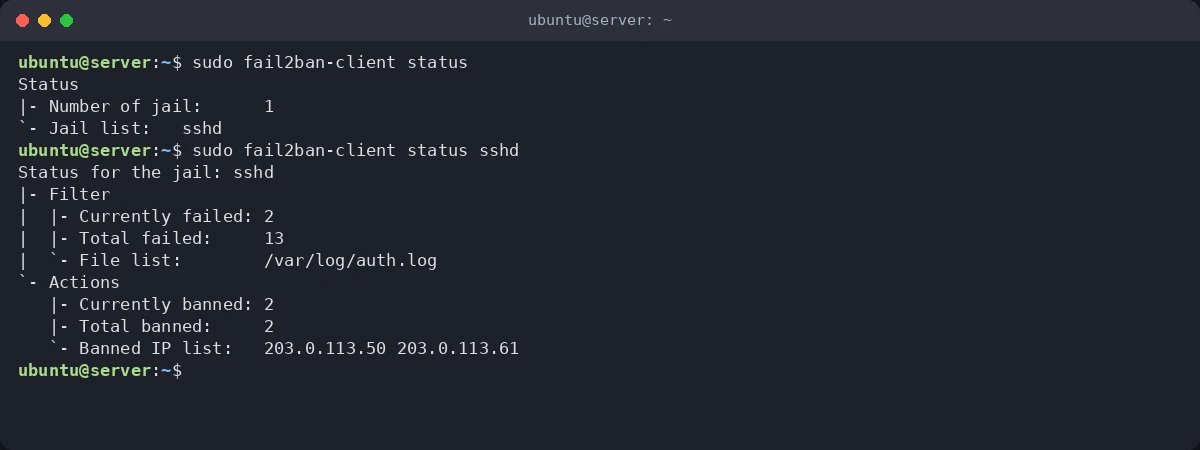
sudo fail2ban-client status
sudo fail2ban-client status sshd
The last command shows how many failures were detected and which IPs are currently banned. After any change to the configuration, run sudo fail2ban-client reload.
Protect other services
Fail2ban ships filters for many applications. Enable the ones you run in jail.local:
[nginx-http-auth]
enabled = true

[nginx-botsearch]
enabled = true

[apache-auth]
enabled = true

[postfix]
enabled = true

[dovecot]
enabled = true
Only enable jails for services that are installed, and check each with fail2ban-client status <jail>. The recidive jail can ban IPs for a long time if they are banned repeatedly by other jails.
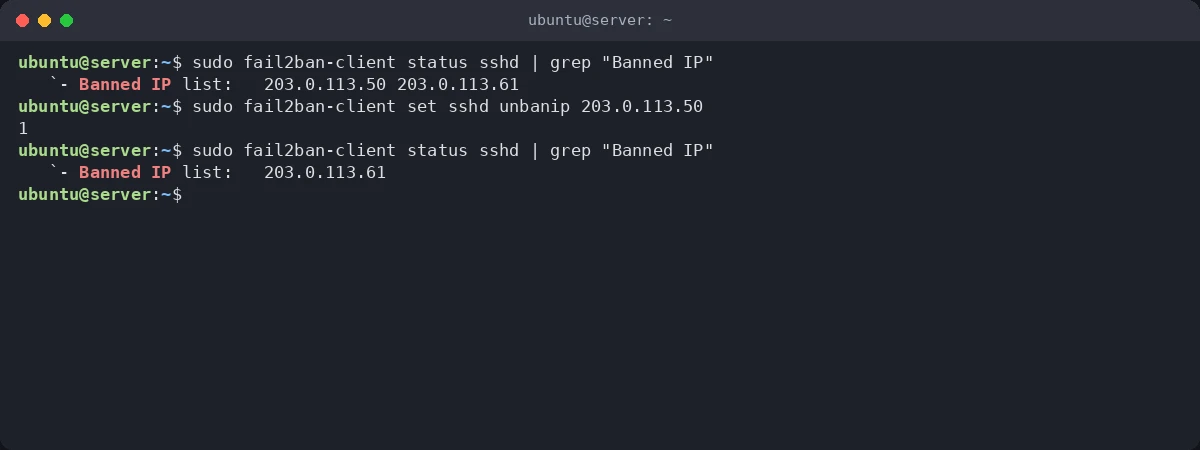
Step 5: Unban an IP address
sudo fail2ban-client set sshd unbanip 203.0.113.50
sudo fail2ban-client unban --all
If you lock yourself out, log in from another IP or your provider's console, unban your address and add it to ignoreip.
Test your filters
sudo fail2ban-regex /var/log/auth.log /etc/fail2ban/filter.d/sshd.confThis shows how many lines in the log match the filter, which helps when a jail never bans anything.
Fail2ban is one layer, not the whole answer
For SSH, the strongest protection is key-based login with PasswordAuthentication no. Fail2ban then mainly reduces log noise and load. Also keep the system updated and restrict SSH to known IPs where possible.
What about Windows servers?
Fail2ban runs on Linux only. On a Windows VPS or RDP server, use:
- An account lockout policy (Local Security Policy → Account Policies → Account Lockout Policy) so accounts lock after repeated failures. Windows 11 and recent Windows Server versions enable a default lockout policy.
- Network Level Authentication for Remote Desktop and strong passwords.
- Firewall rules that limit RDP to your IP addresses, or an RD Gateway or VPN in front of it.
- If you want automatic IP bans like Fail2ban, open-source tools such as IPBan read the Windows Security event log and block attackers in Windows Firewall.
Frequently asked questions
Does Fail2ban work with UFW?
Yes. Fail2ban uses iptables or nftables directly by default, which works alongside UFW. You can also set banaction = ufw in [DEFAULT] so bans appear in ufw status.
How long does Fail2ban ban an IP?
As long as bantime says; the default is 10 minutes. One hour, with increasing bans for repeat offenders, is a good setting.
Why is Fail2ban not banning anyone?
Usually the jail is reading the wrong log file or the wrong port. Check fail2ban-client status sshd, set backend = systemd on journal-only systems, and test with fail2ban-regex.
Is there Fail2ban for Windows?
No official version. Use account lockout policies, firewall restrictions and NLA, or an open-source tool such as IPBan.