Internet Information Services (IIS) is the web server built into Windows Server. It can host a simple static HTML site in a few minutes, and the same steps scale up to ASP.NET and PHP applications. If you've seen a blue page titled "IIS Windows Server" when visiting your server's IP, that's IIS's default site, and you're one step away from replacing it with your own. This guide shows how to install IIS, add a new website, bind it to your domain, add free HTTPS, and fix the most common problems.
Quick answer
Install-WindowsFeature Web-Server -IncludeManagementTools
New-Item -ItemType Directory -Path C:\inetpub\sites\example.com
# copy your index.html and other files into that folder
New-IISSite -Name "example.com" -PhysicalPath C:\inetpub\sites\example.com -BindingInformation "*:80:example.com"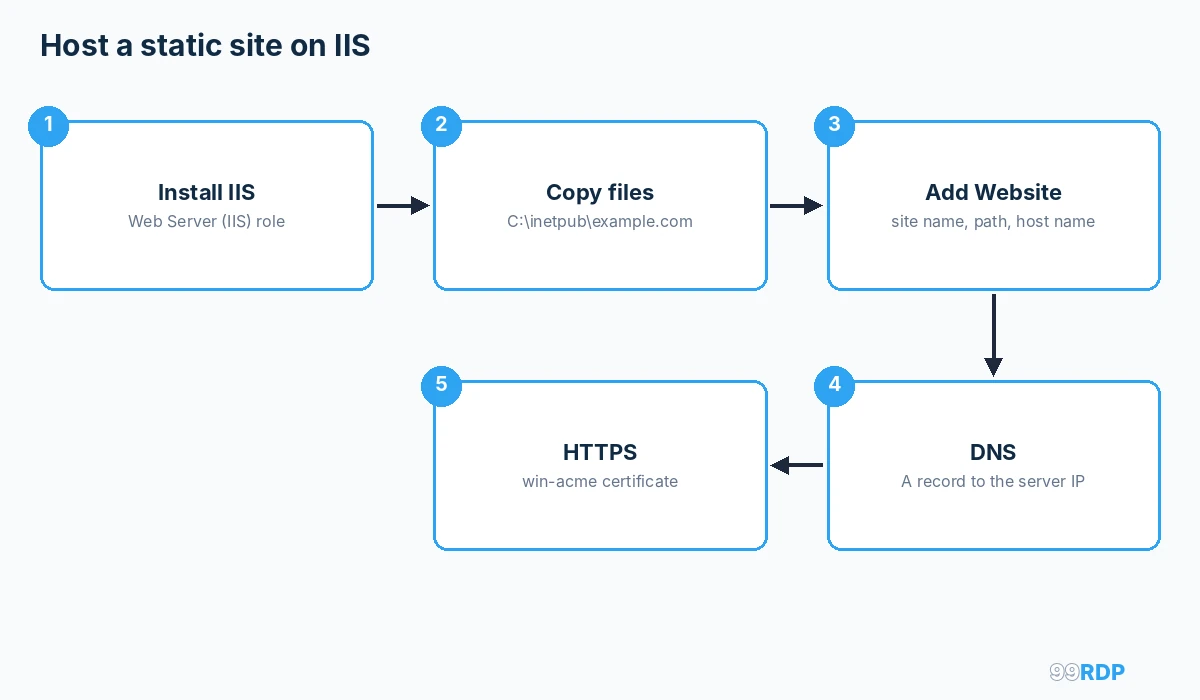
Step 1: Install IIS
In Server Manager → Add Roles and Features, select Web Server (IIS) and accept the default role services. Or in PowerShell:
Install-WindowsFeature Web-Server -IncludeManagementToolsOpen http://localhost on the server, or http://YOUR_SERVER_IP from your PC. The "IIS Windows Server" welcome page means IIS is working.
For dynamic sites, add the features you need: Web-Asp-Net45 for ASP.NET, or install PHP with the PHP Manager or the official Windows build.
Step 2: Create the site folder and upload your files
- Create a folder for the site, for example
C:\inetpub\sites\example.com. Keep each site in its own folder. - Copy your website files into it. The start page should be named
index.html(ordefault.htm); IIS serves it automatically. - Make sure IIS can read the files: the folder needs Read permission for
IIS_IUSRS(folders underC:\inetpubhave it by default).
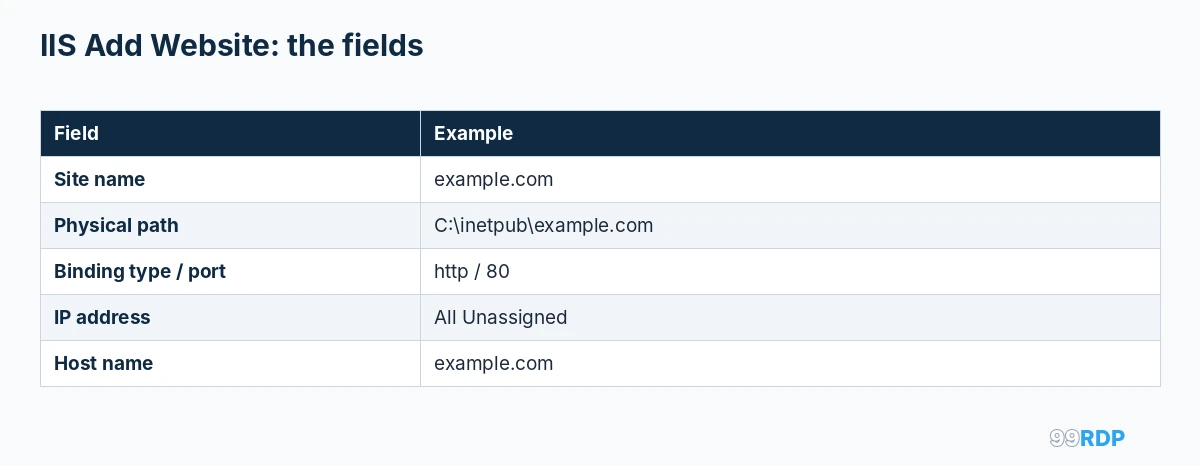
Step 3: Add the website in IIS Manager
- Open IIS Manager (
inetmgr). - Expand the server, right-click Sites → Add Website.
- Site name:
example.com. IIS creates an application pool with the same name. - Physical path:
C:\inetpub\sites\example.com. - Binding: type
http, IP addressAll Unassigned, port80, host nameexample.com. - Click OK. Add a second binding for
www.example.comunder Edit Bindings.
Host names let many sites share one IP and port 80. If you don't have a domain yet, stop the Default Web Site and bind your site to port 80 with no host name so it answers on the IP address.
Step 4: Point your domain to the server
At your DNS provider, create an A record for example.com and www pointing to the server's public IP. DNS changes usually take minutes, sometimes longer. Test with nslookup example.com.
Step 5: Open the firewall
Installing IIS adds Windows Firewall rules for HTTP (80) and HTTPS (443). Check they're enabled, and make sure your hosting provider's firewall also allows these ports:
Get-NetFirewallRule -DisplayGroup "World Wide Web Services (HTTP)" | Select DisplayName, Enabled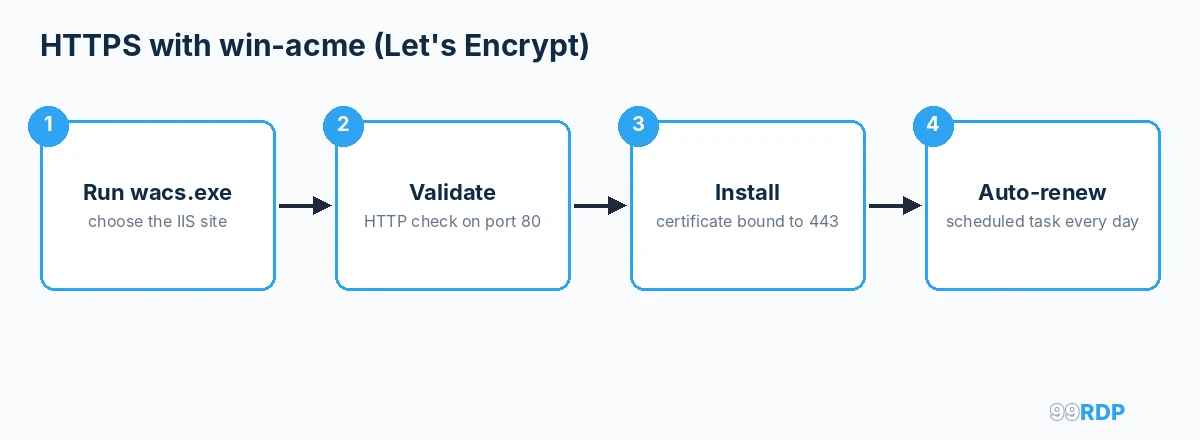
Step 6: Add free HTTPS with Let's Encrypt
Use win-acme, a free Let's Encrypt client for IIS:
- Download win-acme from its official site and extract it on the server.
- Run
wacs.exeas administrator and choose to create a certificate for an IIS site. - Select your site; win-acme validates the domain, installs the certificate, adds an HTTPS binding on port 443 and schedules automatic renewal.
Then redirect HTTP to HTTPS with the URL Rewrite module or a simple rule in web.config.
Useful IIS settings for static sites
- Default Document: controls which file opens for a folder URL (index.html, default.htm).
- MIME Types: add types for newer files (for example
.webp,.woff2,.json) if they return 404. - Compression: enable static compression to make pages load faster.
- Custom errors: set your own 404 page under Error Pages.
Troubleshooting
- Still seeing the "IIS Windows Server" page: the request matches the Default Web Site. Check your binding's host name matches the URL, or stop the Default Web Site.
- HTTP 403.14 Forbidden: there's no default document in the folder. Add
index.htmlor enable it under Default Document. - HTTP 404.3: a MIME type is missing for that file extension.
- HTTP 500.19: an invalid
web.config, or a module it references isn't installed. - Site works on the server but not from outside: firewall rules or DNS.
Frequently asked questions
How do I host a website on IIS?
Install the Web Server (IIS) role, put your files in a folder, add a website in IIS Manager pointing to that folder with a binding for your domain, and point DNS to the server.
What is the "IIS Windows Server" page?
The default welcome page of IIS's Default Web Site. It means IIS is installed and running.
Can I host multiple websites on one IIS server?
Yes. Give each site its own folder and a binding with a different host name on the same IP and port.
How do I add HTTPS to an IIS site for free?
Use win-acme to get and auto-renew a Let's Encrypt certificate and add the HTTPS binding.