For years, CentOS was the default free operating system for web servers, hosting panels and business applications, because it was a rebuild of Red Hat Enterprise Linux (RHEL). That changed when Red Hat ended CentOS Linux and replaced it with CentOS Stream. Rocky Linux was created to fill the gap. This comparison explains how Rocky Linux, CentOS Linux and CentOS Stream differ, how they compare on stability, support and compatibility, and which one to pick for a VPS or dedicated server today.
Quick answerFor a production server, choose Rocky Linux (or AlmaLinux). It is a free, RHEL-compatible distribution with 10 years of support per major version, just as CentOS Linux used to be. CentOS Linux itself is end of life. CentOS Stream is still active, but it is the development preview of the next RHEL minor release, so it suits testing and development more than long-lived servers.
What happened to CentOS?
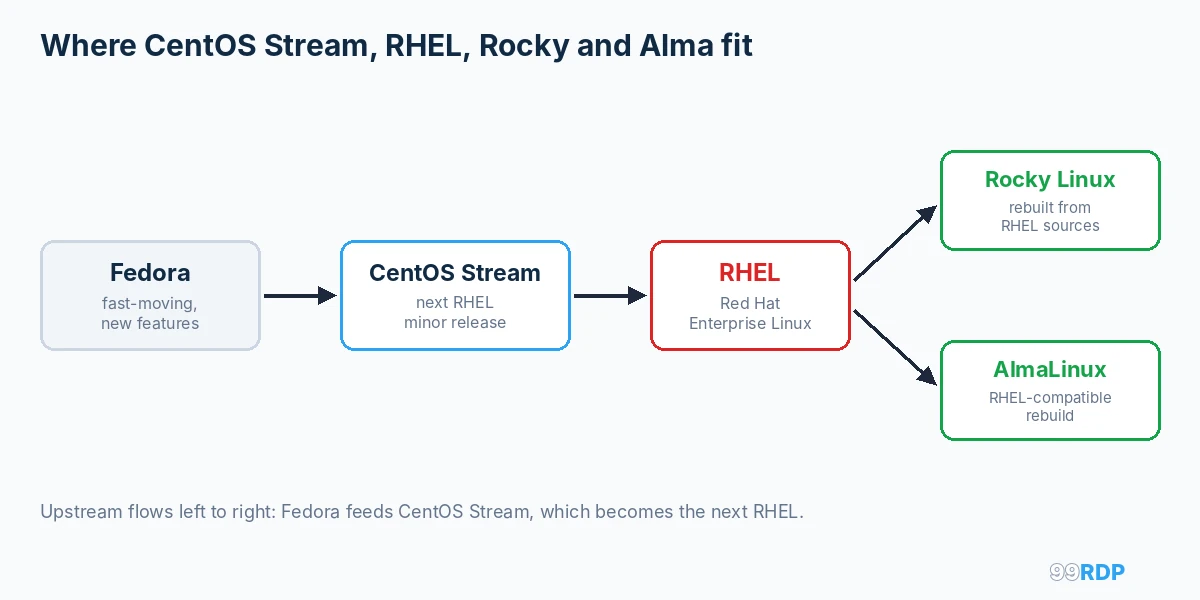
- CentOS Linux 8 ended early, on 31 December 2021, instead of 2029 as originally planned.
- CentOS Linux 7 reached end of life on 30 June 2024. It no longer receives security updates.
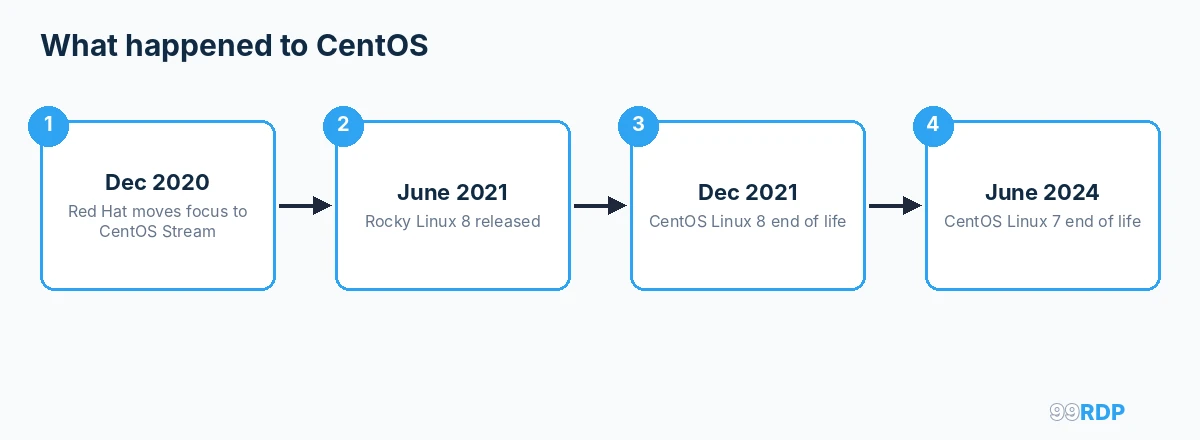
- CentOS Stream continues. It is a continuously updated distribution that sits ahead of RHEL: changes land in Stream first and then flow into the next RHEL minor release. CentOS Stream 9 and 10 are the current versions.
In short, there is no longer a "CentOS" that is a stable, downstream copy of RHEL. That is the role Rocky Linux took over.
What is Rocky Linux?
Rocky Linux was founded in December 2020 by Gregory Kurtzer, one of the original founders of CentOS, after the CentOS change was announced. It is governed by the Rocky Enterprise Software Foundation and aims to be fully compatible with RHEL, bug for bug.
- Current versions: Rocky Linux 8, 9 and 10. Rocky Linux 10 was released in June 2025 and is supported until 2035, and minor releases such as 10.1 follow RHEL's schedule.
- Updates: security fixes arrive shortly after Red Hat publishes them.
- Migration: the
migrate2rockyscript converts existing CentOS, AlmaLinux, Oracle Linux and RHEL installations of the same major version in place. - Cost: free; commercial support is available from partners such as CIQ.
Rocky Linux vs CentOS Stream compared
| Rocky Linux | CentOS Stream | |
|---|---|---|
| Position relative to RHEL | Downstream rebuild (after RHEL) | Upstream preview (before RHEL) |
| Release model | Point releases (10.0, 10.1 ...) | Continuous updates |
| Support per major version | 10 years | About 5 years (until RHEL's full support phase ends) |
| Stability | Same as RHEL | Generally stable, but gets changes before they are fully released |
| Best for | Production servers, hosting, control panels | Development, testing upcoming RHEL changes, contributing to RHEL |
| Governance | Rocky Enterprise Software Foundation | CentOS Project, sponsored by Red Hat |
Compatibility
Rocky Linux uses the same packages, file layout and tools as RHEL: dnf, firewalld, SELinux, systemd and the same repositories structure (BaseOS, AppStream, CRB). Software certified for RHEL, and almost everything written for CentOS, runs on Rocky Linux without changes. Popular hosting panels such as cPanel, Plesk and DirectAdmin support Rocky Linux and AlmaLinux.
One thing to check before moving to version 10: Rocky Linux 10 (like RHEL 10) requires an x86-64-v3 capable processor on Intel/AMD and dropped 32-bit compatibility libraries. Very old hardware or virtual CPUs with a basic CPU model may not boot it; Rocky 9 has lower requirements.
What about AlmaLinux?
AlmaLinux is the other popular RHEL-compatible distribution, run by the AlmaLinux OS Foundation. Since 2023 it aims for application binary compatibility (ABI) with RHEL rather than a bug-for-bug copy, builds from CentOS Stream sources, and often ships releases a little sooner. For most servers, Rocky Linux and AlmaLinux are interchangeable; pick the one your control panel or software vendor documents best.
Which should you choose?
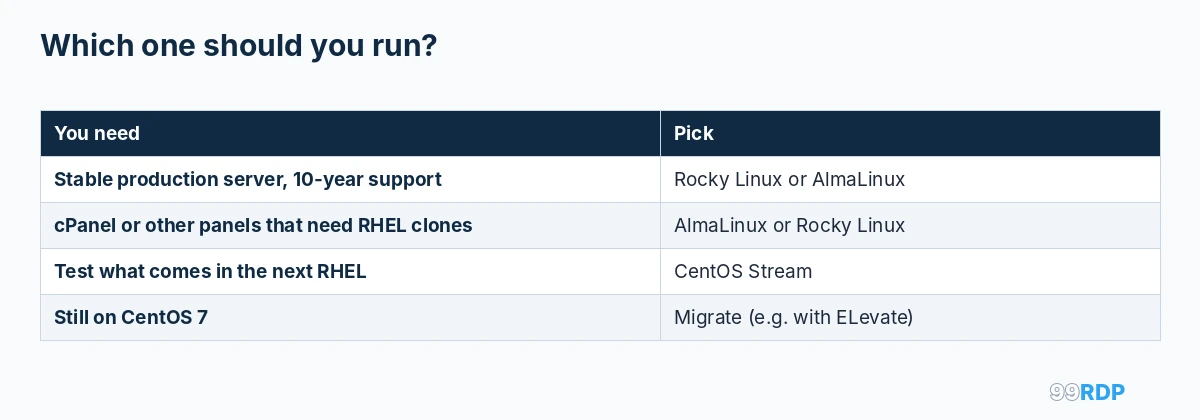
- New production server or VPS: Rocky Linux 9 or 10 (or AlmaLinux).
- Existing CentOS 7 server: CentOS 7 cannot be converted in place to version 9 or 10. Build a new Rocky Linux server, move your data and applications, and switch over. Running an unpatched CentOS 7 on the internet is a security risk.
- Existing CentOS 8 or CentOS Stream 8: convert to Rocky Linux 8 with
migrate2rocky, then plan a move to 9 or 10. - Developing for future RHEL releases: CentOS Stream.
How to check which version you are running
cat /etc/os-release
cat /etc/redhat-release
Frequently asked questions
Is Rocky Linux the same as CentOS?
Not the same project, but it fills the same role: a free, stable rebuild of RHEL. It was started by one of CentOS's founders, and anything that ran on CentOS Linux runs on Rocky Linux.
Is CentOS still supported?
CentOS Linux 7 and 8 are end of life. CentOS Stream 9 and 10 are supported, but Stream is a preview of upcoming RHEL changes rather than a stable rebuild.
Can I migrate from CentOS to Rocky Linux?
Yes, within the same major version, using the migrate2rocky script. For CentOS 7, install a fresh Rocky Linux server and migrate your data, because major-version upgrades are not supported in place.
Rocky Linux or AlmaLinux?
Both are free, RHEL-compatible and supported for 10 years per major version. The differences (build source, release timing, governance) rarely matter for a typical server.