The Linux kernel version tells you which hardware is supported, which security fixes are applied, and whether software such as drivers, Docker, WireGuard or eBPF tools will work. It is also the first thing support teams ask for when troubleshooting. This guide shows several ways to check the kernel version on Ubuntu, Debian, Rocky Linux, AlmaLinux, Fedora and other distributions, how to read the version string, how to list installed kernels, and how to tell whether a reboot is needed after an update.
Quick answerRun uname -r. It prints the running kernel version, for example 7.0.0-15-generic on Ubuntu 26.04 or 6.12.0-55.el10.x86_64 on Rocky Linux 10.
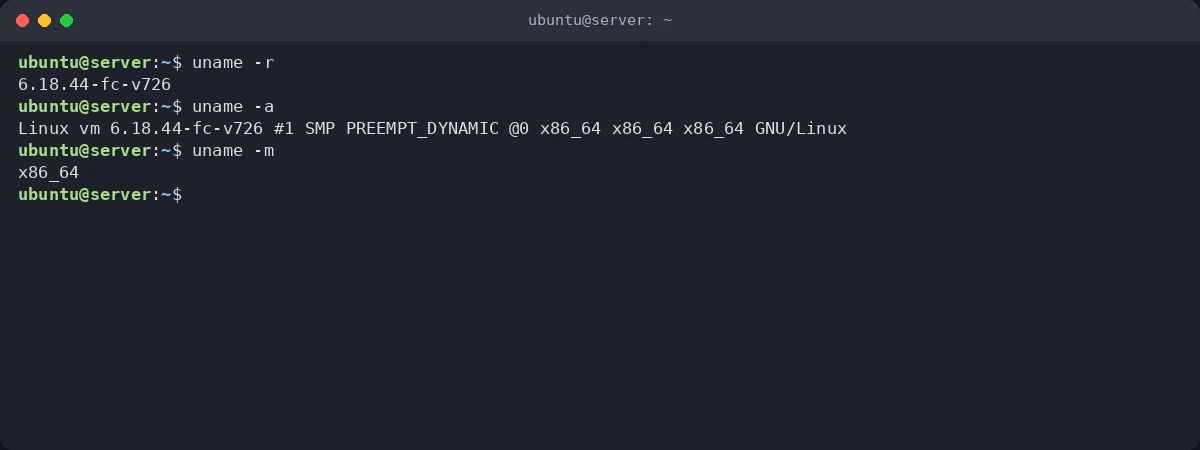
Method 1: uname
uname -r      # kernel release
uname -a      # everything: kernel, hostname, build date, architecture
uname -m      # architecture (x86_64, aarch64)
uname is available on every Linux system and reports the kernel that is currently running.
Method 2: /proc/version
cat /proc/versionThis shows the kernel version plus the compiler and build details, which can help when comparing custom kernels.
Method 3: hostnamectl
hostnamectlShows the kernel alongside the operating system name, architecture and, on virtual machines, the hypervisor type, all in one place.
Method 4: dmesg and the boot log
sudo dmesg | grep -i "linux version"
journalctl -k -b | head -1
Useful to confirm which kernel was used for the current boot.
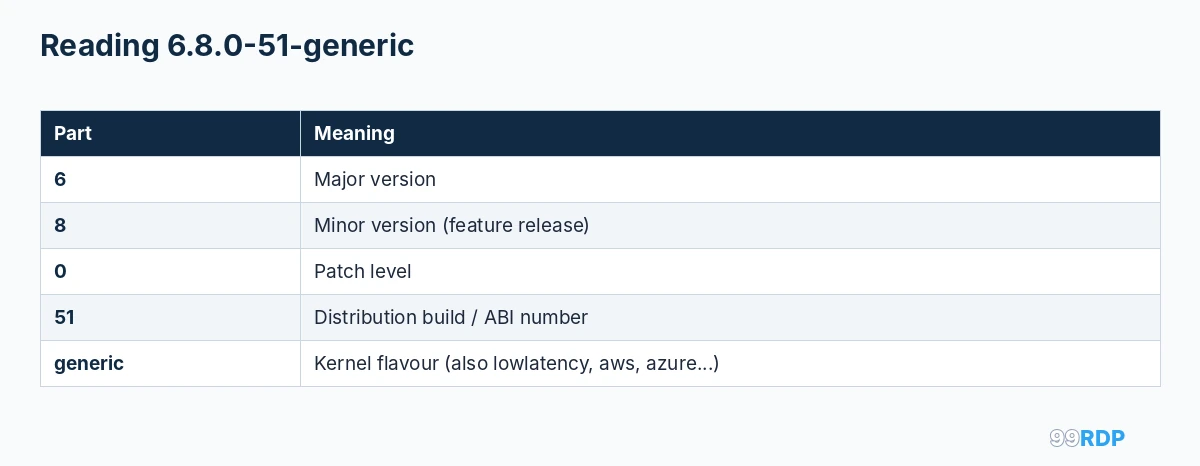
How to read the version string
Take 6.12.0-55.el10.x86_64 or 7.0.0-15-generic:
- Major and minor version (
6.12,7.0): the upstream kernel series. Each new minor version adds features and hardware support. - Patch level (the third number): upstream bug-fix releases. Distributions often keep this at 0 and track fixes in their own numbering.
- Distribution build (
-55.el10,-15): the vendor's revision, which includes backported security fixes.el10means Enterprise Linux 10. - Flavour or architecture (
-generic,.x86_64,-aws,-azure): the kernel variant built for a platform.
Enterprise distributions backport fixes, so an older-looking version number can still be fully patched. Compare against your distribution's security notices, not the upstream number alone.
List installed kernels
# Ubuntu / Debian
dpkg --list | grep -E "linux-image-[0-9]"

# Rocky / AlmaLinux / RHEL / Fedora
rpm -q kernel
sudo grubby --default-kernel
Several kernels are kept installed so you can boot an older one from the GRUB menu if a new kernel causes problems. Old ones are removed automatically by apt autoremove or the installonly_limit setting in DNF.
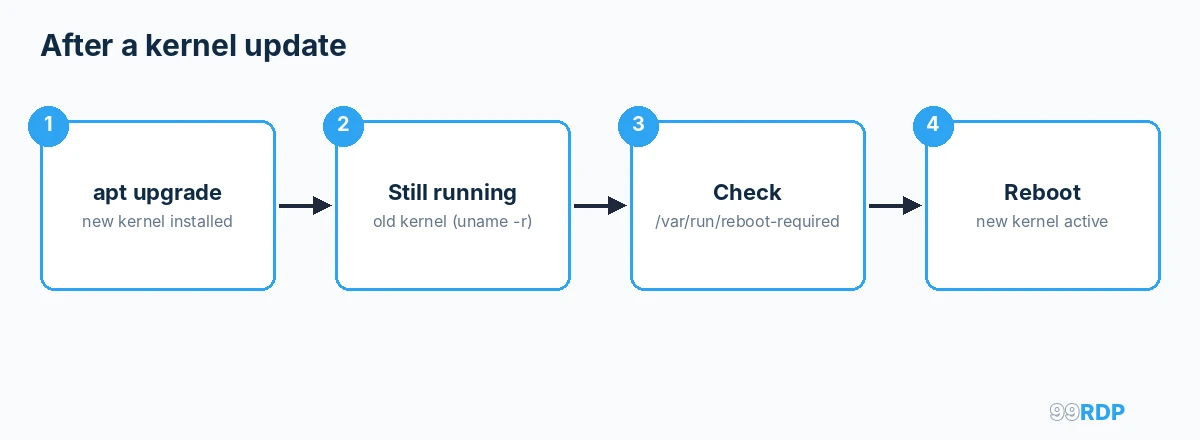
Is a reboot needed after a kernel update?
A new kernel only runs after a reboot. Check whether the running kernel is older than the installed one:
# Ubuntu / Debian
cat /var/run/reboot-required 2>/dev/null

# Rocky / AlmaLinux / RHEL
sudo dnf needs-restarting -r
If uname -r is older than the newest installed kernel, reboot at a convenient time. Ubuntu Pro's Livepatch and similar live-patching services apply many kernel security fixes without a reboot.
Kernel versions of common distributions
| Distribution | Default kernel series |
|---|---|
| Ubuntu 22.04 LTS | 5.15 (newer HWE kernels available) |
| Ubuntu 24.04 LTS | 6.8 (newer HWE kernels available) |
| Ubuntu 26.04 LTS | 7.0 |
| Debian 13 | 6.12 |
| Rocky / AlmaLinux / RHEL 9 | 5.14 with backports |
| Rocky / AlmaLinux / RHEL 10 | 6.12 with backports |
When should you check the kernel version?
- Installing drivers, especially NVIDIA GPU drivers or DKMS modules, which must match the kernel.
- Checking whether a security vulnerability affects your server.
- Confirming a kernel update took effect after a reboot.
- Checking feature support, such as WireGuard (built in since 5.6) or newer filesystems.
- Troubleshooting with your hosting provider or software vendor.
On a VPS, note that container-based virtualization (such as OpenVZ or LXC) shares the host's kernel, so you cannot change or upgrade it yourself. KVM-based VPS run their own kernel.
Frequently asked questions
What command shows the Linux kernel version?
uname -r.
How do I check the kernel version in Ubuntu?
Run uname -r or hostnamectl. To list installed kernels, use dpkg --list | grep linux-image.
How do I update the Linux kernel?
Install updates with your package manager (sudo apt full-upgrade or sudo dnf upgrade) and reboot. Use your distribution's kernels rather than compiling your own on servers.
What is the difference between the kernel version and the OS version?
The OS version (for example Ubuntu 26.04) is the whole distribution; the kernel version is just the core that talks to the hardware. Use cat /etc/os-release for the OS version.