When a Linux server slows down or processes get killed, the first thing to check is memory. Linux reports memory in a way that confuses many people: it uses spare RAM as cache, so "free" memory often looks alarmingly low even on a healthy system. This guide shows the commands to check RAM and swap usage, how to read them correctly, how to find which processes use the most memory, and what to do when a server really is running out.
Quick answerRun free -h and look at the available column. That is how much memory applications can still use. Then run top or htop and press Shift + M to sort processes by memory.
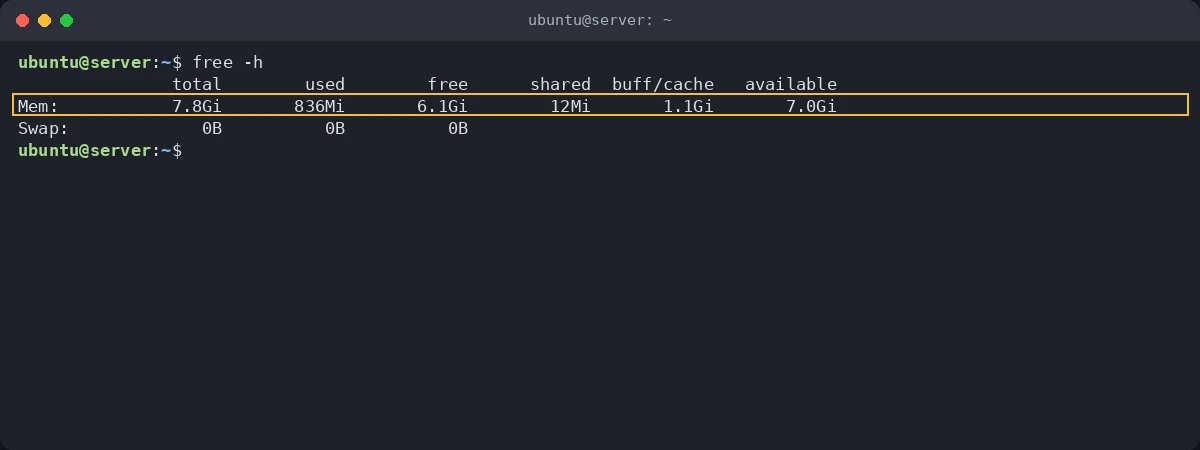
1. free
free -h total used free shared buff/cache available
Mem: 3.8Gi 1.2Gi 410Mi 45Mi 2.2Gi 2.3Gi
Swap: 2.0Gi 0B 2.0Gi- total: installed RAM.
- used: memory used by processes.
- free: completely unused memory. On a busy system this is naturally small.
- buff/cache: memory Linux uses to cache files. It is released automatically when applications need it.
- available: the realistic amount of memory free for new work (free plus reclaimable cache). This is the number to watch.
- Swap: disk space used as overflow memory. Some use is normal; heavy, growing use means RAM is short.
Use free -h -s 5 to refresh every 5 seconds.
2. top
topThe header shows MiB Mem and MiB Swap lines with the same values as free. In the process list, RES is the physical memory a process uses and %MEM its share of total RAM. Press Shift + M to sort by memory and q to quit.
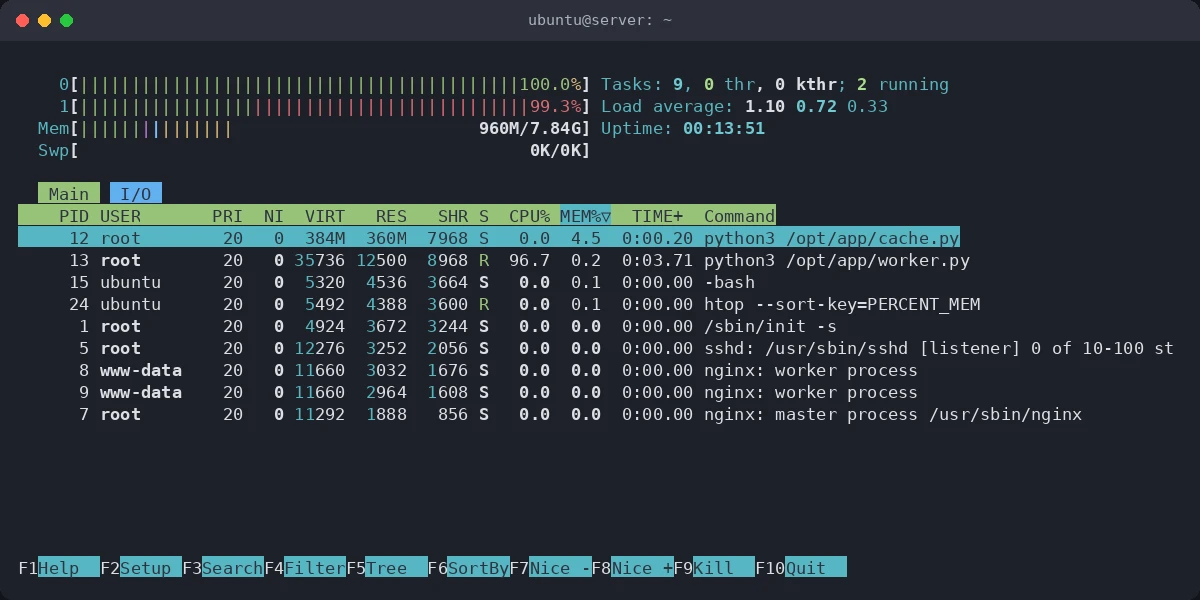
3. htop
sudo apt install htop      # Ubuntu / Debian
sudo dnf install htop      # Rocky / AlmaLinux / Fedora
htop
htop shows a colour memory bar (green for used, blue for buffers, yellow/orange for cache), a swap bar, and a sortable process list. Press F6 to choose the sort column and F5 for a tree view, which shows the total memory of a program with many child processes such as PHP-FPM or Chrome.
4. vmstat
vmstat 2 5Prints memory, swap and CPU activity every 2 seconds. Watch the si and so columns (swap in and swap out). Values that stay above zero mean the system is actively swapping, which slows everything down.
5. /proc/meminfo
cat /proc/meminfo
grep -E "MemTotal|MemAvailable|SwapTotal|SwapFree" /proc/meminfo
The raw source of all the figures above, useful in scripts and monitoring.
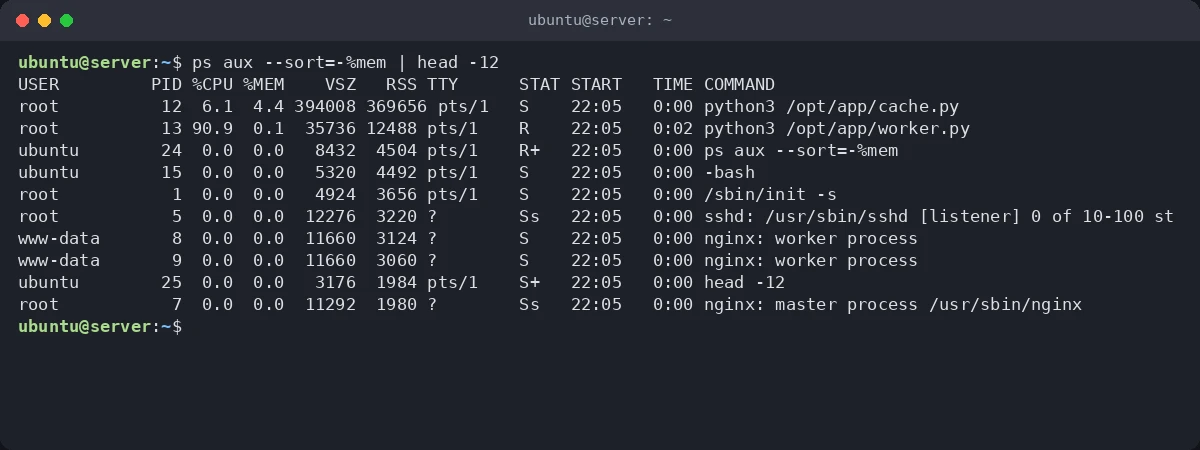
Find the processes using the most memory
ps aux --sort=-%mem | head -10
ps -eo pid,user,rss,%mem,comm --sort=-rss | head -10
RSS is resident memory in kilobytes. For a more accurate picture when processes share memory (for example many PHP workers), install smem and run smem -tk -s pss, which divides shared memory fairly between processes.
On systems with systemd, see memory per service:
systemd-cgtop -mCheck installed RAM hardware
sudo dmidecode -t memory | grep -E "Size|Speed|Type:"
lsmem
On a VPS, these show the memory assigned to the virtual machine.
Is the server out of memory?
Signs of a real shortage:
- available stays very low (a few percent of total) under normal load.
- Swap use keeps growing and
vmstatshows constant swapping. - The kernel's OOM (out-of-memory) killer has stopped processes:
sudo dmesg -T | grep -i "out of memory"
journalctl -k | grep -i "killed process"
What to do about high memory usage
- Find the culprit with
psorhtop, and check its logs for leaks. - Tune services: lower PHP-FPM
pm.max_children, MySQL/MariaDBinnodb_buffer_pool_size, or Java heap sizes to fit the server. - Add swap as a safety net on small VPS plans:
sudo fallocate -l 2G /swapfile sudo chmod 600 /swapfile sudo mkswap /swapfile sudo swapon /swapfile echo '/swapfile none swap sw 0 0' | sudo tee -a /etc/fstab - Upgrade RAM if usage is genuinely high all the time.
Do not "clear the cache" with drop_caches to make free memory look higher; the cache speeds the system up and is released automatically when needed.
Frequently asked questions
How do I check RAM usage in Linux?
Run free -h. The available column shows how much memory is free for applications.
Why does Linux show so little free memory?
Linux uses unused RAM as a disk cache to speed things up. That memory appears under buff/cache and is given back to applications when needed, so low "free" memory is normal.
How do I see which process uses the most memory?
Run ps aux --sort=-%mem | head, or open top and press Shift + M.
How much swap should a server have?
On small VPS plans, 1 to 2 GB of swap is a sensible safety net. Swap is not a substitute for enough RAM.