Google has never released an official Google Drive client for Linux, so on Ubuntu you either use the desktop's built-in integration or a third-party tool. Which one works depends on your Ubuntu version: Ubuntu 26.04 LTS no longer offers Google Drive in the Files app. This guide covers the built-in method for Ubuntu 24.04 and earlier, and rclone, which works on every version, including servers without a desktop.
Quick answer
- Ubuntu 24.04 or earlier (desktop): Settings → Online Accounts → Google, sign in and keep Files switched on. Your Drive appears in the Files sidebar.
- Ubuntu 26.04, or any server: install rclone, run
rclone configto add Google Drive, thenrclone mount gdrive: ~/GoogleDrive.
Method 1: GNOME Online Accounts (Ubuntu 24.04 and earlier)
- Open Settings → Online Accounts (in some versions, Settings → Online Accounts → Google).
- Click Google and sign in. Allow the requested permissions in the browser window.
- Make sure the Files switch is on.
- Open Files (Nautilus). Your Google account appears in the sidebar. Click it to browse your Drive.
This mounts Drive over the network. Files open directly from Google's servers and aren't synced for offline use, and very large folders can be slow.
Ubuntu 26.04 LTS: Google Drive was removed from Files
GNOME 50, which ships with Ubuntu 26.04, no longer supports accessing Google Drive from Nautilus, because the library behind it went unmaintained. Online Accounts still connects your Google mail, contacts and calendar, but the Files option is gone. Use rclone (Method 2) instead.
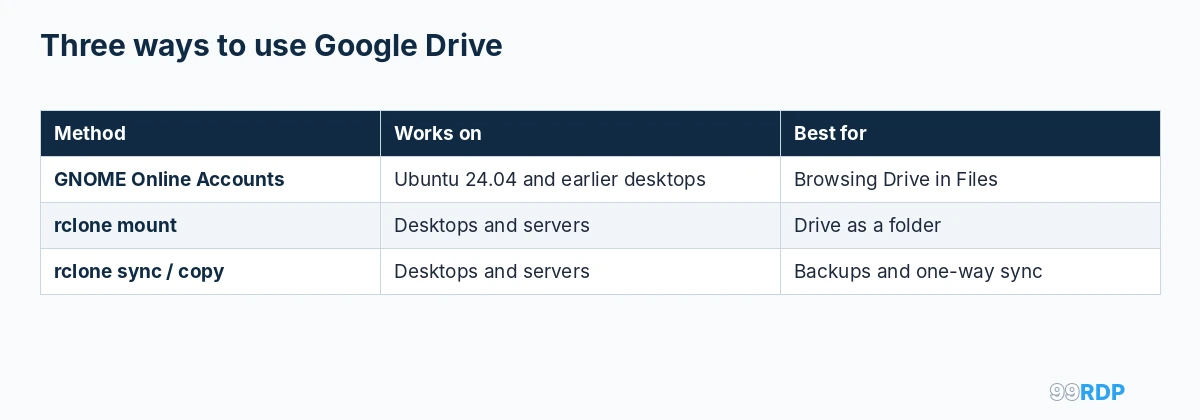
Method 2: rclone (any Ubuntu version, desktop or server)
rclone is a free, widely used command-line tool for cloud storage. It can mount Drive as a folder or sync files in either direction.
Step 1: Install rclone and FUSE
sudo apt update
sudo apt install rclone fuse3
Ubuntu's package can lag behind. For the latest version, use rclone's official installer: sudo -v ; curl https://rclone.org/install.sh | sudo bash.
Step 2: Connect your Google account
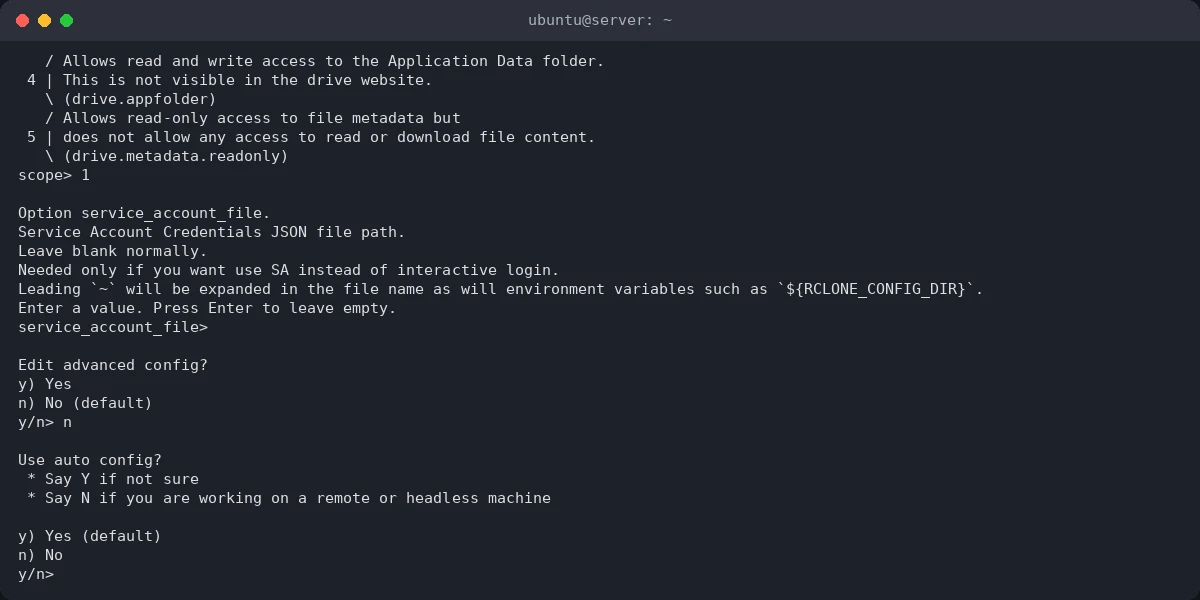
rclone configChoose n (new remote), name it gdrive, pick Google Drive from the list, leave client ID and secret empty (or enter your own for better speed limits), and choose scope 1 (full access). When asked about auto config:
- On a desktop: answer
y. A browser opens; sign in and allow access. - On a server without a browser: answer
n. rclone tells you to runrclone authorize "drive"on a computer with a browser, then paste the token it prints back into the server.
Test it: rclone lsd gdrive: lists your top-level Drive folders.
Step 3: Mount Google Drive as a folder
mkdir -p ~/GoogleDrive
rclone mount gdrive: ~/GoogleDrive --vfs-cache-mode writes --daemon
ls ~/GoogleDrive
--vfs-cache-mode writes lets normal apps save files reliably. Unmount with fusermount3 -u ~/GoogleDrive.
Step 4 (optional): Mount it automatically at login
Create ~/.config/systemd/user/rclone-gdrive.service:
[Unit]
Description=Mount Google Drive with rclone
After=network-online.target

[Service]
Type=notify
ExecStart=/usr/bin/rclone mount gdrive: %h/GoogleDrive --vfs-cache-mode writes
ExecStop=/bin/fusermount3 -u %h/GoogleDrive
Restart=on-failure

[Install]
WantedBy=default.target
systemctl --user daemon-reload
systemctl --user enable --now rclone-gdrive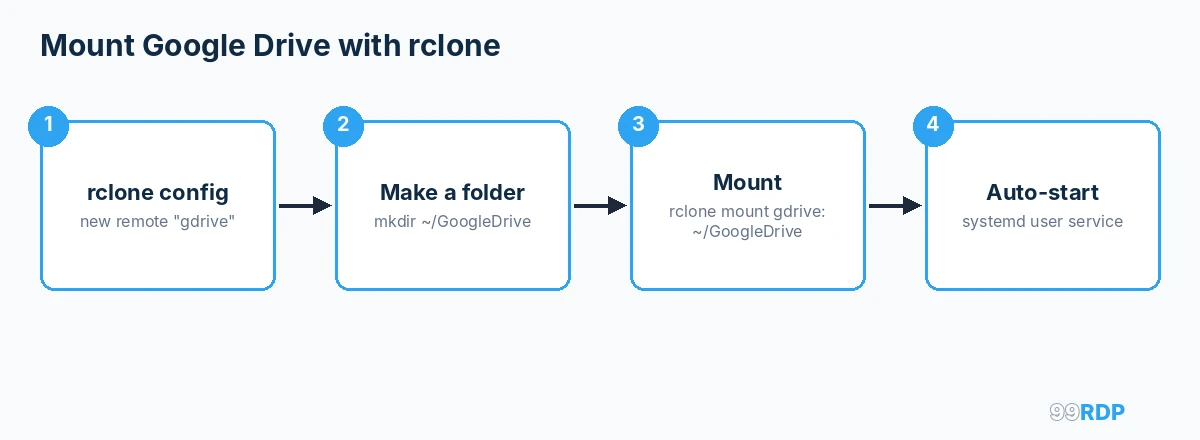
Method 3: sync or back up instead of mounting
To keep a local copy, or back up a server folder to Drive, use copy or sync:
rclone copy ~/Documents gdrive:Backup/Documents --progress      # adds and updates, never deletes
rclone sync /var/www gdrive:Backup/www --progress --dry-run       # makes Drive match the source
sync deletes files on Drive that aren't in the source, so always try it with --dry-run first. Schedule backups with cron.
Frequently asked questions
Is there an official Google Drive app for Ubuntu?
No. Google only makes Drive for desktop for Windows and macOS. On Ubuntu, use GNOME Online Accounts (24.04 and earlier) or rclone.
Why is Google Drive missing from Files in Ubuntu 26.04?
GNOME 50 removed Google Drive support from Nautilus. Online Accounts no longer shows the Files option for Google. Use rclone to mount your Drive instead.
Can I use Google Drive on an Ubuntu server?
Yes, with rclone. Authorize it with rclone authorize "drive" on a computer with a browser, then mount or sync from the server.
Does rclone sync Google Drive automatically?
A mount shows your Drive live. For two-way sync, rclone has a bisync command, but for most people a mount, or a scheduled one-way copy, is simpler and safer.