
Postfix is the most widely used mail transfer agent (MTA) on Linux. On an Ubuntu server it can send email for your applications and websites (password resets, alerts, contact forms), relay through an external SMTP provider, or act as the SMTP part of a full mail server together with Dovecot. This guide installs Postfix on Ubuntu 22.04, 24.04 or 26.04, configures it, adds TLS, tests it, and covers the DNS records and port 25 issues that decide whether your mail actually arrives.
Quick answer
sudo apt update
sudo apt install postfix mailutils      # choose "Internet Site", enter your domain
echo "Test body" | mail -s "Postfix test" you@example.com
sudo tail -f /var/log/mail.log
How an SMTP server works
When an app on your server sends an email, it hands it to Postfix on localhost. Postfix looks up the recipient domain's MX record in DNS, connects to that mail server on port 25 and delivers the message. Receiving works the other way: other servers connect to your server's port 25 if your domain's MX record points to it. Users and apps that submit mail from elsewhere use port 587 with authentication.
Before you start
- A hostname: set a fully qualified name, for example
sudo hostnamectl set-hostname mail.example.com, and point an A record to the server. - Reverse DNS (PTR): ask your provider to set the IP's PTR record to the same hostname.
- Port 25: many cloud and VPS providers block outbound port 25 by default to stop spam. Check with
nc -zv gmail-smtp-in.l.google.com 25. If it's blocked, ask your provider to open it or use a relay (see below).
Step 1: Install Postfix
sudo apt update
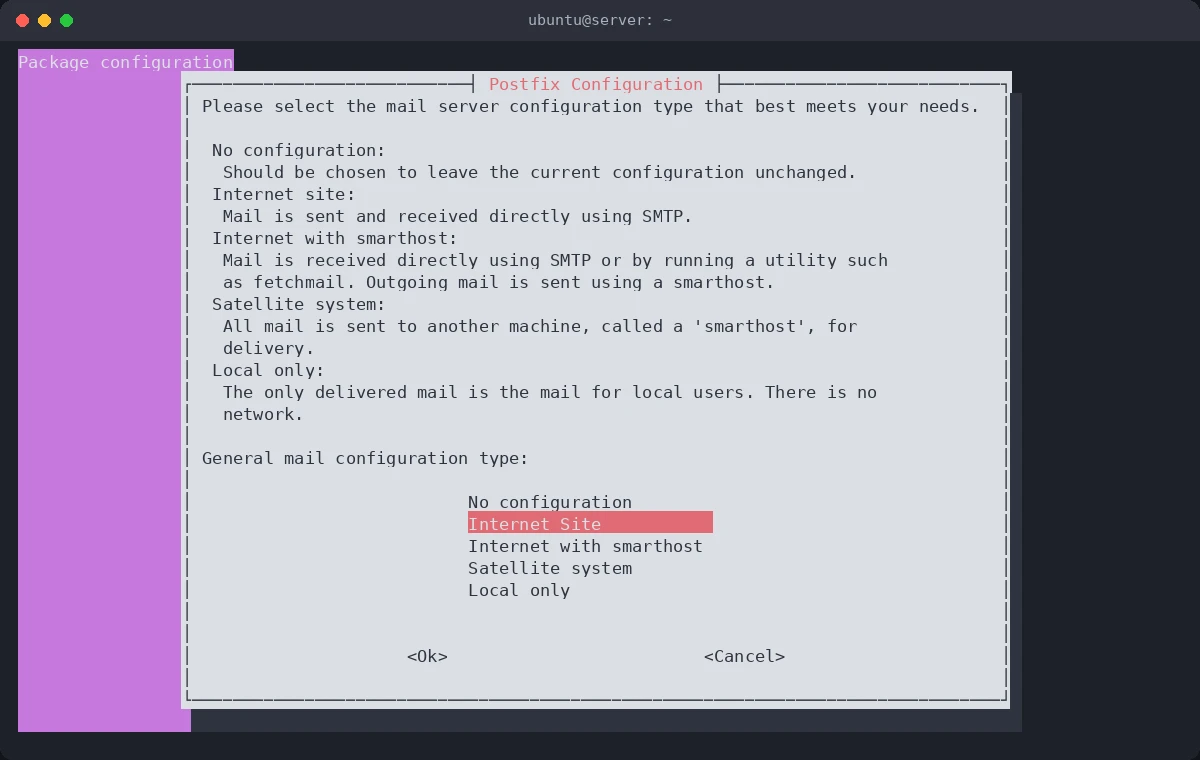
sudo apt install postfix mailutils
In the setup dialog choose Internet Site and enter your domain (example.com) as the system mail name. You can rerun the dialog later with sudo dpkg-reconfigure postfix.
Step 2: Configure main.cf
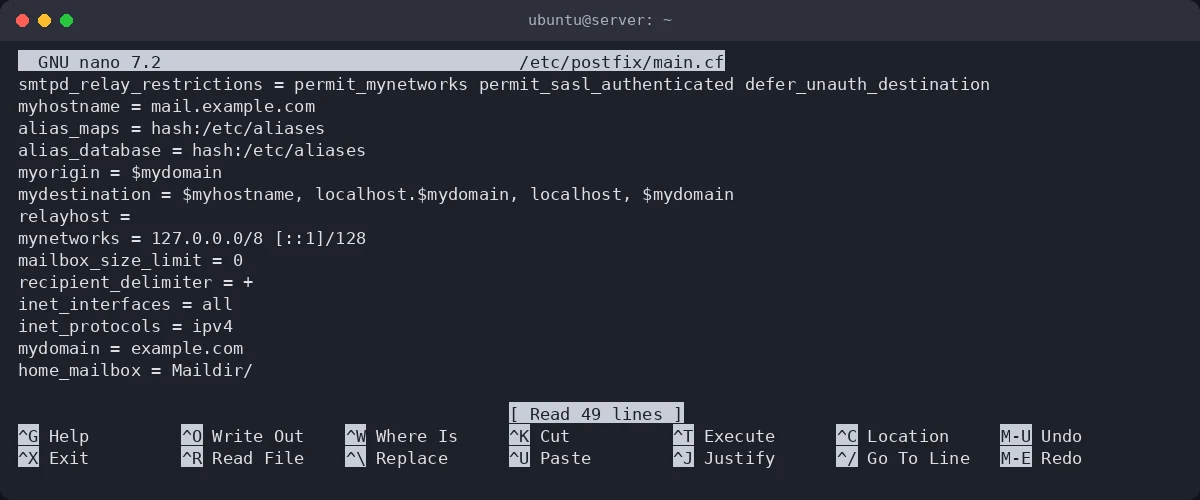
Edit /etc/postfix/main.cf and check these settings:
myhostname = mail.example.com
mydomain = example.com
myorigin = $mydomain
inet_interfaces = all              # use loopback-only for a send-only server
inet_protocols = ipv4              # or all, if IPv6 has a PTR record too
mydestination = $myhostname, localhost.$mydomain, localhost, $mydomain
mynetworks = 127.0.0.0/8 [::1]/128
home_mailbox = Maildir/
For a send-only server that just delivers app mail, set inet_interfaces = loopback-only and remove $mydomain from mydestination, so the server never accepts mail from outside. Never add public ranges to mynetworks; that turns Postfix into an open relay.
Check and apply:
sudo postfix check
sudo systemctl restart postfix
Step 3: Enable TLS encryption
Get a certificate for the mail hostname (for example with Certbot: sudo certbot certonly --standalone -d mail.example.com), then add to main.cf:
smtpd_tls_cert_file = /etc/letsencrypt/live/mail.example.com/fullchain.pem
smtpd_tls_key_file  = /etc/letsencrypt/live/mail.example.com/privkey.pem
smtpd_tls_security_level = may
smtp_tls_security_level = may
smtpd_tls_protocols = !SSLv2, !SSLv3, !TLSv1, !TLSv1.1
Restart Postfix. Outgoing mail is now encrypted whenever the receiving server supports it, which nearly all do.
Step 4: Open the firewall
sudo ufw allow 25/tcp      # receiving mail from other servers
sudo ufw allow 587/tcp     # authenticated submission (if you set it up)
A send-only server doesn't need any inbound mail port open.
Step 5: Test sending
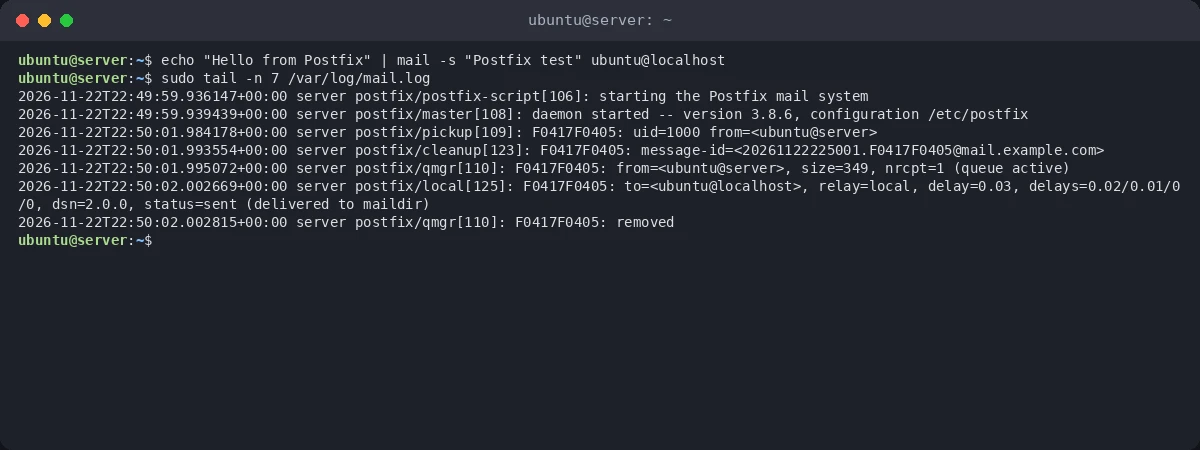
echo "Hello from Postfix" | mail -s "Test" you@gmail.com
sudo tail -n 30 /var/log/mail.log      # or: sudo journalctl -u postfix -n 30
mailq                                   # messages waiting in the queue
Look for status=sent in the log. status=deferred with "Connection timed out" usually means port 25 is blocked; a 5xx rejection usually points to DNS or reputation problems.
Step 6: Add SPF, DKIM and DMARC
Gmail, Outlook and Yahoo reject or spam-folder mail from domains without authentication. Add DNS records:
- SPF: a TXT record on the domain, for example
v=spf1 a mx ip4:203.0.113.10 -all. - DKIM: install OpenDKIM (
sudo apt install opendkim opendkim-tools), generate a key, connect it to Postfix as a milter, and publish the public key as a TXT record. - DMARC: a TXT record at
_dmarc.example.com, starting withv=DMARC1; p=none; rua=mailto:dmarc@example.comand tightening later.
Option: send through a relay (smarthost)
If port 25 is blocked or you want better deliverability, relay through an SMTP service (your email provider or a transactional mail service) on port 587:
# /etc/postfix/main.cf
relayhost = [smtp.provider.com]:587
smtp_sasl_auth_enable = yes
smtp_sasl_password_maps = hash:/etc/postfix/sasl_passwd
smtp_sasl_security_options = noanonymous
smtp_tls_security_level = encrypt
echo "[smtp.provider.com]:587 username:password" | sudo tee /etc/postfix/sasl_passwd
sudo chmod 600 /etc/postfix/sasl_passwd
sudo postmap /etc/postfix/sasl_passwd
sudo systemctl restart postfixNext steps for a full mail server
To give users mailboxes they can read in Outlook or Thunderbird, add Dovecot for IMAP and SASL authentication, enable the submission service on port 587 in /etc/postfix/master.cf, and add spam filtering such as Rspamd. If you'd rather not assemble it yourself, all-in-one suites like Mailcow or iRedMail configure Postfix for you.
Frequently asked questions
How do I install Postfix on Ubuntu?
Run sudo apt install postfix mailutils, choose "Internet Site" and enter your domain, then adjust /etc/postfix/main.cf.
Why are my Postfix emails not being delivered?
Usually port 25 is blocked by the provider, reverse DNS is missing, or SPF/DKIM/DMARC records aren't set. Check /var/log/mail.log.
Can Postfix be used only to send email?
Yes. Set inet_interfaces = loopback-only so it only accepts mail from the server itself.
Where are the Postfix logs on Ubuntu?
In /var/log/mail.log, or with journalctl -u postfix.