
Running your own email on a Linux server gives you full control over your data, unlimited mailboxes and no per-user fees. But "mail server" can mean very different things: a single program that sends mail, a program that stores mailboxes, or a complete suite with webmail, spam filtering and an admin panel. This guide sorts the 15 best Linux mail server options into those three groups, so you can pick the right building blocks or a ready-made package.
Quick answerFor most people, an all-in-one suite is the easiest path. Mailcow (Docker) and iRedMail are the most popular; Stalwart is the modern single-binary option. If you want to build your own stack, the standard combination is Postfix (SMTP) + Dovecot (IMAP) + Rspamd (spam filtering).
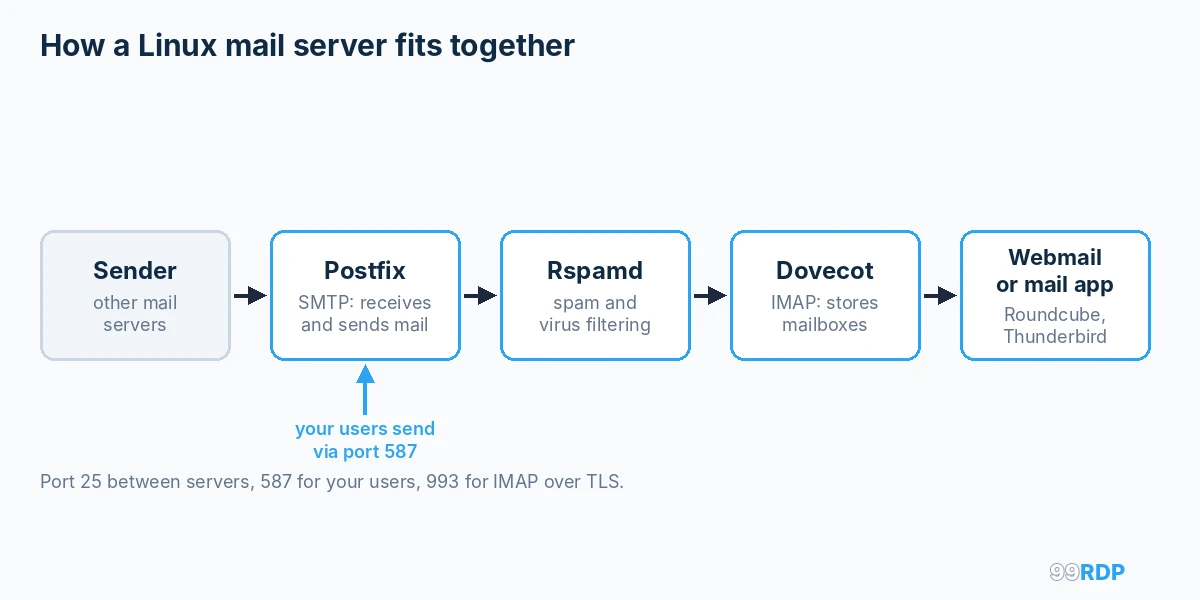
How a Linux mail server is built
- MTA (Mail Transfer Agent): sends and receives mail over SMTP. Examples: Postfix, Exim.
- MDA/IMAP server: stores mailboxes and lets clients read them over IMAP or POP3. Examples: Dovecot, Cyrus.
- Filtering and extras: spam and virus filtering (Rspamd, SpamAssassin, ClamAV), DKIM signing, webmail (Roundcube, SOGo, SnappyMail) and an admin panel.
All-in-one suites bundle these pieces and configure them for you.
MTAs: the mail transfer agents
1. Postfix
The default choice on most Linux distributions. Postfix is secure by design, fast, well documented and the MTA inside most all-in-one suites. If you build your own server, start here.
2. Exim
The default MTA on Debian and in cPanel. Exim's configuration language is extremely flexible, which suits complex routing rules, but it also means more room for mistakes. Keep it updated; it has had serious vulnerabilities in the past.
3. OpenSMTPD
From the OpenBSD project, with a short, readable configuration file. A good fit for small servers and relays where you value simplicity.
4. Sendmail
The original Unix MTA. It still works, but its configuration is hard to maintain. Choose it only for existing systems that depend on it.
IMAP servers: mailbox storage
5. Dovecot
The most widely used IMAP and POP3 server on Linux. It's fast, secure, supports Maildir and its own efficient storage format, full-text search, quotas and Sieve filtering rules. Pairs naturally with Postfix.
6. Cyrus IMAP
Built for large installations with many thousands of mailboxes, shared folders and murder (clustering) setups. Also supports CalDAV and CardDAV. More complex to run than Dovecot.
All-in-one mail server suites
7. Mailcow: dockerized
A complete stack (Postfix, Dovecot, Rspamd, ClamAV, SOGo groupware, SnappyMail webmail) in Docker containers, with a polished admin UI for domains, mailboxes, aliases, DKIM keys and quotas. Easy to update and one of the most popular choices for self-hosting. Needs a few GB of RAM.
8. iRedMail
A shell script that installs and configures Postfix, Dovecot, Amavisd or Rspamd, SpamAssassin, ClamAV and Roundcube on a fresh Ubuntu, Debian, Rocky or AlmaLinux server. The free edition is managed through a basic admin panel; iRedAdmin-Pro is paid.
9. Stalwart
A modern all-in-one server written in Rust: SMTP, IMAP, POP3, JMAP, CalDAV, CardDAV and WebDAV in a single binary, with built-in spam filtering and a web admin. It reached its first stable release, 1.0, in October 2026. The Community Edition is licensed AGPLv3.
10. Mailu
A lighter Docker-based suite than Mailcow, with Postfix, Dovecot, Rspamd and a choice of webmail. Its setup tool generates the compose file for you.
11. Mail-in-a-Box
Turns a fresh Ubuntu server into a complete mail server, including DNS, with almost no decisions to make. Great for a single person or small organization; less flexible for custom setups.
12. Modoboa
A Python/Django admin panel and installer on top of Postfix and Dovecot, with webmail, calendars, contacts and per-domain administrators. Good for hosting mail for many domains.
13. docker-mailserver
A single, configuration-file-driven container with Postfix, Dovecot, Rspamd and more, with no web UI. Popular with admins who manage everything as code.
14. Zimbra
A full collaboration suite with webmail, calendars and contacts. The core is still open source, but official free binaries stopped after version 8.8.15; current releases are either the paid Network Edition or community-built packages. Check the licensing situation before you commit.
15. Carbonio Community Edition
From Zextras, built on Zimbra's open-source code with a new web interface, file storage and chat. An option for teams that want a Zimbra-style suite with free community builds.
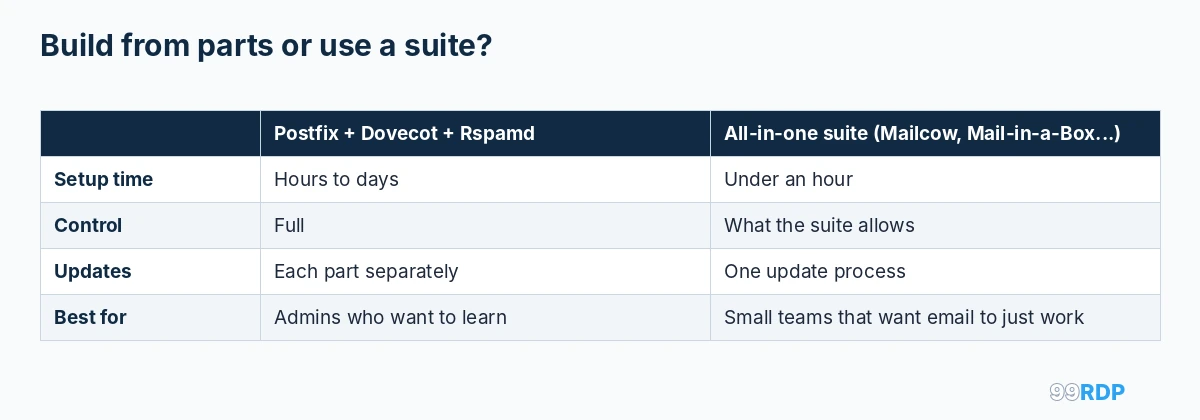
How to choose
- Easiest complete server: Mailcow or iRedMail; Mail-in-a-Box for a single domain.
- Lowest resource use: Postfix + Dovecot + Rspamd by hand, or Stalwart.
- Groupware (calendars, contacts): Mailcow with SOGo, Stalwart, Zimbra or Carbonio.
- Many customer domains: Modoboa, iRedMail or Mailcow.
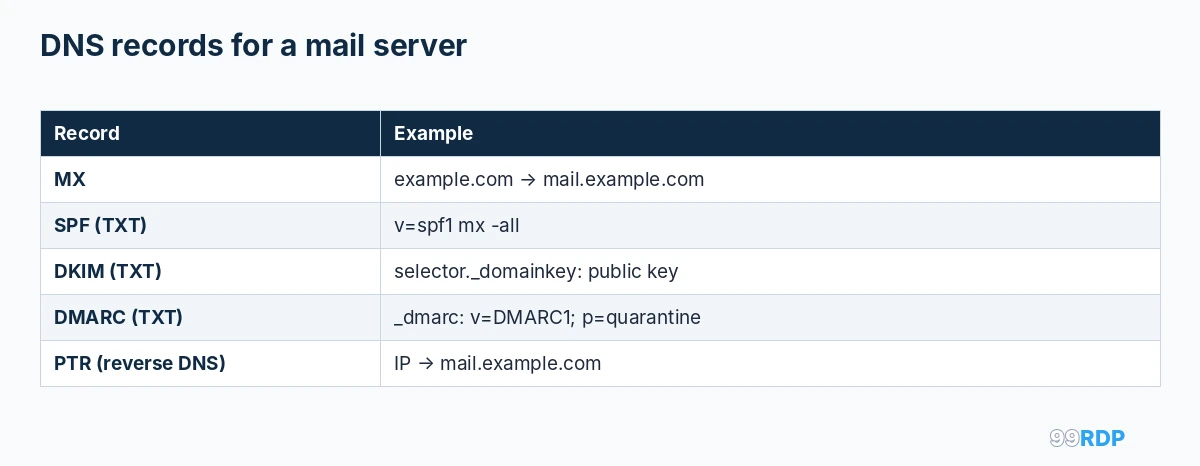
Before you host email yourself
The software is the easy part. Whether your mail reaches inboxes depends on these:
- Port 25: many VPS providers block outbound SMTP by default. Ask your provider to open it, or relay outgoing mail through a smarthost.
- Reverse DNS (PTR): the server's IP must resolve back to its mail hostname, for example
mail.example.com. - SPF, DKIM and DMARC DNS records. Gmail and Yahoo reject or spam-folder bulk mail without them.
- IP reputation: check that your IP isn't on blocklists before you start, and warm it up slowly.
- TLS certificates for SMTP, IMAP and webmail (Let's Encrypt works well).
- Resources: a basic Postfix/Dovecot server runs in 1–2 GB of RAM; full suites with antivirus and groupware want 4–8 GB.
- Backups and monitoring: back up mailboxes and configuration, and watch the mail queue.
Frequently asked questions
What is the best mail server for Linux?
Postfix with Dovecot is the most widely used combination. For a ready-made suite, Mailcow and iRedMail are the most popular, and Stalwart is a strong modern option.
What is the best free Linux email server?
Postfix, Dovecot, Mailcow, iRedMail (free edition), Mailu, Mail-in-a-Box, Modoboa and Stalwart Community Edition are all free.
Can I run a mail server on a VPS?
Yes, if the provider allows port 25 and lets you set reverse DNS. A VPS with 2–4 GB of RAM is enough for a small organization.
Which Linux mail servers include webmail?
Mailcow, iRedMail, Mailu, Mail-in-a-Box, Modoboa, Stalwart, Zimbra and Carbonio all include webmail.