Linux permissions decide who can read, change and run each file, and who can open and modify each folder. Getting them right keeps a server secure and stops "Permission denied" errors; getting them wrong (for example with chmod 777) can let anyone change your website. This guide explains how to read permissions, change them with chmod in symbolic and numeric form, change owners with chown, set safe permissions for web folders, and use special bits, umask and ACLs.
Quick answerCheck permissions with ls -l. Change them with chmod (for example chmod 644 file or chmod 755 folder) and change the owner with sudo chown user:group file. Typical safe defaults: 644 for files and 755 for folders.
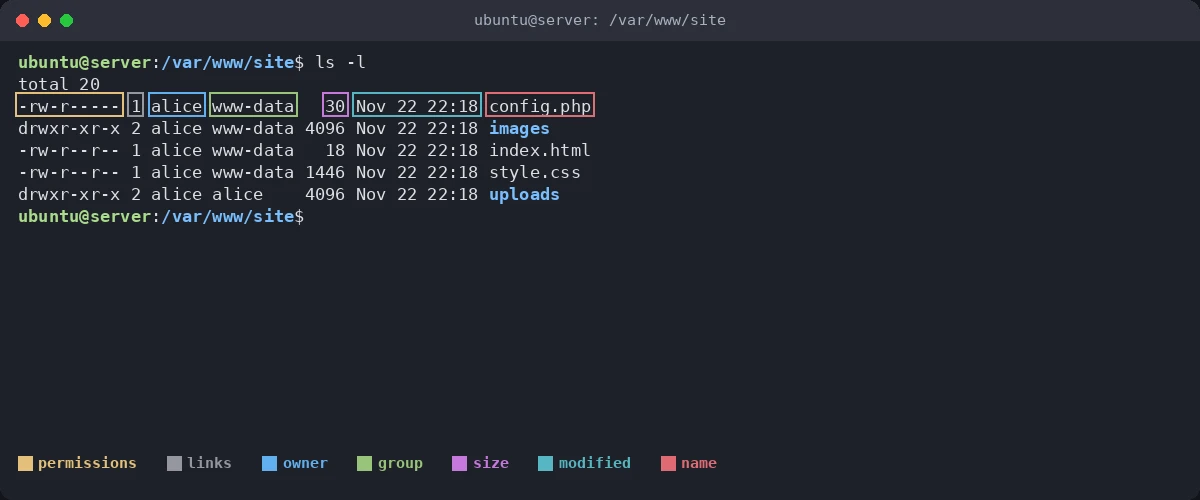
Reading permissions with ls -l
ls -l
-rw-r--r-- 1 alice www-data  4096 Nov 21 10:00 index.html
drwxr-xr-x 2 alice www-data  4096 Nov 21 10:00 images
The first column has 10 characters:
- Character 1: type.
-is a file,da directory,la symbolic link. - Characters 2-4: permissions for the owner (user).
- Characters 5-7: permissions for the group.
- Characters 8-10: permissions for others (everyone else).
The third and fourth columns are the owner (alice) and the group (www-data).
What r, w and x mean
| Permission | On a file | On a folder |
|---|---|---|
| r (read, 4) | View the contents | List the files inside |
| w (write, 2) | Change the contents | Create, delete and rename files inside |
| x (execute, 1) | Run it as a program or script | Enter it (cd) and reach files inside |
Folders almost always need x along with r; without it, you cannot open files inside even if you know their names.
Changing permissions with chmod: symbolic mode
Use u (user/owner), g (group), o (others) and a (all), with + to add, - to remove and = to set exactly:
chmod u+x deploy.sh        # let the owner run the script
chmod g+w shared.txt       # let the group edit
chmod o-r secret.txt       # stop others reading
chmod a=r readme.txt       # read-only for everyone
chmod u=rwx,g=rx,o= app/   # owner full, group read/enter, others nothing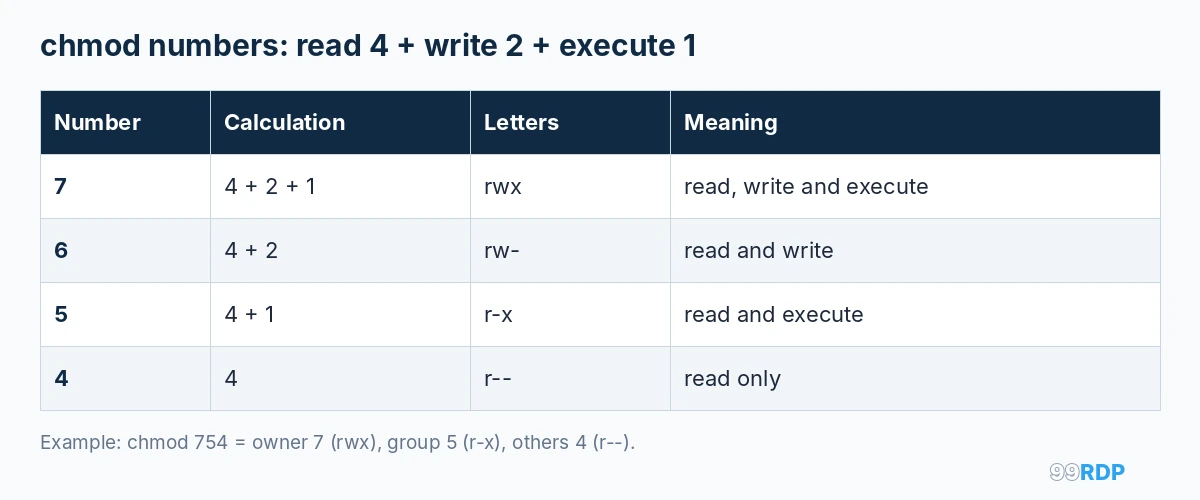
Changing permissions with chmod: numeric (octal) mode
Add the values r=4, w=2, x=1 for each of owner, group and others:
| Mode | Meaning | Typical use |
|---|---|---|
| 644 | rw- r-- r-- | Normal files, web pages |
| 600 | rw- --- --- | Private files: SSH keys, config with passwords |
| 755 | rwx r-x r-x | Folders, scripts and programs |
| 750 | rwx r-x --- | Folders shared with a group only |
| 700 | rwx --- --- | Private folders such as ~/.ssh |
| 777 | rwx rwx rwx | Avoid: anyone can change it |
chmod 600 ~/.ssh/id_ed25519
chmod 700 ~/.ssh
Recursive changes, done safely
chmod -R 755 folder also makes every file executable, which is not what you want. Set folders and files separately:
find /var/www/site -type d -exec chmod 755 {} +
find /var/www/site -type f -exec chmod 644 {} +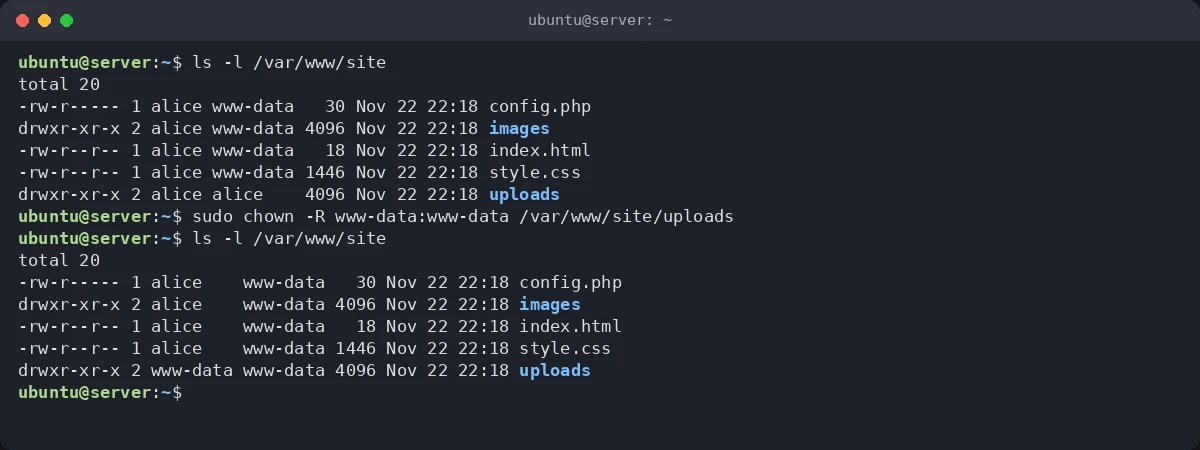
Changing ownership with chown and chgrp
sudo chown alice file.txt              # change owner
sudo chown alice:www-data file.txt     # owner and group
sudo chown -R www-data:www-data /var/www/site/uploads
sudo chgrp developers project/
Only root (through sudo) can give a file to another user. To let a user work with group files, add them to the group: sudo usermod -aG www-data alice (they must log out and back in).
Web server permissions on Ubuntu
Nginx and Apache run as www-data on Ubuntu. A safe pattern for a site you deploy as your own user:
- Owner: your deploy user; group:
www-data. - Folders 755 (or 750) and files 644 (or 640), so the web server can read but not change code.
- Only folders the application must write to (uploads, cache) are writable by
www-data. - Configuration files with database passwords: 640 or 600.
If a tutorial suggests chmod 777 to fix an error, fix the owner or group instead.
Special permissions
- setuid (4xxx,
sin the owner's x position): a program runs with its owner's rights, aspasswddoes. Rarely set by hand. - setgid on a folder (2xxx): new files inherit the folder's group, which is ideal for shared team folders:
chmod 2775 /srv/shared. - Sticky bit (1xxx,
t): on a shared folder such as/tmp, users can delete only their own files:chmod 1777 /srv/dropbox.
Default permissions: umask
New files start from 666 and folders from 777, minus the umask. Ubuntu's default umask of 002 for regular users (in their own private group) or 022 gives 664/775 or 644/755. Check yours with umask.
Finer control: ACLs
When owner/group/others is not enough, Access Control Lists give permissions to extra users or groups:
sudo apt install acl
setfacl -m u:bob:rw report.txt
getfacl report.txt
A + at the end of the permission string in ls -l shows a file has an ACL.
Frequently asked questions
How do I check folder permissions in Ubuntu?
Run ls -ld foldername for the folder itself, or ls -l inside it for its contents. stat filename shows permissions in both symbolic and numeric form.
What does chmod 755 mean?
The owner can read, write and execute; the group and others can read and execute but not change anything.
How do I give a user permission to a folder in Ubuntu?
Make them the owner with chown, add them to the folder's group with usermod -aG, or grant access with an ACL using setfacl.
Is chmod 777 safe?
No. It lets every user and process on the system change or replace the file, which is a common way websites get compromised.