
grep searches text for lines that match a pattern. It is one of the most used Linux commands: finding an error in a log file, a setting in a configuration folder, a function in source code, or filtering the output of other commands. This guide explains the syntax, the options you will use every day, regular expressions, recursive searches, combining grep with pipes, and practical examples for servers.
Quick answer
grep "error" /var/log/syslog          # lines containing "error"
grep -i "error" file.log              # ignore case
grep -rn "DB_HOST" /var/www/          # search a folder recursively, with line numbers
ps aux | grep nginx                   # filter command output
Syntax
grep [options] PATTERN [FILE...]grep prints every line of the files (or standard input) that matches PATTERN. Quote the pattern to protect spaces and special characters from the shell. grep is installed by default on every Linux distribution as part of GNU grep; on minimal containers, install it with apt install grep or dnf install grep.
Common options
| Option | Meaning |
|---|---|
-i | Ignore case |
-v | Invert: show lines that do not match |
-n | Show line numbers |
-c | Count matching lines |
-w | Match whole words only |
-x | Match the whole line only |
-r / -R | Search directories recursively (-R follows symlinks) |
-l / -L | List only file names that match / do not match |
-o | Print only the matching part of the line |
-A n, -B n, -C n | Show n lines after, before, or around each match |
-E | Extended regular expressions (|, +, ?, {} without backslashes) |
-F | Fixed string, no regex (fast, and safe for patterns with dots or brackets) |
-P | Perl-compatible regular expressions |
-m n | Stop after n matches |
-q | Quiet: print nothing, just set the exit status (for scripts) |
--color=auto | Highlight matches (usually on by default) |
Basic examples
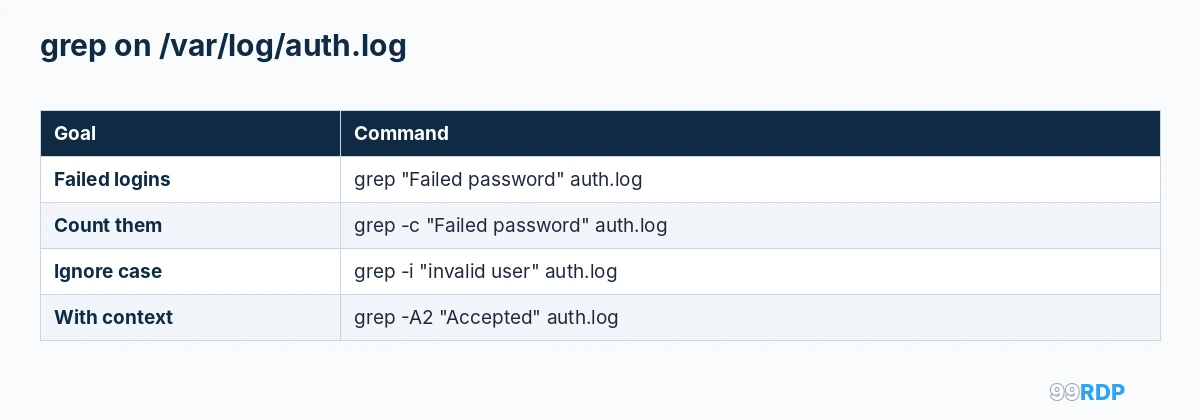
grep "Failed password" /var/log/auth.log           # failed SSH logins
grep -c "Failed password" /var/log/auth.log        # how many
grep -i "warning" app.log                          # Warning, WARNING, warning
grep -w "root" /etc/passwd                         # whole word "root"
grep -v "^#" /etc/ssh/sshd_config | grep -v "^$"   # config without comments and blank lines
Search multiple files and directories
grep "listen" /etc/nginx/sites-enabled/*
grep -rn "server_name" /etc/nginx/
grep -rl "eval(base64_decode" /var/www/            # list files with a suspicious PHP pattern
grep -r --include="*.php" "mysqli_connect" /var/www/
grep -r --exclude-dir=node_modules "API_KEY" .
--include and --exclude-dir keep recursive searches fast and focused.
Show context around matches
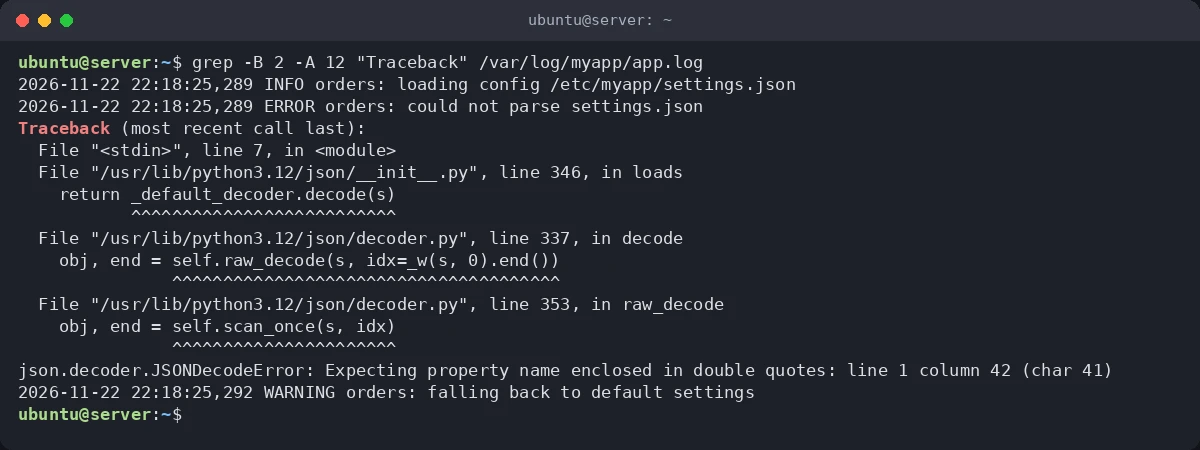
grep -A 5 "Traceback" app.log     # the match and 5 lines after
grep -B 2 -A 2 "OOM" /var/log/syslog
grep -C 3 "segfault" /var/log/kern.log
Context is invaluable for errors, where the useful details are on the following lines.
Regular expressions
grep "^Port" /etc/ssh/sshd_config          # lines starting with "Port"
grep "\.conf$" filelist.txt                 # lines ending in ".conf"
grep -E "error|fail|critical" app.log       # any of several words
grep -E "[0-9]{1,3}(\.[0-9]{1,3}){3}" access.log -o   # extract IPv4 addresses
grep -P "\d{4}-\d{2}-\d{2}" app.log          # dates like 2026-11-21
Key symbols: ^ start of line, $ end of line, . any character, * zero or more, [abc] any of a, b or c, [^abc] none of them. Use -F when you want to search for literal text such as 192.168.1.1 or array[0].
Using grep with pipes
ps aux | grep [n]ginx                      # running nginx processes (the brackets hide the grep itself)
ss -tlnp | grep :443                       # what is listening on port 443
journalctl -u ssh | grep -i "accepted"     # successful SSH logins
dmesg | grep -i usb
history | grep apt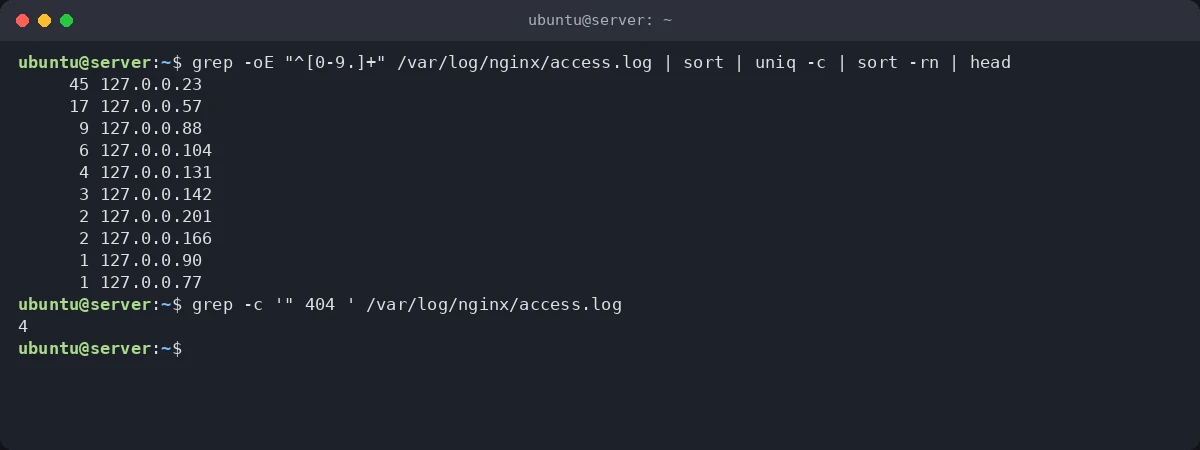
Practical server examples
# Top 10 IPs hitting a website
grep -oE "^[0-9.]+" /var/log/nginx/access.log | sort | uniq -c | sort -rn | head

# Count 404 errors
grep -c '" 404 ' /var/log/nginx/access.log

# Check whether a setting exists (for scripts)
if grep -q "^PasswordAuthentication no" /etc/ssh/sshd_config; then echo "passwords disabled"; fi

# Search compressed rotated logs
zgrep "Failed password" /var/log/auth.log.*.gz
grep, egrep and fgrep
egrep and fgrep are old names for grep -E and grep -F. Recent GNU grep versions print a warning when you use them, so use the options instead.
Faster alternative: ripgrep
For searching large source trees, ripgrep (rg, package ripgrep) is much faster than grep -r, respects .gitignore by default and has similar options.
Frequently asked questions
What does grep stand for?
It comes from the old ed editor command g/re/p: globally search for a regular expression and print matching lines.
How do I search for a word in all files in a folder?
Run grep -rn "word" /path/to/folder. Add -i to ignore case or -l to list file names only.
How do I search for multiple words with grep?
Use grep -E "word1|word2", or grep -e word1 -e word2.
How do I exclude lines with grep?
Use -v: grep -v "debug" app.log shows every line that does not contain "debug".